
How to Use POWER SUPPLY 24v 350w: Examples, Pinouts, and Specs
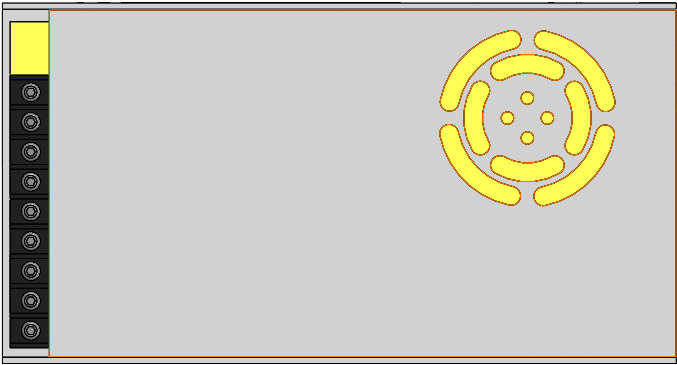
 Design with POWER SUPPLY 24v 350w in Cirkit Designer
Introduction
The Meanwell POWER SUPPLY 24v 350w is a high-performance, reliable power supply designed to convert electrical energy into a stable 24V DC output. With a maximum power output of 350 watts, this power supply is ideal for powering a wide range of electronic devices and systems. Its robust design ensures consistent performance, making it suitable for industrial, commercial, and hobbyist applications.
Explore Projects Built with POWER SUPPLY 24v 350w
 Open Project in Cirkit Designer
 Open Project in Cirkit Designer
 Open Project in Cirkit Designer
 Open Project in Cirkit Designer
Explore Projects Built with POWER SUPPLY 24v 350w
Open Project in Cirkit DesignerOpen Project in Cirkit DesignerOpen Project in Cirkit DesignerOpen Project in Cirkit DesignerCommon Applications and Use Cases
- Industrial automation systems
- LED lighting and signage
- CNC machines and 3D printers
- Robotics and motor controllers
- Laboratory equipment and testing setups
- DIY electronics projects requiring a stable 24V power source
Technical Specifications
The following table outlines the key technical specifications of the Meanwell POWER SUPPLY 24v 350w:
| Parameter | Value |
|---|---|
| Input Voltage Range | 85-264 VAC / 120-370 VDC |
| Output Voltage | 24V DC |
| Maximum Output Power | 350W |
| Maximum Output Current | 14.6A |
| Efficiency | Up to 89% |
| Operating Temperature | -20°C to +70°C |
| Dimensions | 215.5 x 115.5 x 50 mm |
| Weight | 0.8 kg |
| Protection Features | Overload, Overvoltage, Overtemperature, Short Circuit |
Pin Configuration and Descriptions
The power supply features screw terminal connections for input and output. Below is the pin configuration:
Input Terminals
| Pin | Label | Description |
|---|---|---|
| 1 | L | Live AC input |
| 2 | N | Neutral AC input |
| 3 | FG | Frame Ground (Earth connection) |
Output Terminals
| Pin | Label | Description |
|---|---|---|
| 1 | V+ | Positive DC output (24V) |
| 2 | V+ | Positive DC output (24V) |
| 3 | V- | Negative DC output (Ground) |
| 4 | V- | Negative DC output (Ground) |
Usage Instructions
How to Use the Component in a Circuit
Input Connection:
- Connect the AC input terminals (L and N) to a suitable AC power source within the specified input voltage range (85-264 VAC).
- Ensure the FG terminal is connected to the earth ground for safety.
Output Connection:
- Connect the V+ and V- terminals to the load requiring 24V DC.
- Use appropriately rated wires to handle the maximum output current (14.6A).
Adjusting Output Voltage:
- The power supply includes a small potentiometer near the output terminals for fine-tuning the output voltage (±10% adjustment range).
Mounting:
- Secure the power supply in a well-ventilated area to prevent overheating.
- Ensure proper clearance around the unit for airflow.
Important Considerations and Best Practices
- Load Requirements: Ensure the connected load does not exceed the maximum power rating of 350W.
- Ventilation: Avoid enclosing the power supply in a confined space without proper ventilation.
- Safety: Always disconnect the power supply from the mains before making any connections or adjustments.
- Fusing: Use an appropriate fuse on the input side to protect against overcurrent conditions.
Example: Connecting to an Arduino UNO
The Meanwell POWER SUPPLY 24v 350w can be used to power an Arduino UNO via a step-down voltage regulator (e.g., LM2596) to convert 24V to 5V. Below is an example circuit and Arduino code:
Circuit Setup
- Connect the power supply's V+ and V- terminals to the input of the step-down regulator.
- Adjust the regulator to output 5V.
- Connect the regulator's output to the Arduino UNO's 5V and GND pins.
Arduino Code Example
// Example code to blink an LED connected to pin 13 of the Arduino UNO
// Ensure the power supply is properly connected to the Arduino via a step-down regulator

void setup() {
  pinMode(13, OUTPUT); // Set pin 13 as an output
}

void loop() {
  digitalWrite(13, HIGH); // Turn the LED on
  delay(1000);            // Wait for 1 second
  digitalWrite(13, LOW);  // Turn the LED off
  delay(1000);            // Wait for 1 second
}
Troubleshooting and FAQs
Common Issues and Solutions
No Output Voltage:
- Check the AC input connections (L and N) and ensure the power supply is receiving power.
- Verify that the FG terminal is properly grounded.
- Inspect the load connections and ensure there are no short circuits.
Overheating:
- Ensure the power supply is installed in a well-ventilated area.
- Check that the load does not exceed the maximum power rating of 350W.
Output Voltage Fluctuations:
- Verify that the input voltage is within the specified range.
- Check for loose connections on the output terminals.
- Adjust the output voltage potentiometer if necessary.
Power Supply Shuts Down:
- This may be due to overload, overvoltage, or overtemperature protection being triggered.
- Reduce the load or allow the power supply to cool down before restarting.
FAQs
Q: Can this power supply be used outdoors?
A: No, the Meanwell POWER SUPPLY 24v 350w is not waterproof and should only be used in dry, indoor environments.
Q: How do I know if the power supply is overloaded?
A: The power supply will automatically shut down if the load exceeds its maximum power rating. Reduce the load and restart the unit.
Q: Can I connect multiple devices to the power supply?
A: Yes, as long as the total current draw does not exceed 14.6A.
Q: Is the output voltage adjustable?
A: Yes, the output voltage can be fine-tuned using the built-in potentiometer near the output terminals.