
How to Use KCU105: Examples, Pinouts, and Specs
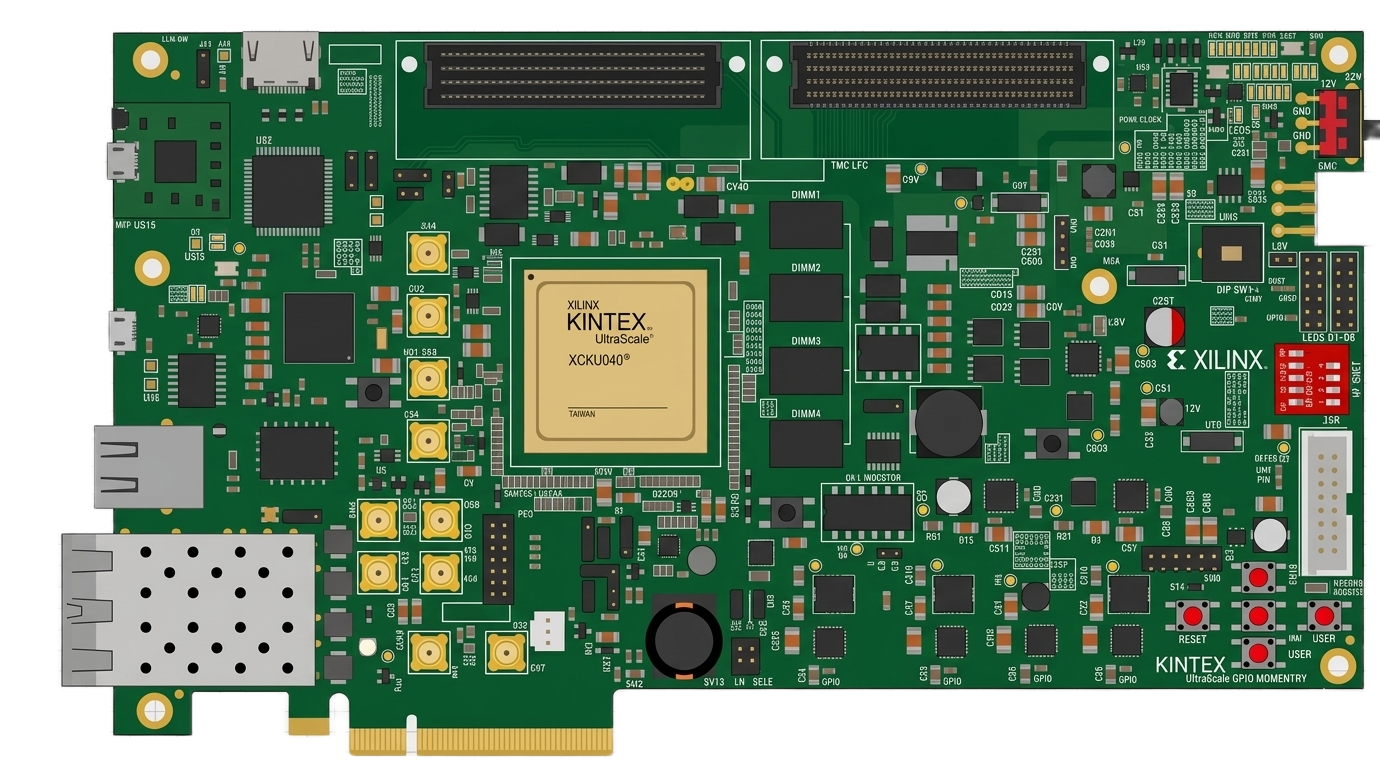
 Design with KCU105 in Cirkit Designer
Introduction
The KCU105 is a development board manufactured by AMD (formerly Xilinx) and designed for the Kintex-7 FPGA family. It serves as a versatile platform for prototyping and testing FPGA-based designs. The board is equipped with a variety of interfaces, including HDMI, USB, Ethernet, and PCIe, making it ideal for applications in digital signal processing, communications, embedded systems, and high-performance computing.
Explore Projects Built with KCU105
 Open Project in Cirkit Designer
 Open Project in Cirkit Designer
 Open Project in Cirkit Designer
 Open Project in Cirkit Designer
Explore Projects Built with KCU105
Open Project in Cirkit DesignerOpen Project in Cirkit DesignerOpen Project in Cirkit DesignerOpen Project in Cirkit DesignerCommon Applications and Use Cases
- Digital signal processing (DSP) applications
- High-speed communication systems
- Embedded system prototyping
- Video and image processing
- Hardware acceleration for machine learning and AI
- PCIe-based system development
Technical Specifications
Key Technical Details
- FPGA Device: Kintex-7 XC7K325T-2FFG900C
- Memory:
- 1 GB DDR3 SDRAM (64-bit wide)
- 128 Mb Quad-SPI Flash
- Interfaces:
- HDMI input and output
- USB 2.0 and USB-UART
- Gigabit Ethernet
- PCIe Gen2 x8
- Clocking:
- Programmable clock generator
- On-board 200 MHz oscillator
- Power Supply: 12V DC input
- Debugging:
- JTAG interface
- On-board System Monitor for voltage and temperature monitoring
Pin Configuration and Descriptions
The KCU105 board has multiple connectors and interfaces. Below is a summary of key pin configurations:
FPGA I/O Banks
| Bank Number | Voltage Standard | Description |
|---|---|---|
| Bank 13 | 1.8V | General-purpose I/O |
| Bank 34 | 3.3V | High-speed differential I/O |
| Bank 65 | 2.5V | Dedicated for DDR3 memory |
Key Connectors
| Connector | Pin Count | Description |
|---|---|---|
| FMC (HPC) Connector | 160 | High-speed expansion for custom peripherals |
| PCIe Edge Connector | 164 | PCIe Gen2 x8 interface |
| HDMI Input/Output | 19 | Video input and output |
Usage Instructions
How to Use the KCU105 in a Circuit
Powering the Board:
- Connect a 12V DC power supply to the power input jack.
- Ensure the power switch is turned on.
Programming the FPGA:
- Use the JTAG interface to program the FPGA via Vivado Design Suite.
- Alternatively, load a bitstream from the Quad-SPI Flash.
Connecting Peripherals:
- Use the FMC connector to attach custom hardware modules.
- Connect HDMI cables for video input/output.
- Use the USB-UART interface for serial communication with a host PC.
Clock Configuration:
- Configure the programmable clock generator using Vivado or external tools.
- Ensure the clock frequency matches the requirements of your design.
Important Considerations and Best Practices
- Power Supply: Always use a regulated 12V DC power supply to avoid damaging the board.
- Thermal Management: The FPGA can generate significant heat during operation. Use the provided heat sink and ensure adequate airflow.
- Signal Integrity: For high-speed signals (e.g., PCIe, HDMI), use high-quality cables and minimize trace lengths on custom hardware.
- Vivado Compatibility: Ensure you are using a compatible version of Vivado Design Suite for programming and debugging.
Example Code for UART Communication with Arduino UNO
The KCU105 can communicate with an Arduino UNO via the USB-UART interface. Below is an example Arduino sketch for sending data to the KCU105:
// Arduino UNO UART Communication Example
// Sends a message to the KCU105 via the USB-UART interface.

void setup() {
  Serial.begin(9600); // Initialize UART at 9600 baud rate
  delay(1000);        // Wait for the serial connection to stabilize
}

void loop() {
  Serial.println("Hello, KCU105!"); // Send a message to the KCU105
  delay(1000);                      // Wait 1 second before sending again
}
On the KCU105, you can use a UART receiver module in your FPGA design to process the incoming data.
Troubleshooting and FAQs
Common Issues and Solutions
The board does not power on:
- Ensure the power supply is connected and providing 12V DC.
- Check the power switch and ensure it is in the "ON" position.
- Verify the power LED is lit.
FPGA programming fails:
- Confirm the JTAG cable is securely connected.
- Ensure the correct bitstream file is selected in Vivado.
- Check for any errors in the Vivado console output.
No output on HDMI:
- Verify the HDMI cables are properly connected.
- Ensure the FPGA design includes an HDMI controller.
- Check the clock configuration for the HDMI interface.
Ethernet connection not working:
- Confirm the Ethernet cable is connected to an active network.
- Verify the FPGA design includes an Ethernet MAC and PHY interface.
- Check the IP address configuration in your design.
FAQs
Q: Can I use the KCU105 with other FPGA families?
A: No, the KCU105 is specifically designed for the Kintex-7 FPGA family.
Q: What is the maximum clock frequency supported by the FPGA?
A: The Kintex-7 XC7K325T FPGA supports clock frequencies up to 400 MHz, depending on the design.
Q: Is the KCU105 compatible with Linux-based development tools?
A: Yes, the Vivado Design Suite is available for both Windows and Linux operating systems.
Q: Can I use the KCU105 for machine learning applications?
A: Yes, the KCU105 is suitable for hardware acceleration of machine learning algorithms, especially for applications requiring high-speed computation and parallelism.
Q: How do I update the firmware on the KCU105?
A: Firmware updates can be applied via the JTAG interface or by loading a new bitstream into the Quad-SPI Flash.
This concludes the documentation for the KCU105 development board. For further assistance, refer to the official AMD/Xilinx user guide or contact technical support.