
How to Use DFRobot EC Sensor: Examples, Pinouts, and Specs
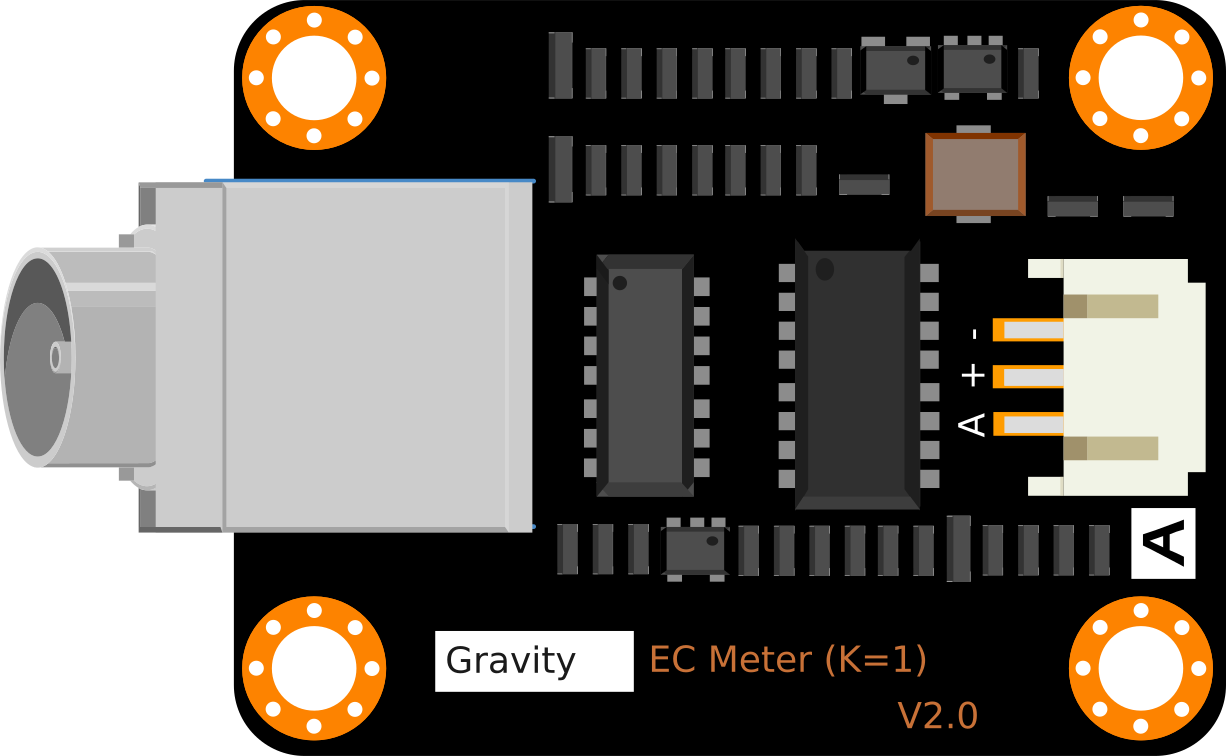
 Design with DFRobot EC Sensor in Cirkit Designer
Introduction
The DFRobot EC Sensor is a high-precision sensor designed to measure the electrical conductivity (EC) of a solution. Electrical conductivity is a key parameter in determining the concentration of ions in water, making this sensor an essential tool for applications such as water quality monitoring, hydroponics, aquaculture, and environmental research. By providing accurate and reliable measurements, the DFRobot EC Sensor helps users maintain optimal water conditions for various applications.
Explore Projects Built with DFRobot EC Sensor
 Open Project in Cirkit Designer
 Open Project in Cirkit Designer
 Open Project in Cirkit Designer
 Open Project in Cirkit Designer
Explore Projects Built with DFRobot EC Sensor
Open Project in Cirkit DesignerOpen Project in Cirkit DesignerOpen Project in Cirkit DesignerOpen Project in Cirkit DesignerTechnical Specifications
- Model: DFRobot EC Sensor
- Measurement Range: 0–20 mS/cm
- Accuracy: ±2% F.S. (Full Scale)
- Operating Voltage: 3.3V–5.5V
- Output Signal: Analog voltage
- Temperature Compensation: Supported (requires an external temperature sensor)
- Operating Temperature: 0°C–60°C
- Connector Type: BNC
- Dimensions: 42mm x 32mm (PCB)
Pin Configuration and Descriptions
The DFRobot EC Sensor module has a 3-pin interface for connecting to a microcontroller. Below is the pin configuration:
| Pin | Name | Description |
|---|---|---|
| 1 | VCC | Power supply input (3.3V–5.5V) |
| 2 | GND | Ground connection |
| 3 | AOUT | Analog output signal proportional to EC value |
Usage Instructions
How to Use the DFRobot EC Sensor in a Circuit
Connect the Sensor:
- Connect the VCC pin to the 5V (or 3.3V) pin of your microcontroller.
- Connect the GND pin to the ground (GND) of your microcontroller.
- Connect the AOUT pin to an analog input pin on your microcontroller (e.g., A0 on an Arduino UNO).
Calibrate the Sensor:
- Before using the sensor, it is essential to calibrate it using a standard EC solution (e.g., 1413 µS/cm).
- Follow the calibration procedure provided in the DFRobot EC Sensor manual to ensure accurate readings.
Temperature Compensation:
- For accurate measurements, use a temperature sensor (e.g., DS18B20) to perform temperature compensation.
- The EC value changes with temperature, so compensation is necessary for precise results.
Read the Analog Signal:
- The sensor outputs an analog voltage signal proportional to the EC value. Use an ADC (Analog-to-Digital Converter) on your microcontroller to read this signal.
Important Considerations and Best Practices
- Avoid Air Bubbles: Ensure the probe is fully submerged in the solution without air bubbles, as they can affect the accuracy of the readings.
- Clean the Probe: Rinse the probe with distilled water after each use to prevent contamination.
- Avoid Corrosion: Do not leave the probe in highly acidic or alkaline solutions for extended periods.
- Use Shielded Cables: To minimize electrical noise, use shielded cables for the sensor connections.
Example Code for Arduino UNO
Below is an example code snippet to interface the DFRobot EC Sensor with an Arduino UNO:
// Include necessary libraries
const int EC_PIN = A0; // Analog pin connected to the sensor's AOUT pin
float voltage;         // Variable to store the sensor's output voltage
float ecValue;         // Variable to store the calculated EC value

void setup() {
  Serial.begin(9600); // Initialize serial communication at 9600 baud
  pinMode(EC_PIN, INPUT); // Set the EC_PIN as an input
}

void loop() {
  // Read the analog voltage from the sensor
  int sensorValue = analogRead(EC_PIN);

  // Convert the analog value to voltage (assuming 5V reference)
  voltage = sensorValue * (5.0 / 1023.0);

  // Calculate the EC value (example formula, adjust based on calibration)
  ecValue = voltage * 1000; // Convert voltage to EC in µS/cm

  // Print the EC value to the Serial Monitor
  Serial.print("EC Value: ");
  Serial.print(ecValue);
  Serial.println(" µS/cm");

  delay(1000); // Wait for 1 second before the next reading
}
Troubleshooting and FAQs
Common Issues and Solutions
No Output or Incorrect Readings:
- Cause: Loose or incorrect connections.
- Solution: Double-check all connections, ensuring the VCC, GND, and AOUT pins are properly connected.
Fluctuating Readings:
- Cause: Electrical noise or air bubbles in the solution.
- Solution: Use shielded cables to reduce noise and ensure the probe is fully submerged without air bubbles.
Inaccurate Measurements:
- Cause: Calibration not performed or incorrect calibration.
- Solution: Calibrate the sensor using a standard EC solution before use.
Probe Corrosion:
- Cause: Prolonged exposure to extreme pH levels or improper cleaning.
- Solution: Rinse the probe with distilled water after each use and avoid leaving it in extreme solutions for long periods.
FAQs
Q1: Can the DFRobot EC Sensor be used in seawater?
A1: Yes, the sensor can measure the EC of seawater, but ensure it is calibrated for high EC ranges.
Q2: How often should I calibrate the sensor?
A2: It is recommended to calibrate the sensor before each use or at least once a week for consistent accuracy.
Q3: Can I use the sensor without temperature compensation?
A3: Yes, but the readings may not be accurate if the solution's temperature deviates significantly from the calibration temperature.
Q4: What is the lifespan of the probe?
A4: The probe's lifespan depends on usage and maintenance. With proper care, it can last for several years.
By following this documentation, users can effectively integrate and utilize the DFRobot EC Sensor in their projects for accurate and reliable EC measurements.