
How to Use Xt60 female and male combine: Examples, Pinouts, and Specs
 Design with Xt60 female and male combine in Cirkit Designer
Introduction
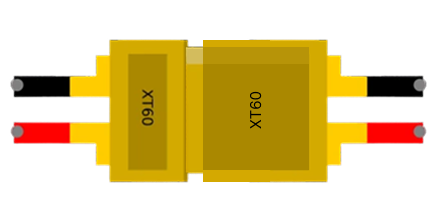
The XT60 connector, manufactured by XT60, is a widely used electrical connector in RC (radio-controlled) applications and other high-current systems. The "female and male combine" refers to the pairing of the female and male connectors, which ensures a secure, reliable, and efficient connection. These connectors are designed to handle high currents (up to 60A) and are commonly used in drones, RC cars, battery packs, and other electronic systems requiring robust power delivery.
Explore Projects Built with Xt60 female and male combine
 Open Project in Cirkit Designer
 Open Project in Cirkit Designer
 Open Project in Cirkit Designer
 Open Project in Cirkit Designer
Explore Projects Built with Xt60 female and male combine
Open Project in Cirkit DesignerOpen Project in Cirkit DesignerOpen Project in Cirkit DesignerOpen Project in Cirkit DesignerCommon Applications
- RC vehicles (drones, cars, boats, and planes)
- Lithium Polymer (LiPo) battery connections
- High-current power systems
- DIY electronics projects requiring secure power connections
Technical Specifications
Key Technical Details
| Parameter | Value |
|---|---|
| Manufacturer | XT60 |
| Manufacturer Part ID | XT60 |
| Connector Type | Male and Female Pair |
| Current Rating | Up to 60A |
| Voltage Rating | Up to 500V DC |
| Material | Nylon with gold-plated pins |
| Operating Temperature | -20°C to 120°C |
| Wire Gauge Compatibility | 12 AWG to 14 AWG |
| Dimensions (Combined) | 21.6mm x 15.8mm x 8.4mm |
Pin Configuration and Descriptions
The XT60 connector consists of two gold-plated pins: one for positive (+) and one for negative (-). The connectors are keyed to prevent reverse polarity.
Female Connector Pinout
| Pin Number | Function | Description |
|---|---|---|
| 1 | Positive (+) | Connects to the positive terminal of the power source |
| 2 | Negative (-) | Connects to the negative terminal of the power source |
Male Connector Pinout
| Pin Number | Function | Description |
|---|---|---|
| 1 | Positive (+) | Connects to the positive terminal of the load |
| 2 | Negative (-) | Connects to the negative terminal of the load |
Usage Instructions
How to Use the XT60 Connector in a Circuit
- Prepare the Wires: Strip the insulation from the wires you intend to connect to the XT60 connector. Ensure the wire gauge is compatible (12 AWG to 14 AWG).
- Solder the Wires:
- Heat the soldering iron to the appropriate temperature.
- Tin the exposed wire ends and the connector's solder cups with solder.
- Insert the tinned wire into the solder cup and apply heat until the solder flows and creates a solid connection.
- Secure the Connection: Allow the solder to cool and inspect the joint for a clean, shiny finish. Ensure there are no cold solder joints or loose connections.
- Assemble the Connector: Slide the heat shrink tubing (if used) over the soldered joint and apply heat to secure it. Connect the male and female connectors to ensure proper alignment and fit.
Important Considerations and Best Practices
- Polarity: Always double-check the polarity before connecting the XT60 connectors to avoid damage to your circuit.
- Soldering: Use a high-quality soldering iron and lead-free solder for a reliable connection.
- Heat Management: Avoid overheating the connector during soldering, as excessive heat can deform the nylon housing.
- Connection: Ensure the male and female connectors are fully mated to prevent arcing or intermittent connections.
- Testing: Use a multimeter to verify continuity and polarity after soldering.
Example: Connecting an XT60 to an Arduino UNO
While the XT60 connector itself is not directly connected to an Arduino UNO, it can be used to supply power to the Arduino via a voltage regulator or battery pack. Below is an example of how to use an XT60 connector with a LiPo battery to power an Arduino UNO.
Circuit Diagram
- Connect the XT60 female connector to the LiPo battery.
- Use a voltage regulator (e.g., LM7805) to step down the voltage to 5V.
- Connect the output of the voltage regulator to the Arduino UNO's VIN and GND pins.
Sample Code
// Example code to blink an LED on Arduino UNO
// Ensure the Arduino is powered via the XT60 connector and voltage regulator

void setup() {
  pinMode(13, OUTPUT); // Set pin 13 as an output for the onboard LED
}

void loop() {
  digitalWrite(13, HIGH); // Turn the LED on
  delay(1000);            // Wait for 1 second
  digitalWrite(13, LOW);  // Turn the LED off
  delay(1000);            // Wait for 1 second
}
Troubleshooting and FAQs
Common Issues
Loose Connection:
- Cause: Improper soldering or incomplete mating of connectors.
- Solution: Re-solder the connections and ensure the connectors are fully mated.
Overheating During Soldering:
- Cause: Excessive heat applied to the connector.
- Solution: Use a temperature-controlled soldering iron and limit the soldering time.
Reverse Polarity:
- Cause: Incorrect wiring of the positive and negative terminals.
- Solution: Double-check the polarity before soldering and connecting.
Arcing or Intermittent Connection:
- Cause: Connectors not fully mated or damaged pins.
- Solution: Inspect the connectors for damage and ensure a tight fit.
FAQs
Q: Can the XT60 connector handle currents above 60A?
A: While the XT60 is rated for up to 60A, exceeding this limit may cause overheating and damage. For higher currents, consider using connectors like the XT90.
Q: Can I reuse an XT60 connector after desoldering?
A: Yes, but ensure the connector is not damaged or deformed during the desoldering process.
Q: Is the XT60 connector waterproof?
A: No, the XT60 connector is not waterproof. Use additional sealing methods if water resistance is required.
Q: Can I connect an XT60 directly to an Arduino?
A: No, the XT60 is typically used for high-current power delivery. Use a voltage regulator to step down the voltage to a level suitable for the Arduino.
By following this documentation, you can effectively use the XT60 female and male connectors in your projects for secure and reliable power connections.