Cirkit Designer Logo
Cirkit Designer
Your all-in-one circuit design IDE
Home / 
Component Documentation

How to Use MQ135: Examples, Pinouts, and Specs
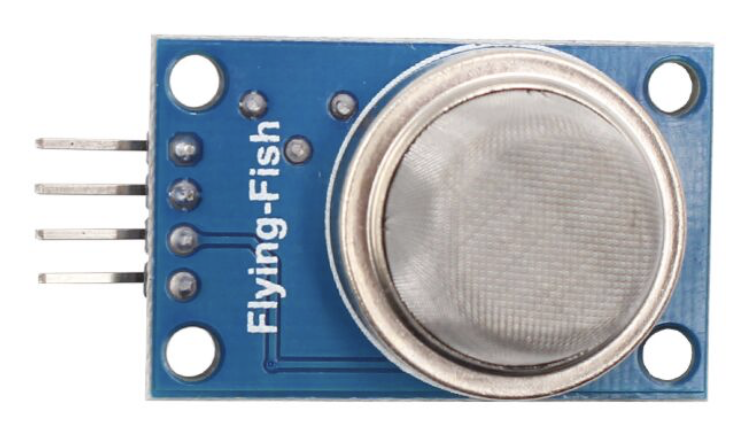

Image of MQ135
Cirkit Designer LogoDesign with MQ135 in Cirkit Designer

Introduction

The MQ135 is a versatile gas sensor designed to detect a wide range of gases, including ammonia, benzene, alcohol, and smoke. It operates on the principle of resistive change, where the sensor's resistance varies in the presence of target gases. This makes it an ideal choice for air quality monitoring and environmental sensing applications. Manufactured by ESP32 with part ID 001, the MQ135 is widely used in both industrial and hobbyist projects.

Explore Projects Built with MQ135
Use Cirkit Designer to design, explore, and prototype these projects online. Some projects support real-time simulation. Click "Open Project" to start designing instantly!
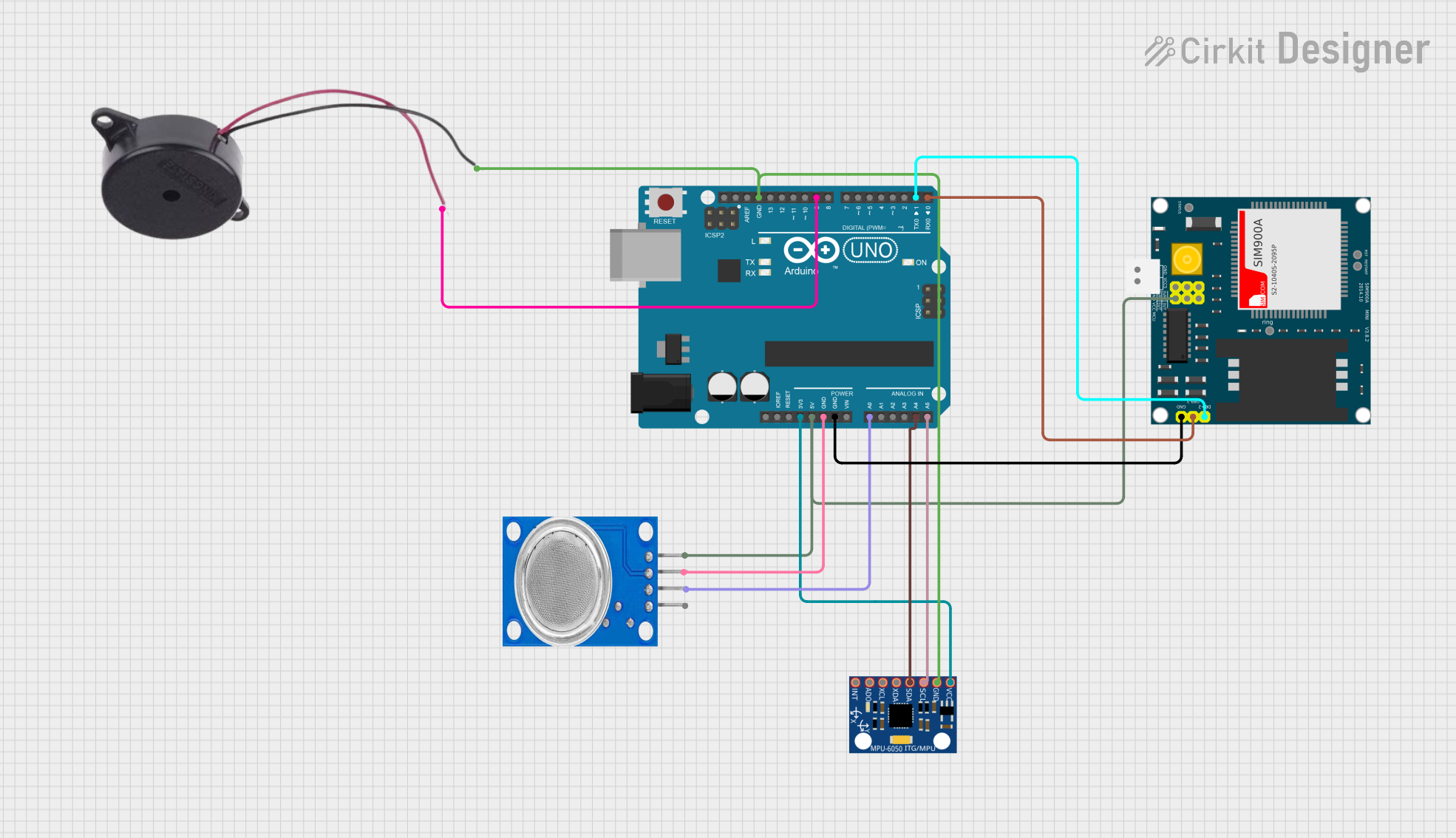
Arduino UNO Based Air Quality Monitoring and GSM Notification System
Image of Arduino wild: A project utilizing MQ135 in a practical application
This circuit features an Arduino UNO microcontroller interfaced with an MQ135 air quality sensor, an MPU-6050 accelerometer/gyroscope, a SIM900A GSM communication module, and a buzzer. The Arduino reads analog data from the MQ135 sensor and communicates with the MPU-6050 via I2C, while also controlling the buzzer and handling serial communication with the SIM900A module. The purpose of this circuit is likely to monitor air quality and motion, provide alerts through the buzzer, and enable remote communication via GSM.
Cirkit Designer LogoOpen Project in Cirkit Designer
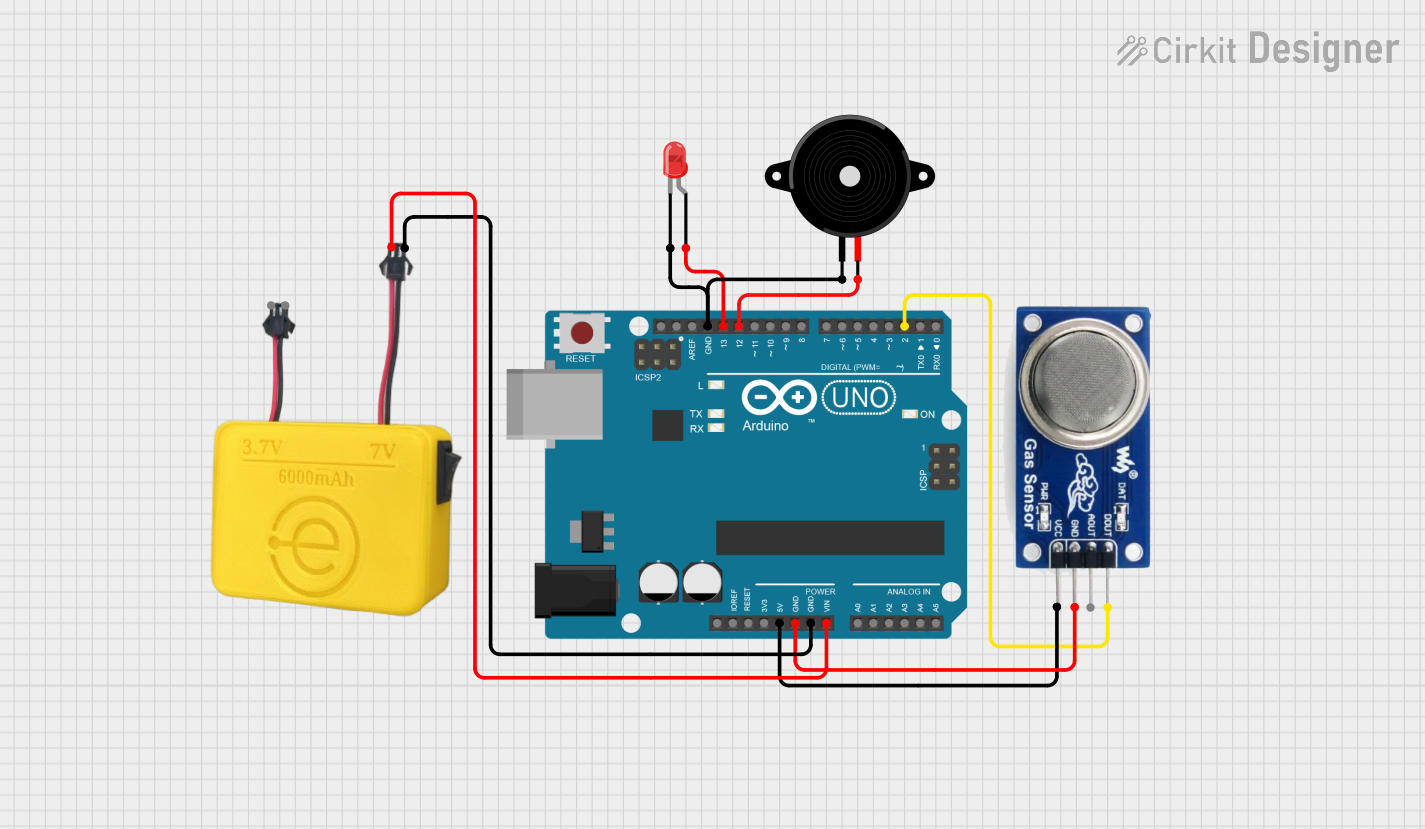
Arduino UNO Air Quality Monitor with LED Indicator and Piezo Speaker
Image of EXP-2. LED & Buzzer ON/OFF Using MQ-135 Sensor & Arduino: A project utilizing MQ135 in a practical application
This circuit uses an Arduino UNO to monitor air quality via an MQ 135 sensor and provides visual and auditory feedback using an LED and a piezo speaker. The Arduino is powered by a MAHIR 7.0 power supply, and the LED and speaker are controlled through digital pins D13 and D12, respectively.
Cirkit Designer LogoOpen Project in Cirkit Designer
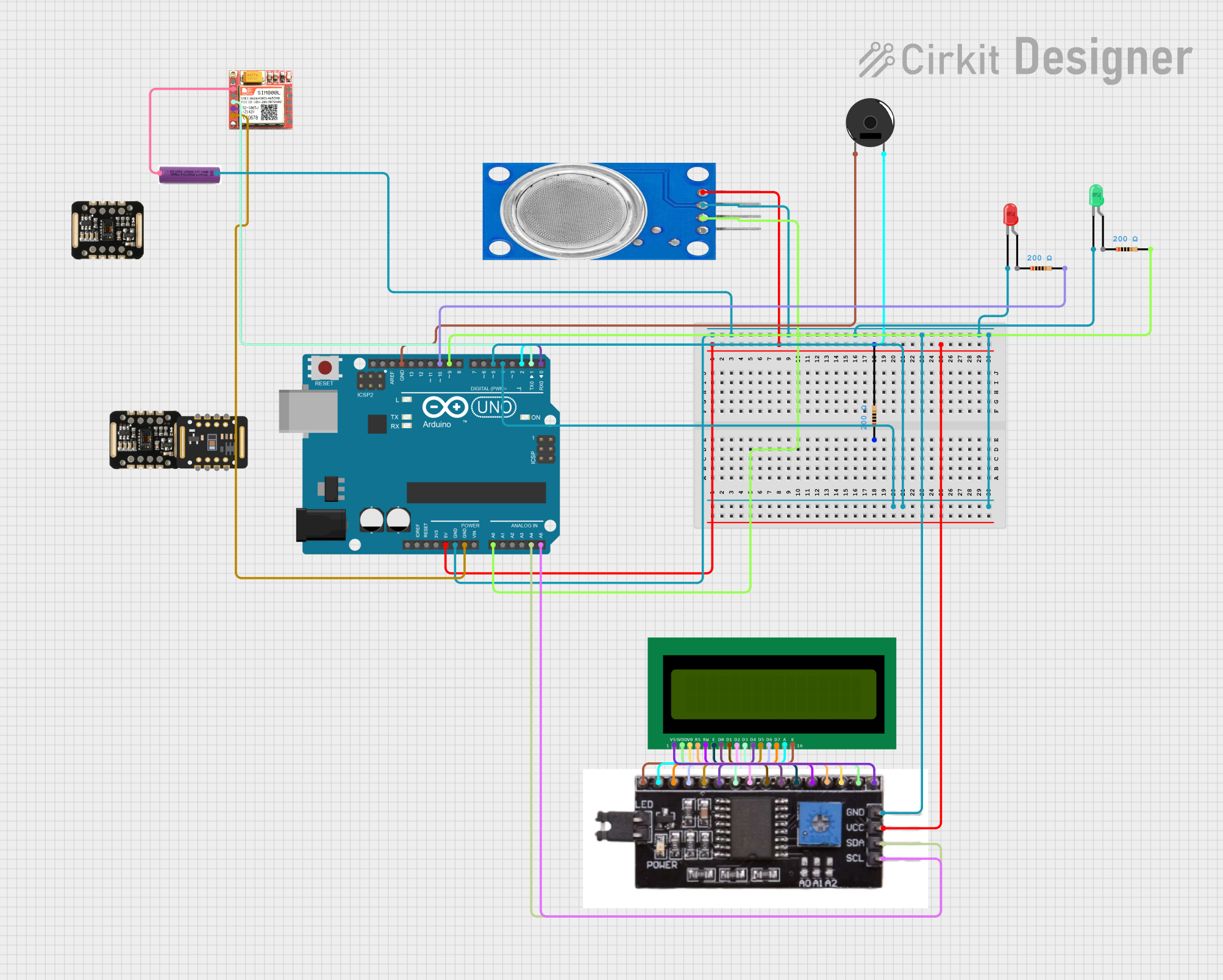
Arduino UNO Based Gas Detection and GSM Alert System
Image of Copy of Copy of gas sensor: A project utilizing MQ135 in a practical application
This circuit is designed to monitor air quality using an MQ135 sensor and provide visual and audible alerts. It features an Arduino UNO microcontroller interfaced with a GSM module for communication, an I2C LCD for display, and LEDs and a buzzer for local alerts. The Arduino runs embedded code to read the MQ135 sensor data, display air quality index (AQI) on the LCD, and trigger SMS and call alerts via the GSM module when gas is detected above a certain threshold.
Cirkit Designer LogoOpen Project in Cirkit Designer
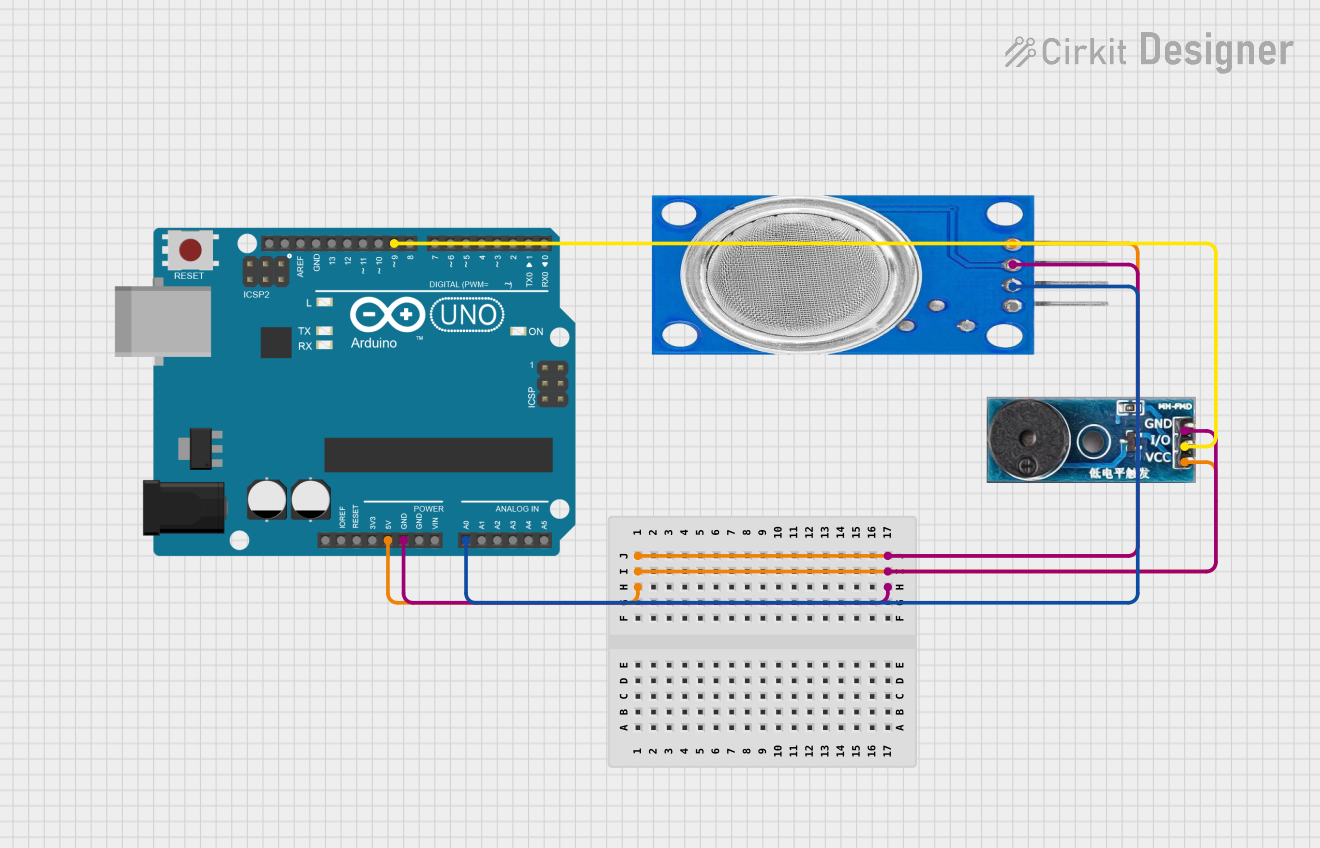
Arduino UNO Based Air Quality Monitor with Buzzer Alert
Image of smoke detector: A project utilizing MQ135 in a practical application
This circuit consists of an Arduino UNO microcontroller connected to an MQ135 air quality sensor and a buzzer module. The MQ135 sensor's analog output (A0) is connected to the Arduino's analog input (A0) to monitor air quality, while the buzzer's I/O pin is connected to the Arduino's digital pin (D9) to potentially alert based on sensor readings. The Arduino, sensor, and buzzer share a common power supply (5V) and ground (GND), indicating that the Arduino controls both the sensor data acquisition and the buzzer activation.
Cirkit Designer LogoOpen Project in Cirkit Designer

Explore Projects Built with MQ135

Use Cirkit Designer to design, explore, and prototype these projects online. Some projects support real-time simulation. Click "Open Project" to start designing instantly!
Image of Arduino wild: A project utilizing MQ135 in a practical application
Arduino UNO Based Air Quality Monitoring and GSM Notification System
This circuit features an Arduino UNO microcontroller interfaced with an MQ135 air quality sensor, an MPU-6050 accelerometer/gyroscope, a SIM900A GSM communication module, and a buzzer. The Arduino reads analog data from the MQ135 sensor and communicates with the MPU-6050 via I2C, while also controlling the buzzer and handling serial communication with the SIM900A module. The purpose of this circuit is likely to monitor air quality and motion, provide alerts through the buzzer, and enable remote communication via GSM.
Cirkit Designer LogoOpen Project in Cirkit Designer
Image of EXP-2. LED & Buzzer ON/OFF Using MQ-135 Sensor & Arduino: A project utilizing MQ135 in a practical application
Arduino UNO Air Quality Monitor with LED Indicator and Piezo Speaker
This circuit uses an Arduino UNO to monitor air quality via an MQ 135 sensor and provides visual and auditory feedback using an LED and a piezo speaker. The Arduino is powered by a MAHIR 7.0 power supply, and the LED and speaker are controlled through digital pins D13 and D12, respectively.
Cirkit Designer LogoOpen Project in Cirkit Designer
Image of Copy of Copy of gas sensor: A project utilizing MQ135 in a practical application
Arduino UNO Based Gas Detection and GSM Alert System
This circuit is designed to monitor air quality using an MQ135 sensor and provide visual and audible alerts. It features an Arduino UNO microcontroller interfaced with a GSM module for communication, an I2C LCD for display, and LEDs and a buzzer for local alerts. The Arduino runs embedded code to read the MQ135 sensor data, display air quality index (AQI) on the LCD, and trigger SMS and call alerts via the GSM module when gas is detected above a certain threshold.
Cirkit Designer LogoOpen Project in Cirkit Designer
Image of smoke detector: A project utilizing MQ135 in a practical application
Arduino UNO Based Air Quality Monitor with Buzzer Alert
This circuit consists of an Arduino UNO microcontroller connected to an MQ135 air quality sensor and a buzzer module. The MQ135 sensor's analog output (A0) is connected to the Arduino's analog input (A0) to monitor air quality, while the buzzer's I/O pin is connected to the Arduino's digital pin (D9) to potentially alert based on sensor readings. The Arduino, sensor, and buzzer share a common power supply (5V) and ground (GND), indicating that the Arduino controls both the sensor data acquisition and the buzzer activation.
Cirkit Designer LogoOpen Project in Cirkit Designer

Common Applications

  • Air quality monitoring systems
  • Industrial gas detection
  • Smoke and fire detection systems
  • Environmental monitoring
  • IoT-based smart home applications

Technical Specifications

Key Technical Details

Parameter Value
Operating Voltage 5V DC
Load Resistance 10 kΩ (recommended)
Heating Voltage 5V ± 0.1V
Heating Current ≤ 120 mA
Detection Range 10 ppm to 1000 ppm
Preheat Time ≥ 24 hours (for stable output)
Operating Temperature -20°C to 50°C
Humidity Range ≤ 95% RH
Sensitivity Detects ammonia, benzene,
alcohol, smoke, and other gases

Pin Configuration and Descriptions

Pin Name Pin Number Description
VCC 1 Power supply pin (5V DC)
GND 2 Ground pin
AOUT 3 Analog output pin for gas concentration readings
DOUT 4 Digital output pin for threshold-based detection

Usage Instructions

How to Use the MQ135 in a Circuit

  1. Power Supply: Connect the VCC pin to a 5V DC power source and the GND pin to ground.
  2. Analog Output: Use the AOUT pin to read gas concentration levels as an analog voltage. This pin is typically connected to an ADC (Analog-to-Digital Converter) pin on a microcontroller.
  3. Digital Output: The DOUT pin provides a digital HIGH or LOW signal based on a preset threshold. Adjust the threshold using the onboard potentiometer.
  4. Preheating: Allow the sensor to preheat for at least 24 hours before taking stable readings.

Important Considerations and Best Practices

  • Preheat Time: The sensor requires a long preheat time (≥ 24 hours) for accurate readings. Ensure this is accounted for in your project timeline.
  • Calibration: Calibrate the sensor in a clean air environment to establish a baseline resistance value.
  • Placement: Avoid placing the sensor in areas with high humidity or temperatures outside the specified range.
  • Power Supply: Use a stable 5V power source to avoid fluctuations in readings.

Example Code for Arduino UNO

Below is an example of how to interface the MQ135 with an Arduino UNO to read analog values:

// Include necessary libraries (if any additional libraries are required, install them)
// Define the analog pin connected to the MQ135 sensor
const int MQ135_PIN = A0;

void setup() {
  Serial.begin(9600); // Initialize serial communication at 9600 baud
  pinMode(MQ135_PIN, INPUT); // Set the MQ135 pin as input
}

void loop() {
  int sensorValue = analogRead(MQ135_PIN); // Read the analog value from the sensor
  float voltage = sensorValue * (5.0 / 1023.0); // Convert the analog value to voltage
  
  // Print the sensor value and voltage to the Serial Monitor
  Serial.print("Sensor Value: ");
  Serial.print(sensorValue);
  Serial.print(" | Voltage: ");
  Serial.println(voltage);
  
  delay(1000); // Wait for 1 second before taking the next reading
}

Troubleshooting and FAQs

Common Issues and Solutions

  1. Inconsistent Readings:

    • Cause: Insufficient preheat time or unstable power supply.
    • Solution: Ensure the sensor has been preheated for at least 24 hours and use a regulated 5V power source.
  2. No Output from DOUT Pin:

    • Cause: Threshold not properly set.
    • Solution: Adjust the onboard potentiometer to set the desired threshold level.
  3. High Sensitivity to Humidity:

    • Cause: The sensor is exposed to high humidity levels.
    • Solution: Place the sensor in a controlled environment with humidity ≤ 95% RH.
  4. Sensor Not Responding:

    • Cause: Incorrect wiring or damaged sensor.
    • Solution: Double-check the wiring and ensure the sensor is not physically damaged.

FAQs

Q1: Can the MQ135 detect CO2?
A1: Yes, the MQ135 can detect CO2, but it is not specifically calibrated for precise CO2 measurements. For accurate CO2 detection, consider using a dedicated CO2 sensor.

Q2: How do I calibrate the MQ135?
A2: To calibrate the MQ135, expose it to clean air and measure the baseline resistance. Use this value to calculate gas concentrations in your application.

Q3: Can I use the MQ135 with a 3.3V microcontroller?
A3: The MQ135 requires a 5V power supply for proper operation. If using a 3.3V microcontroller, use a level shifter for the output signals.

Q4: How long does the MQ135 last?
A4: The MQ135 has a typical lifespan of 2-3 years under normal operating conditions.