
How to Use 12V 15A Power Supply: Examples, Pinouts, and Specs
 Design with 12V 15A Power Supply in Cirkit Designer
Introduction
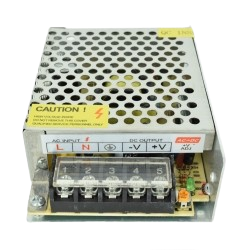
The 12V 15A Power Supply by AC (Part ID: Power Supply) is a robust and reliable device designed to convert electrical energy from an AC source into a stable 12V DC output. With a maximum current capacity of 15A, this power supply is ideal for powering a wide range of electronic devices and circuits, including LED strips, motors, microcontrollers, and other high-current applications.
Explore Projects Built with 12V 15A Power Supply
 Open Project in Cirkit Designer
 Open Project in Cirkit Designer
 Open Project in Cirkit Designer
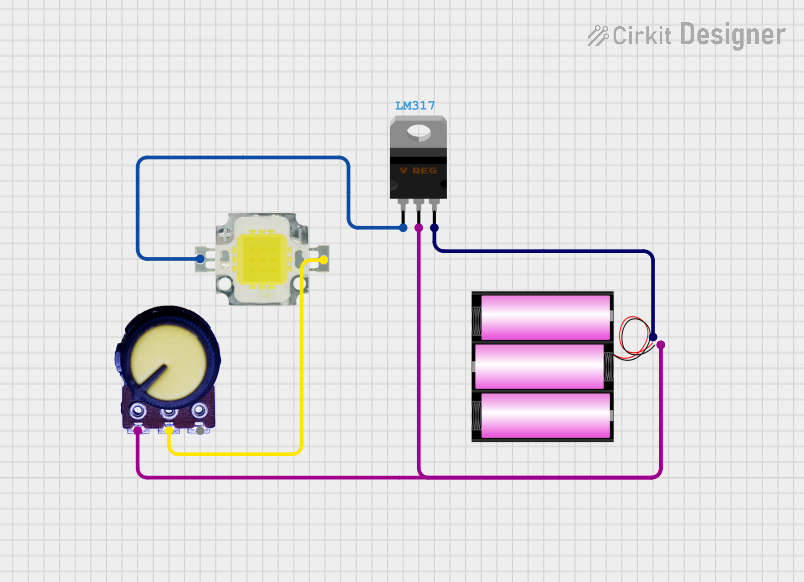 Open Project in Cirkit Designer
Explore Projects Built with 12V 15A Power Supply
Open Project in Cirkit DesignerOpen Project in Cirkit DesignerOpen Project in Cirkit DesignerOpen Project in Cirkit DesignerCommon Applications and Use Cases
- Powering LED lighting systems, such as LED strips or panels.
- Supplying power to DC motors in robotics or industrial applications.
- Providing a stable power source for microcontroller-based projects (e.g., Arduino, Raspberry Pi).
- Charging 12V batteries or powering automotive electronics.
- General-purpose DC power supply for laboratory or prototyping use.
Technical Specifications
Key Technical Details
| Parameter | Value |
|---|---|
| Input Voltage Range | 100-240V AC, 50/60Hz |
| Output Voltage | 12V DC |
| Maximum Output Current | 15A |
| Maximum Output Power | 180W |
| Efficiency | ≥85% |
| Operating Temperature | -10°C to +50°C |
| Cooling Method | Built-in fan (active cooling) |
| Protection Features | Overload, overvoltage, and short-circuit protection |
Pin Configuration and Descriptions
The power supply typically has the following input and output terminals:
Input Terminals
| Pin Name | Description |
|---|---|
| L | Live wire (AC input) |
| N | Neutral wire (AC input) |
| GND | Ground (Earth connection) |
Output Terminals
| Pin Name | Description |
|---|---|
| V+ | Positive DC output (12V) |
| V- | Negative DC output (Ground) |
Usage Instructions
How to Use the Component in a Circuit
- Safety First: Ensure the power supply is disconnected from the AC mains before wiring.
- Connect the Input Terminals:
- Connect the L terminal to the live wire of the AC mains.
- Connect the N terminal to the neutral wire of the AC mains.
- Optionally, connect the GND terminal to the earth ground for safety.
- Connect the Output Terminals:
- Connect the V+ terminal to the positive input of your load or circuit.
- Connect the V- terminal to the ground or negative input of your load or circuit.
- Power On:
- Plug the power supply into the AC mains and switch it on.
- Verify the output voltage using a multimeter before connecting sensitive devices.
- Load Connection:
- Ensure the total current draw of the connected devices does not exceed 15A.
Important Considerations and Best Practices
- Ventilation: Ensure adequate airflow around the power supply to prevent overheating.
- Load Matching: Do not exceed the maximum current rating of 15A to avoid triggering overload protection.
- Polarity: Double-check the polarity of the output connections to prevent damage to connected devices.
- Fuse Protection: Consider adding a fuse on the input side for additional safety.
- Testing: Use a multimeter to verify the output voltage and current before connecting sensitive electronics.
Example: Using with an Arduino UNO
The 12V 15A power supply can be used to power an Arduino UNO via its barrel jack or VIN pin. Below is an example of how to connect and use it:
- Connect the V+ terminal of the power supply to the Arduino's VIN pin.
- Connect the V- terminal of the power supply to the Arduino's GND pin.
- Use the following Arduino code to blink an LED:
// Example code to blink an LED connected to pin 13 on the Arduino UNO

void setup() {
  pinMode(13, OUTPUT); // Set pin 13 as an output
}

void loop() {
  digitalWrite(13, HIGH); // Turn the LED on
  delay(1000);            // Wait for 1 second
  digitalWrite(13, LOW);  // Turn the LED off
  delay(1000);            // Wait for 1 second
}
Troubleshooting and FAQs
Common Issues and Solutions
| Issue | Possible Cause | Solution |
|---|---|---|
| No output voltage | Input AC power not connected properly | Check the AC input connections (L, N, GND). |
| Output voltage fluctuates or drops | Overload or overheating | Reduce the load or improve ventilation. |
| Power supply shuts down unexpectedly | Overload or short circuit protection | Check for short circuits or reduce the load. |
| Excessive noise or interference | Poor grounding or EMI | Ensure proper grounding and use shielded cables. |
FAQs
Can I use this power supply to charge a 12V battery?
- Yes, but ensure the battery charging current does not exceed 15A. Use a charge controller for optimal performance.
Is this power supply suitable for outdoor use?
- No, this power supply is designed for indoor use only. Use a weatherproof enclosure if outdoor operation is required.
What happens if I exceed the 15A current limit?
- The power supply's overload protection will activate, shutting down the output to prevent damage.
Can I adjust the output voltage?
- Some models may include a small potentiometer for fine-tuning the output voltage. Refer to the specific model's datasheet for details.
Is it safe to leave the power supply on continuously?
- Yes, as long as it is operated within its specified limits and has adequate ventilation.
This concludes the documentation for the 12V 15A Power Supply by AC. For further assistance, refer to the manufacturer's datasheet or contact technical support.