
How to Use ECU: Examples, Pinouts, and Specs
 Design with ECU in Cirkit Designer
Introduction
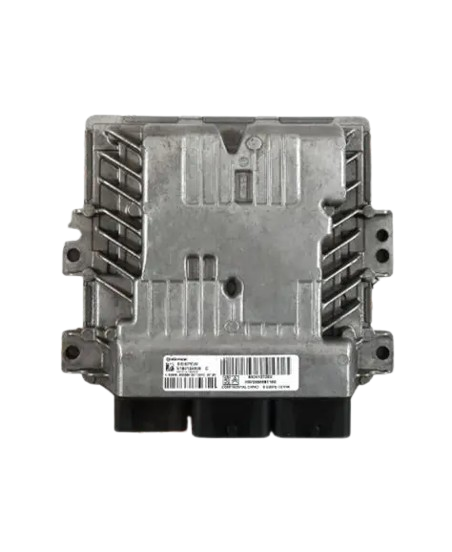
The Electronic Control Unit (ECU), manufactured by CAR (Part ID: CAR), is a digital computer designed to manage and control various functions in a vehicle. It plays a critical role in modern automotive systems by ensuring optimal performance, efficiency, and safety. The ECU processes data from various sensors and executes commands to control actuators, enabling precise management of systems such as engine performance, transmission, braking, and more.
Explore Projects Built with ECU
 Open Project in Cirkit Designer
 Open Project in Cirkit Designer
 Open Project in Cirkit Designer
 Open Project in Cirkit Designer
Explore Projects Built with ECU
Open Project in Cirkit DesignerOpen Project in Cirkit DesignerOpen Project in Cirkit DesignerOpen Project in Cirkit DesignerCommon Applications and Use Cases
- Engine Management: Controls fuel injection, ignition timing, and air-fuel mixture for optimal engine performance.
- Transmission Control: Manages gear shifting in automatic transmissions.
- Anti-lock Braking System (ABS): Ensures safe braking by preventing wheel lock-up.
- Airbag Deployment: Activates airbags during a collision.
- Climate Control: Regulates cabin temperature and airflow.
- Advanced Driver Assistance Systems (ADAS): Supports features like lane-keeping assist and adaptive cruise control.
Technical Specifications
The following table outlines the key technical specifications of the ECU:
| Parameter | Value |
|---|---|
| Manufacturer | CAR |
| Part ID | CAR |
| Operating Voltage | 12V DC (nominal) |
| Input Voltage Range | 9V to 16V DC |
| Power Consumption | 5W to 50W (depending on system) |
| Communication Protocol | CAN, LIN, or FlexRay |
| Operating Temperature | -40°C to +85°C |
| Storage Temperature | -55°C to +125°C |
| Dimensions | Varies by vehicle model |
Pin Configuration and Descriptions
The ECU typically features a multi-pin connector. Below is an example of a generic pin configuration:
| Pin Number | Pin Name | Description |
|---|---|---|
| 1 | Power (+12V) | Main power supply input |
| 2 | Ground (GND) | Ground connection |
| 3 | CAN_H | High line for CAN communication |
| 4 | CAN_L | Low line for CAN communication |
| 5 | Sensor Input 1 | Input from a connected sensor (e.g., temperature) |
| 6 | Sensor Input 2 | Input from another sensor (e.g., pressure) |
| 7 | Actuator Output 1 | Output to control an actuator (e.g., fuel injector) |
| 8 | Actuator Output 2 | Output to control another actuator |
Note: Pin configurations may vary depending on the specific ECU model and vehicle manufacturer. Always refer to the vehicle's service manual for exact details.
Usage Instructions
How to Use the ECU in a Circuit
- Power Supply: Connect the ECU to a stable 12V DC power source. Ensure the voltage remains within the specified range (9V to 16V DC).
- Grounding: Properly connect the ground pin to the vehicle's chassis or a designated ground point.
- Sensor Connections: Attach the appropriate sensors (e.g., temperature, pressure) to the designated input pins.
- Actuator Connections: Connect actuators (e.g., fuel injectors, throttle control) to the output pins.
- Communication: Use the CAN_H and CAN_L pins to interface with the vehicle's CAN bus for data exchange and diagnostics.
Important Considerations and Best Practices
- Wiring: Use high-quality automotive-grade wires and connectors to ensure reliable connections.
- Diagnostics: Regularly monitor the ECU's performance using an On-Board Diagnostics (OBD-II) scanner.
- Firmware Updates: Keep the ECU firmware up to date to ensure compatibility with the latest vehicle systems.
- Protection: Avoid exposing the ECU to excessive heat, moisture, or vibration to prevent damage.
Example: Reading Sensor Data with Arduino UNO
The ECU can communicate with an Arduino UNO via the CAN bus. Below is an example code snippet to read sensor data:
#include <SPI.h>
#include <mcp_can.h>

// Define the CAN bus pins for the MCP2515 module
#define CAN_CS_PIN 10
#define CAN_INT_PIN 2

// Initialize the CAN bus object
MCP_CAN CAN(CAN_CS_PIN);

void setup() {
  Serial.begin(9600); // Initialize serial communication for debugging

  // Initialize the CAN bus at 500 kbps
  if (CAN.begin(MCP_ANY, 500000, MCP_8MHZ) == CAN_OK) {
    Serial.println("CAN bus initialized successfully!");
  } else {
    Serial.println("Error initializing CAN bus.");
    while (1); // Halt execution if initialization fails
  }

  CAN.setMode(MCP_NORMAL); // Set CAN bus to normal mode
  Serial.println("CAN bus set to normal mode.");
}

void loop() {
  unsigned char len = 0;
  unsigned char buf[8];

  // Check if data is available on the CAN bus
  if (CAN.checkReceive() == CAN_MSGAVAIL) {
    CAN.readMsgBuf(&len, buf); // Read the received message

    // Print the received data
    Serial.print("Received data: ");
    for (int i = 0; i < len; i++) {
      Serial.print(buf[i], HEX);
      Serial.print(" ");
    }
    Serial.println();
  }

  delay(100); // Small delay to avoid flooding the serial monitor
}
Note: This example assumes the use of an MCP2515 CAN module. Ensure proper wiring between the Arduino, MCP2515, and ECU.
Troubleshooting and FAQs
Common Issues and Solutions
ECU Not Powering On
- Cause: Faulty power supply or loose connections.
- Solution: Verify the power supply voltage and check all connections.
No Communication with CAN Bus
- Cause: Incorrect baud rate or wiring issues.
- Solution: Ensure the CAN bus baud rate matches the ECU's settings. Check the CAN_H and CAN_L connections.
Sensor Data Not Detected
- Cause: Faulty sensor or incorrect wiring.
- Solution: Test the sensor independently and verify the wiring to the ECU.
Actuator Not Responding
- Cause: Damaged actuator or incorrect output signal.
- Solution: Test the actuator and ensure the ECU is sending the correct signal.
FAQs
Q: Can the ECU be used with a 24V system?
A: No, the ECU is designed for 12V systems. Using a 24V system may damage the component.Q: How do I update the ECU firmware?
A: Firmware updates are typically performed using specialized diagnostic tools provided by the vehicle manufacturer.Q: Can I use the ECU for non-automotive applications?
A: While possible, the ECU is optimized for automotive systems and may not perform well in other environments.Q: What happens if the ECU fails?
A: A failed ECU can lead to various issues, such as engine misfires or loss of communication with critical systems. Immediate diagnosis and replacement are recommended.