
How to Use TC7660: Examples, Pinouts, and Specs
 Design with TC7660 in Cirkit Designer
Introduction
The TC7660 is a charge pump voltage inverter designed to convert a positive input voltage into a negative output voltage. This component is widely used in applications where a negative supply voltage is required but only a positive voltage source is available. Typical use cases include operational amplifier circuits, data acquisition systems, and powering analog circuits that require dual supply voltages.
The TC7660 is valued for its simplicity, low power consumption, and ability to operate without the need for inductors, making it an efficient and compact solution for generating negative voltages.
Explore Projects Built with TC7660
 Open Project in Cirkit Designer
 Open Project in Cirkit Designer
 Open Project in Cirkit Designer
 Open Project in Cirkit Designer
Explore Projects Built with TC7660
Open Project in Cirkit DesignerOpen Project in Cirkit DesignerOpen Project in Cirkit DesignerOpen Project in Cirkit DesignerTechnical Specifications
The following table outlines the key technical specifications of the TC7660:
| Parameter | Value |
|---|---|
| Input Voltage Range | 1.5V to 10V |
| Output Voltage Range | -1.5V to -10V (approx. -Vin) |
| Maximum Output Current | 20mA (typical) |
| Quiescent Current | 200µA (typical) |
| Efficiency | Up to 98% |
| Operating Temperature Range | -40°C to +85°C |
| Package Types | 8-pin DIP, SOIC |
Pin Configuration and Descriptions
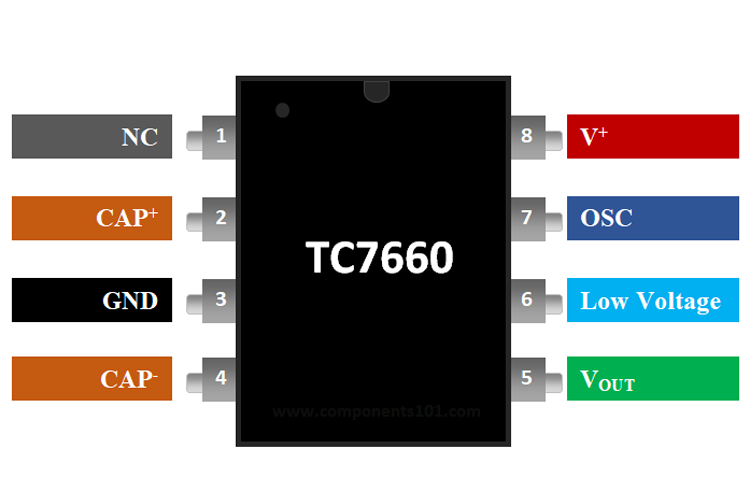
The TC7660 is an 8-pin IC. The pinout and descriptions are as follows:
| Pin Number | Pin Name | Description |
|---|---|---|
| 1 | CAP+ | Positive terminal for the external charge pump capacitor |
| 2 | GND | Ground connection |
| 3 | CAP- | Negative terminal for the external charge pump capacitor |
| 4 | VOUT | Negative output voltage (-Vin) |
| 5 | LV | Low-voltage pin (connect to GND for input voltages below 3.5V) |
| 6 | OSC | Oscillator control pin (can be used to adjust the switching frequency) |
| 7 | V+ | Positive input voltage |
| 8 | NC | No connection (leave unconnected or use as a mechanical support if necessary) |
Usage Instructions
How to Use the TC7660 in a Circuit
- Power Supply: Connect the positive voltage source to the
V+pin and ground to theGNDpin. - Charge Pump Capacitors:
- Connect a capacitor (typically 10µF) between the
CAP+andCAP-pins. This capacitor is used for the charge pump operation. - Place another capacitor (typically 10µF) between the
VOUTpin andGNDto stabilize the output voltage.
- Connect a capacitor (typically 10µF) between the
- Low Voltage Operation: If the input voltage is below 3.5V, connect the
LVpin toGNDto optimize performance. - Oscillator Control (Optional): The internal oscillator frequency can be adjusted by connecting an external capacitor or resistor to the
OSCpin. For most applications, this pin can be left unconnected.
Example Circuit
Below is a basic circuit diagram for using the TC7660 to generate a -5V output from a +5V input:
   +5V ---- V+ (Pin 7)          CAP+ (Pin 1) ----||---- CAP- (Pin 3)
           |                                      |
          GND ---- GND (Pin 2)                    |
           |                                      |
          -5V ---- VOUT (Pin 4)                   |
Arduino UNO Example Code
The TC7660 can be used in conjunction with an Arduino UNO to power circuits requiring a negative voltage. Below is an example code snippet to demonstrate its use:
// Example: Using TC7660 to generate -5V for an op-amp circuit
// This code demonstrates how to monitor the input voltage using Arduino

const int inputVoltagePin = A0; // Analog pin to read input voltage
float inputVoltage = 0.0;

void setup() {
  Serial.begin(9600); // Initialize serial communication
  pinMode(inputVoltagePin, INPUT); // Set the pin as input
}

void loop() {
  // Read the input voltage (scaled to 0-5V range)
  int sensorValue = analogRead(inputVoltagePin);
  inputVoltage = sensorValue * (5.0 / 1023.0); // Convert ADC value to voltage

  // Print the input voltage to the Serial Monitor
  Serial.print("Input Voltage: ");
  Serial.print(inputVoltage);
  Serial.println(" V");

  delay(1000); // Wait for 1 second before the next reading
}
Important Considerations and Best Practices
- Use low-ESR capacitors (e.g., ceramic or tantalum) for the charge pump and output capacitors to ensure stable operation.
- Keep the capacitors as close as possible to the IC to minimize noise and improve performance.
- Avoid exceeding the maximum input voltage (10V) or output current (20mA) to prevent damage to the IC.
- If the output voltage is unstable, check the capacitor values and connections.
Troubleshooting and FAQs
Common Issues and Solutions
Output Voltage is Incorrect or Unstable:
- Ensure the charge pump and output capacitors are properly connected and have the correct values (typically 10µF).
- Verify that the input voltage is within the specified range (1.5V to 10V).
- Check for loose connections or poor solder joints.
Excessive Heat Generation:
- Ensure the output current does not exceed the maximum rating of 20mA.
- Verify that the input voltage is not higher than 10V.
No Output Voltage:
- Confirm that the
LVpin is connected toGNDif the input voltage is below 3.5V. - Check the polarity of the capacitors and ensure they are not damaged.
- Confirm that the
FAQs
Q: Can the TC7660 provide a regulated output voltage?
A: No, the TC7660 is not a voltage regulator. The output voltage is approximately equal to the negative of the input voltage (-Vin), minus a small voltage drop due to internal resistance.
Q: What happens if I use capacitors with values other than 10µF?
A: The TC7660 can work with other capacitor values, but the performance may vary. Larger capacitors can improve stability, while smaller capacitors may result in higher ripple or instability.
Q: Can I use the TC7660 with an input voltage higher than 10V?
A: No, exceeding the maximum input voltage of 10V can damage the IC. Use a voltage regulator if a higher input voltage needs to be stepped down.
By following this documentation, you can effectively integrate the TC7660 into your circuits and troubleshoot common issues.