
How to Use XH-M603: Examples, Pinouts, and Specs
 Design with XH-M603 in Cirkit Designer
Introduction
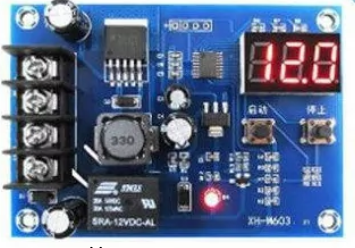
The XH-M603 is a DC-DC buck converter module designed to step down voltage from a higher input level to a lower, stable output voltage. This module is highly efficient and widely used in power supply circuits to provide regulated voltage for various electronic devices and systems. Its compact design and adjustable output make it suitable for a range of applications, including battery charging, LED drivers, and powering microcontrollers.
Explore Projects Built with XH-M603
 Open Project in Cirkit Designer
 Open Project in Cirkit Designer
 Open Project in Cirkit Designer
 Open Project in Cirkit Designer
Explore Projects Built with XH-M603
Open Project in Cirkit DesignerOpen Project in Cirkit DesignerOpen Project in Cirkit DesignerOpen Project in Cirkit DesignerCommon Applications and Use Cases
- Powering microcontrollers and development boards (e.g., Arduino, Raspberry Pi)
- Battery charging circuits
- LED lighting systems
- Voltage regulation in DIY electronics projects
- Powering low-voltage devices from higher-voltage sources
Technical Specifications
The XH-M603 module has the following key technical specifications:
| Parameter | Value |
|---|---|
| Input Voltage Range | 6V to 40V DC |
| Output Voltage Range | 1.25V to 36V DC (adjustable) |
| Maximum Output Current | 8A (with proper heat dissipation) |
| Efficiency | Up to 92% |
| Output Ripple | ≤ 50mV |
| Dimensions | 60mm x 40mm x 20mm |
Pin Configuration and Descriptions
The XH-M603 module has the following input and output terminals:
| Pin/Terminal | Description |
|---|---|
| VIN+ | Positive input voltage terminal |
| VIN- | Negative input voltage terminal (ground) |
| VOUT+ | Positive output voltage terminal |
| VOUT- | Negative output voltage terminal (ground) |
| Adjustment Potentiometer | Used to adjust the output voltage level |
Usage Instructions
How to Use the XH-M603 in a Circuit
Connect the Input Voltage:
- Connect the positive voltage source to the
VIN+terminal. - Connect the ground of the voltage source to the
VIN-terminal. - Ensure the input voltage is within the range of 6V to 40V DC.
- Connect the positive voltage source to the
Connect the Output Load:
- Connect the positive terminal of the load to the
VOUT+terminal. - Connect the ground of the load to the
VOUT-terminal.
- Connect the positive terminal of the load to the
Adjust the Output Voltage:
- Use the onboard potentiometer to adjust the output voltage.
- Turn the potentiometer clockwise to increase the output voltage and counterclockwise to decrease it.
- Use a multimeter to measure the output voltage while adjusting.
Verify Connections:
- Double-check all connections to ensure proper polarity and secure wiring.
Power On:
- Apply power to the input terminals and verify the output voltage is as desired.
Important Considerations and Best Practices
- Heat Dissipation: The XH-M603 can handle up to 8A of current, but proper heat dissipation (e.g., a heatsink or active cooling) is required for high-current applications.
- Input Voltage: Ensure the input voltage is at least 1.5V higher than the desired output voltage for proper operation.
- Output Ripple: If low ripple is critical for your application, consider adding additional filtering capacitors to the output.
- Polarity: Always observe correct polarity for both input and output connections to avoid damage to the module.
Example: Using the XH-M603 with an Arduino UNO
The XH-M603 can be used to power an Arduino UNO by stepping down a higher voltage (e.g., 12V) to 5V. Below is an example circuit and code:
Circuit Connections
- Connect a 12V DC power source to the
VIN+andVIN-terminals of the XH-M603. - Adjust the output voltage to 5V using the potentiometer.
- Connect the
VOUT+terminal to the 5V pin of the Arduino UNO. - Connect the
VOUT-terminal to the GND pin of the Arduino UNO.
Example Code
// Example code to blink an LED connected to pin 13 of the Arduino UNO
// Ensure the XH-M603 is providing a stable 5V to the Arduino UNO

void setup() {
  pinMode(13, OUTPUT); // Set pin 13 as an output
}

void loop() {
  digitalWrite(13, HIGH); // Turn the LED on
  delay(1000);            // Wait for 1 second
  digitalWrite(13, LOW);  // Turn the LED off
  delay(1000);            // Wait for 1 second
}
Troubleshooting and FAQs
Common Issues and Solutions
No Output Voltage:
- Verify that the input voltage is within the specified range (6V to 40V).
- Check all connections for proper polarity and secure wiring.
- Ensure the potentiometer is not set to the minimum output voltage.
Overheating:
- Ensure proper heat dissipation by attaching a heatsink or using active cooling.
- Reduce the load current if it exceeds the module's capacity.
Output Voltage Fluctuations:
- Check the input voltage for stability.
- Add additional filtering capacitors to the input and output terminals.
Module Not Working After Connection:
- Verify that the input and output connections are not reversed.
- Inspect the module for physical damage or burnt components.
FAQs
Q: Can the XH-M603 be used to charge batteries?
A: Yes, the XH-M603 can be used to charge batteries, but you must ensure the output voltage and current are set according to the battery's specifications.
Q: What is the maximum power output of the XH-M603?
A: The maximum power output depends on the input voltage and current. For example, at 12V input and 8A output, the power output is approximately 96W. Ensure proper cooling for high-power applications.
Q: Can I use the XH-M603 with an AC power source?
A: No, the XH-M603 is designed for DC input only. Use a rectifier and filter circuit to convert AC to DC before connecting to the module.
Q: How do I reduce output ripple?
A: You can add low ESR capacitors to the output terminals to reduce ripple and noise.
By following this documentation, you can effectively use the XH-M603 module in your projects and troubleshoot common issues.