
How to Use Li-ion battery 18650-2000mAh 3.7V 7.4WH: Examples, Pinouts, and Specs
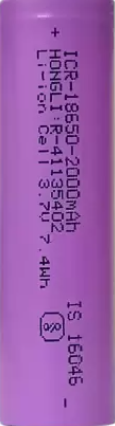
 Design with Li-ion battery 18650-2000mAh 3.7V 7.4WH in Cirkit Designer
Introduction
The Li-ion Battery 18650-2000mAh 3.7V 7.4Wh is a cylindrical rechargeable lithium-ion battery widely used in various applications. With a nominal voltage of 3.7V and a capacity of 2000mAh, it provides a total energy capacity of 7.4 watt-hours. This battery is known for its high energy density, lightweight design, and long cycle life, making it a popular choice for portable electronics, power tools, flashlights, and electric vehicles.
Explore Projects Built with Li-ion battery 18650-2000mAh 3.7V 7.4WH
 Open Project in Cirkit Designer
 Open Project in Cirkit Designer
 Open Project in Cirkit Designer
 Open Project in Cirkit Designer
Explore Projects Built with Li-ion battery 18650-2000mAh 3.7V 7.4WH
Open Project in Cirkit DesignerOpen Project in Cirkit DesignerOpen Project in Cirkit DesignerOpen Project in Cirkit DesignerCommon Applications
- Portable electronic devices (e.g., smartphones, tablets, and cameras)
- Power banks and battery packs
- Electric vehicles and e-bikes
- Flashlights and LED lighting
- DIY electronics projects and robotics
Technical Specifications
Below are the key technical details of the Li-ion Battery 18650-2000mAh 3.7V 7.4Wh:
| Parameter | Value |
|---|---|
| Nominal Voltage | 3.7V |
| Capacity | 2000mAh |
| Energy Capacity | 7.4Wh |
| Maximum Charging Voltage | 4.2V |
| Minimum Discharge Voltage | 2.5V |
| Standard Charge Current | 0.5C (1A) |
| Maximum Charge Current | 1C (2A) |
| Standard Discharge Current | 0.5C (1A) |
| Maximum Discharge Current | 3C (6A) |
| Dimensions | 18mm (diameter) x 65mm (length) |
| Weight | ~45g |
| Operating Temperature (Charge) | 0°C to 45°C |
| Operating Temperature (Discharge) | -20°C to 60°C |
| Cycle Life | ≥500 cycles |
Pin Configuration and Descriptions
The 18650 battery has two terminals:
| Pin | Description |
|---|---|
| Positive (+) | The positive terminal of the battery. Connect to the positive side of the circuit. |
| Negative (-) | The negative terminal of the battery. Connect to the ground or negative side of the circuit. |
Usage Instructions
How to Use the Component in a Circuit
Charging the Battery:
- Use a dedicated lithium-ion battery charger with a constant current/constant voltage (CC/CV) charging profile.
- Ensure the charging voltage does not exceed 4.2V to prevent overcharging.
- Limit the charging current to 1A (standard) or 2A (maximum) for safe operation.
Connecting the Battery:
- Connect the positive terminal (+) to the positive input of your circuit.
- Connect the negative terminal (-) to the ground or negative input of your circuit.
- Use a battery holder or solder wires carefully to avoid short circuits.
Protection Circuit:
- Always use a Battery Management System (BMS) or protection circuit module (PCM) to prevent overcharging, over-discharging, and short circuits.
- Ensure the BMS is rated for the battery's voltage and current specifications.
Discharging the Battery:
- Do not discharge the battery below 2.5V to avoid damage.
- Use a load that matches the battery's discharge current rating (e.g., ≤6A for maximum discharge).
Important Considerations and Best Practices
- Safety First: Avoid puncturing, crushing, or exposing the battery to fire or water.
- Storage: Store the battery in a cool, dry place at a charge level of ~50% for long-term storage.
- Parallel/Series Connections: When connecting multiple batteries in series or parallel, ensure they are of the same type, capacity, and charge level.
- Heat Management: Avoid overheating the battery during charging or discharging. Use proper ventilation or heat sinks if necessary.
Example: Using the Battery with an Arduino UNO
To power an Arduino UNO with the 18650 battery, you can use a DC-DC step-up converter to boost the 3.7V to 5V. Below is an example circuit and code:
Circuit Setup
- Connect the positive terminal of the battery to the input of the DC-DC step-up converter.
- Connect the output of the step-up converter to the Arduino UNO's 5V and GND pins.
- Use a BMS to protect the battery from over-discharge.
Example Code
// Example code to blink an LED using Arduino UNO powered by 18650 battery
// Ensure the battery is connected via a DC-DC step-up converter to provide 5V

const int ledPin = 13; // Pin connected to the onboard LED

void setup() {
  pinMode(ledPin, OUTPUT); // Set the LED pin as an output
}

void loop() {
  digitalWrite(ledPin, HIGH); // Turn the LED on
  delay(1000);                // Wait for 1 second
  digitalWrite(ledPin, LOW);  // Turn the LED off
  delay(1000);                // Wait for 1 second
}
Troubleshooting and FAQs
Common Issues and Solutions
Battery Not Charging:
- Cause: Charger not compatible or faulty.
- Solution: Use a charger designed for 18650 Li-ion batteries with a CC/CV profile.
Battery Overheating:
- Cause: Excessive charging/discharging current or poor ventilation.
- Solution: Reduce the current or improve heat dissipation.
Battery Drains Quickly:
- Cause: Aging battery or high standby current in the circuit.
- Solution: Replace the battery if it has exceeded its cycle life. Optimize the circuit to reduce power consumption.
Battery Voltage Drops Below 2.5V:
- Cause: Over-discharge due to lack of a protection circuit.
- Solution: Use a BMS to prevent over-discharge. Recharge the battery immediately if voltage drops too low.
FAQs
Can I use this battery without a protection circuit?
- It is not recommended. A protection circuit ensures safe operation and prolongs battery life.
How do I know when the battery is fully charged?
- The charger will typically indicate full charge when the current drops to a minimal level, and the voltage reaches 4.2V.
Can I connect multiple 18650 batteries in series or parallel?
- Yes, but ensure all batteries are of the same type, capacity, and charge level. Use a BMS designed for the configuration.
What happens if I overcharge the battery?
- Overcharging can cause overheating, swelling, or even explosion. Always use a charger with overcharge protection.
This documentation provides a comprehensive guide to safely and effectively use the Li-ion Battery 18650-2000mAh 3.7V 7.4Wh in your projects.