The H2S Sensor (SEN0568) by DFRobot is a high-performance device designed to detect the presence of hydrogen sulfide (H2S) gas in the environment. Hydrogen sulfide is a toxic and flammable gas commonly found in industrial settings, making this sensor an essential tool for safety monitoring and environmental analysis. The sensor provides reliable and accurate measurements, ensuring timely detection of H2S gas to prevent hazardous situations.
Explore Projects Built with H2S Sensor
Use Cirkit Designer to design, explore, and prototype these projects online. Some projects support real-time simulation. Click "Open Project" to start designing instantly!
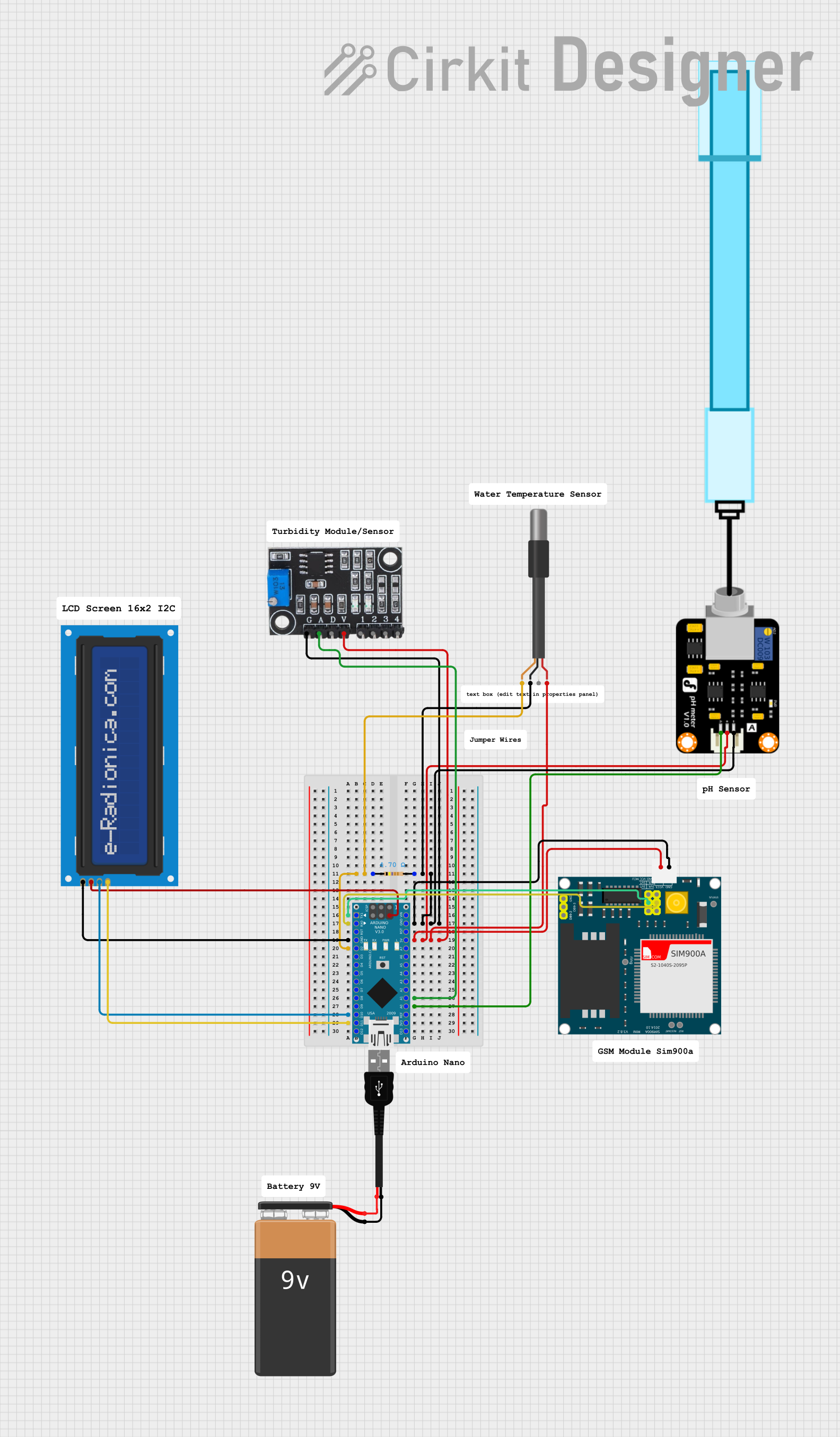
This circuit is designed for environmental monitoring, specifically for detecting harmful algal blooms (HABs) by measuring pH, turbidity, and temperature. It uses an Arduino Nano interfaced with a pH meter, turbidity module, and DS18B20 temperature sensor to collect data, and a SIM900A GSM module to send SMS alerts when the readings exceed predefined thresholds. The circuit also includes an LCD screen for displaying the measurements and a resistor for the temperature sensor setup.
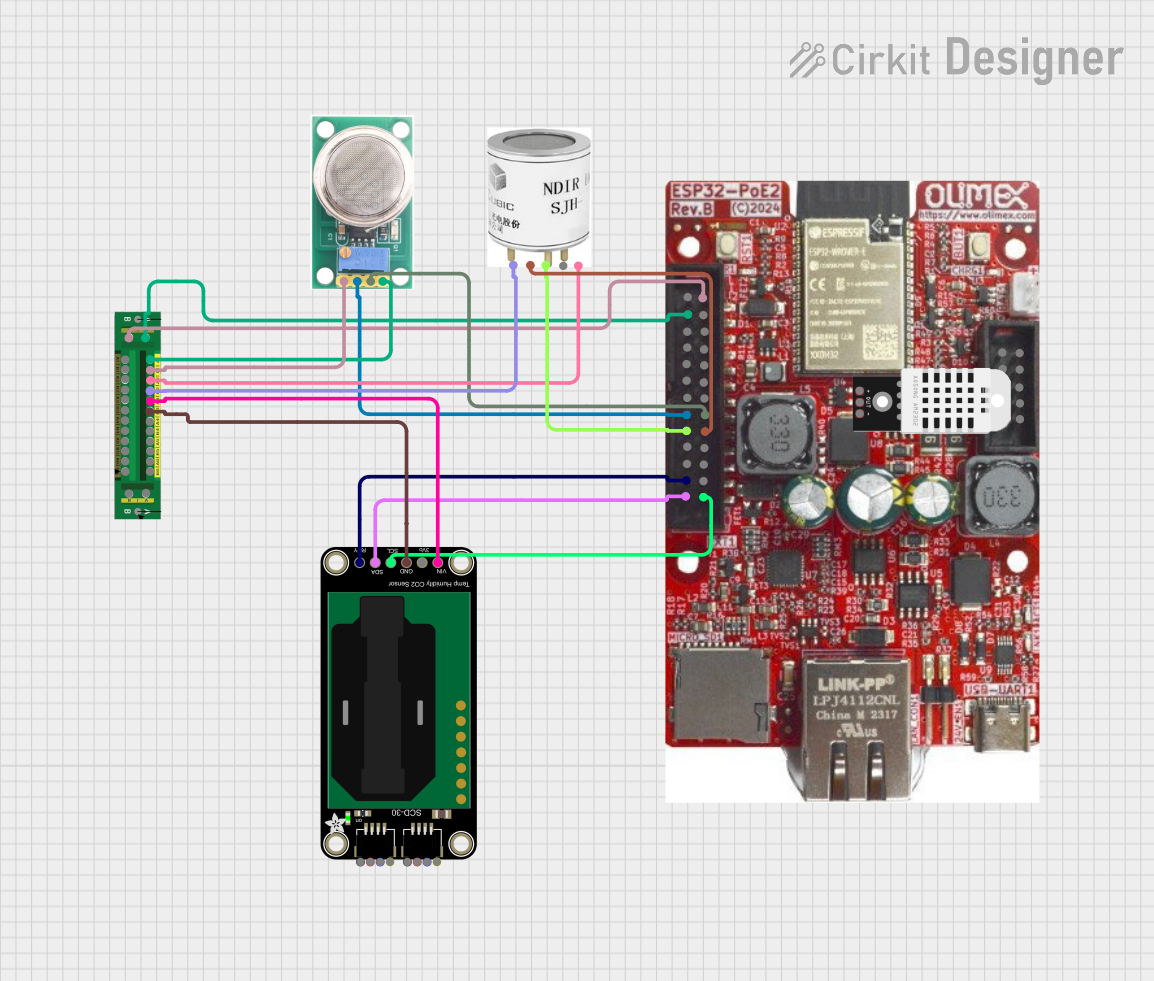
This circuit is designed for environmental monitoring, utilizing an ESP32 microcontroller to collect data from various sensors including an MQ-136 for H2S detection, an SCD30 for CO2 and humidity measurement, and an SJH-100A for methane detection. The collected data is processed and can be integrated with Home Assistant for real-time monitoring and analysis.
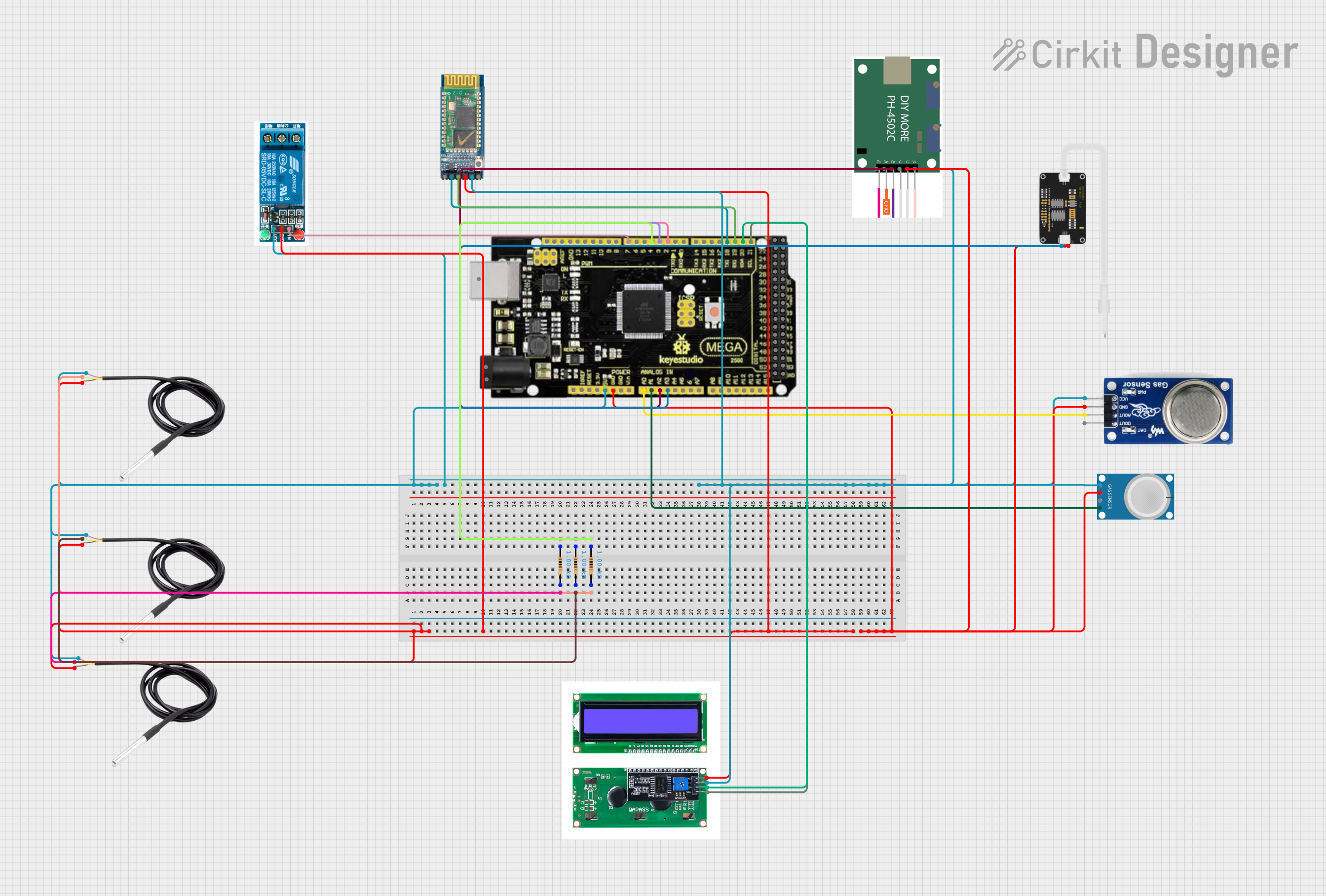
This circuit is a multi-sensor environmental monitoring system using an Arduino Mega 2560. It measures temperature, methane, CO2, pH, and TDS levels, displaying the data on an LCD and controlling a relay based on temperature thresholds. The system also includes Bluetooth communication for data transmission.
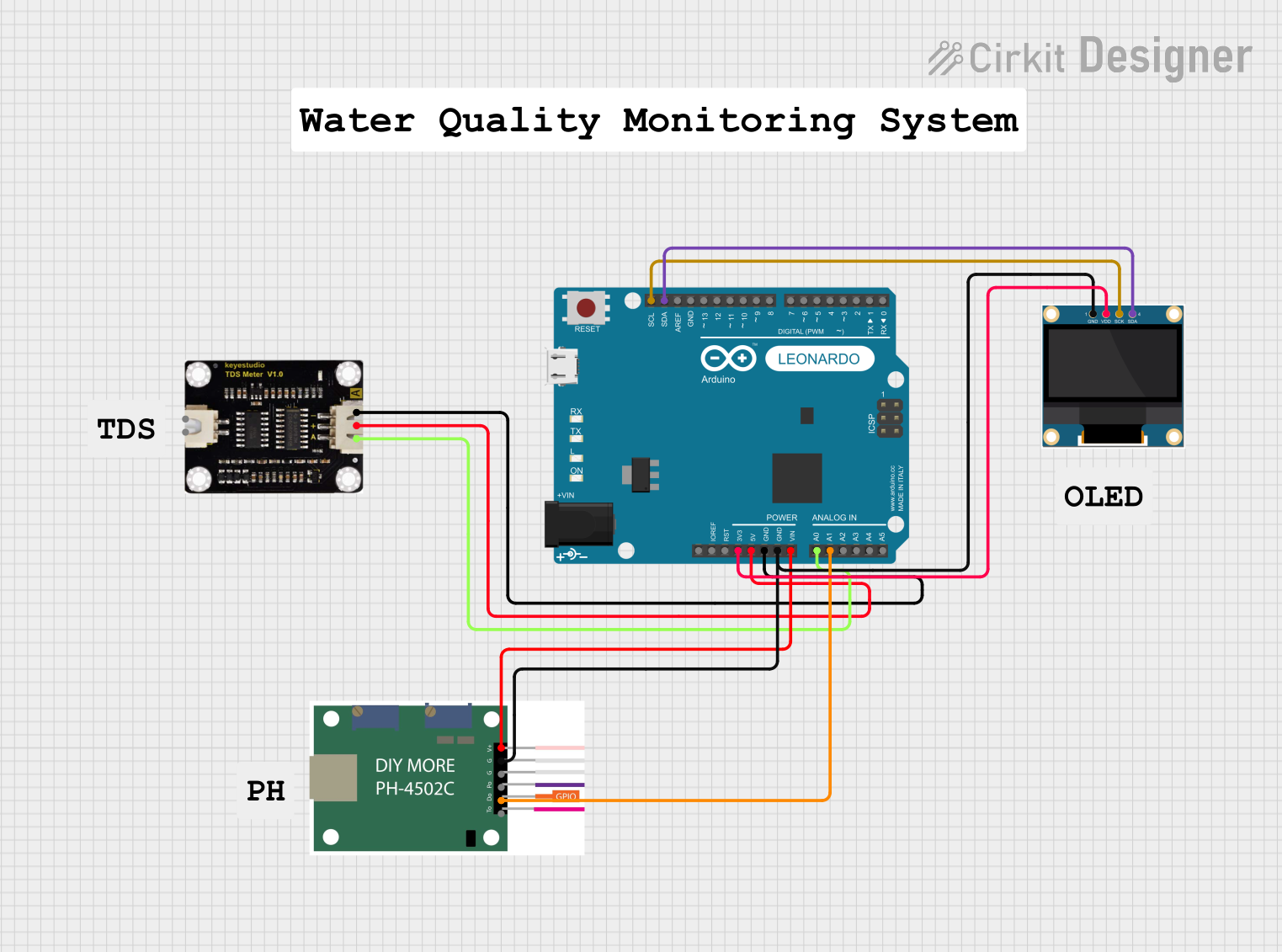
This circuit is designed to measure pH and TDS (Total Dissolved Solids) levels in a solution using a pH sensor and a TDS sensor, respectively, interfaced with an Arduino Leonardo. The measured data is then displayed on a 0.96" OLED screen.
Industrial safety monitoring in chemical plants, refineries, and wastewater treatment facilities.
Environmental monitoring for detecting H2S emissions.
Gas detection systems in confined spaces.
Educational and research projects involving gas sensing technologies.
Technical Specifications
The following table outlines the key technical details of the H2S Sensor (SEN0568):
Parameter
Value
Manufacturer
DFRobot
Part ID
SEN0568
Detection Gas
Hydrogen Sulfide (H2S)
Detection Range
0–100 ppm
Operating Voltage
3.3V–5.5V
Output Signal
Analog voltage
Response Time
≤30 seconds
Recovery Time
≤60 seconds
Operating Temperature
-20°C to 50°C
Operating Humidity
15%–90% RH (non-condensing)
Power Consumption
≤0.5W
Dimensions
32mm x 22mm
Pin Configuration and Descriptions
The H2S Sensor (SEN0568) has a simple pinout for easy integration into circuits. The pin configuration is as follows:
Pin
Name
Description
1
VCC
Power supply input (3.3V–5.5V)
2
GND
Ground connection
3
AOUT
Analog output signal proportional to H2S gas level
Usage Instructions
How to Use the H2S Sensor in a Circuit
Power the Sensor: Connect the VCC pin to a 3.3V or 5V power source and the GND pin to the ground of your circuit.
Read the Analog Output: Connect the AOUT pin to an analog input pin of a microcontroller (e.g., Arduino UNO) to read the sensor's output voltage.
Calibrate the Sensor: Allow the sensor to warm up for at least 24 hours before taking measurements to ensure accurate readings.
Interpret the Output: The analog output voltage is proportional to the concentration of H2S gas. Use the sensor's datasheet to map the voltage to the corresponding gas concentration.
Important Considerations and Best Practices
Avoid Exposure to High Humidity: Prolonged exposure to high humidity or condensation can damage the sensor.
Prevent Contamination: Keep the sensor away from dust, oil, and other contaminants that may affect its performance.
Use in Well-Ventilated Areas: Ensure proper ventilation to avoid sensor saturation in high H2S concentrations.
Handle with Care: The sensor is sensitive to physical shocks and vibrations, which may affect its accuracy.
Example Code for Arduino UNO
Below is an example code to interface the H2S Sensor (SEN0568) with an Arduino UNO:
// H2S Sensor (SEN0568) Example Code
// This code reads the analog output of the H2S sensor and prints the
// corresponding voltage to the Serial Monitor.

const int sensorPin = A0; // Connect the AOUT pin of the sensor to Arduino A0

void setup() {
  Serial.begin(9600); // Initialize serial communication at 9600 baud
  pinMode(sensorPin, INPUT); // Set the sensor pin as input
}

void loop() {
  int sensorValue = analogRead(sensorPin); // Read the analog value from the sensor
  float voltage = sensorValue * (5.0 / 1023.0); // Convert the value to voltage

  // Print the voltage to the Serial Monitor
  Serial.print("Sensor Voltage: ");
  Serial.print(voltage);
  Serial.println(" V");

  delay(1000); // Wait for 1 second before the next reading
}
Troubleshooting and FAQs
Common Issues and Solutions
No Output Signal:
Cause: Incorrect wiring or insufficient power supply.
Solution: Verify the connections and ensure the power supply voltage is within the specified range (3.3V–5.5V).
Inaccurate Readings:
Cause: Sensor not calibrated or exposed to contaminants.
Solution: Allow the sensor to warm up for 24 hours and ensure it is clean and free from dust or oil.
Slow Response Time:
Cause: Operating in extreme environmental conditions.
Solution: Ensure the sensor is used within the specified temperature and humidity range.
Sensor Saturation:
Cause: Exposure to very high concentrations of H2S gas.
Solution: Ventilate the area and allow the sensor to recover.
FAQs
Q1: Can the sensor detect gases other than H2S?
A1: No, the sensor is specifically designed to detect hydrogen sulfide (H2S) gas and may not provide accurate readings for other gases.
Q2: How often should the sensor be calibrated?
A2: The sensor should be calibrated periodically, depending on the application and environmental conditions. Refer to the manufacturer's guidelines for calibration intervals.
Q3: Can the sensor be used outdoors?
A3: Yes, but ensure it is protected from direct exposure to rain, extreme humidity, and dust to maintain accuracy and longevity.
Q4: What is the lifespan of the sensor?
A4: The sensor's lifespan depends on usage and environmental conditions. Under normal conditions, it can last several years with proper care and maintenance.


 Open Project in Cirkit Designer