
How to Use MS1100: Examples, Pinouts, and Specs
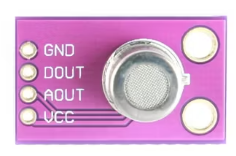
 Design with MS1100 in Cirkit Designer
Introduction
The MS1100 is a high-performance, low-power microcontroller designed for embedded applications. It features a 16-bit architecture, integrated peripherals, and a variety of communication interfaces, making it suitable for a wide range of control and automation tasks. Its compact design and energy efficiency make it ideal for battery-powered devices, IoT applications, and industrial automation systems.
Explore Projects Built with MS1100
 Open Project in Cirkit Designer
 Open Project in Cirkit Designer
 Open Project in Cirkit Designer
 Open Project in Cirkit Designer
Explore Projects Built with MS1100
Open Project in Cirkit DesignerOpen Project in Cirkit DesignerOpen Project in Cirkit DesignerOpen Project in Cirkit DesignerCommon Applications and Use Cases
- IoT devices and smart home systems
- Industrial automation and control systems
- Portable and battery-powered devices
- Sensor interfacing and data acquisition
- Communication gateways and protocol converters
Technical Specifications
The MS1100 microcontroller is built to deliver reliable performance while maintaining low power consumption. Below are its key technical details:
Key Specifications
| Parameter | Value |
|---|---|
| Architecture | 16-bit |
| Operating Voltage | 1.8V to 3.6V |
| Clock Speed | Up to 32 MHz |
| Flash Memory | 64 KB |
| RAM | 8 KB |
| Communication Interfaces | UART, SPI, I2C, CAN |
| GPIO Pins | 24 |
| ADC Resolution | 12-bit |
| Power Consumption | < 1 µA in sleep mode |
| Operating Temperature | -40°C to +85°C |
Pin Configuration and Descriptions
The MS1100 comes in a 32-pin QFN package. Below is the pin configuration:
| Pin Number | Pin Name | Description |
|---|---|---|
| 1 | VDD | Positive power supply |
| 2 | GND | Ground |
| 3 | GPIO1 | General-purpose I/O pin |
| 4 | GPIO2 | General-purpose I/O pin |
| 5 | UART_TX | UART Transmit |
| 6 | UART_RX | UART Receive |
| 7 | SPI_MOSI | SPI Master Out Slave In |
| 8 | SPI_MISO | SPI Master In Slave Out |
| 9 | SPI_SCK | SPI Clock |
| 10 | SPI_CS | SPI Chip Select |
| 11 | I2C_SCL | I2C Clock |
| 12 | I2C_SDA | I2C Data |
| 13-24 | GPIO3-14 | General-purpose I/O pins |
| 25 | ADC_IN1 | Analog-to-Digital Converter Input 1 |
| 26 | ADC_IN2 | Analog-to-Digital Converter Input 2 |
| 27 | RESET | Reset pin (active low) |
| 28 | XTAL_IN | External crystal oscillator input |
| 29 | XTAL_OUT | External crystal oscillator output |
| 30 | CAN_TX | CAN Transmit |
| 31 | CAN_RX | CAN Receive |
| 32 | NC | Not connected |
Usage Instructions
The MS1100 microcontroller is versatile and can be used in a variety of embedded applications. Below are the steps and best practices for using the MS1100 in a circuit:
Basic Circuit Setup
- Power Supply: Connect the VDD pin to a 3.3V power source and the GND pin to ground.
- Clock Source: Use an external crystal oscillator (connected to XTAL_IN and XTAL_OUT) or configure the internal clock.
- Reset: Connect a pull-up resistor (10 kΩ) to the RESET pin to ensure proper startup.
- GPIO Configuration: Configure GPIO pins as input or output based on your application.
- Communication Interfaces: Connect the appropriate pins (e.g., UART_TX, UART_RX, SPI, I2C) to external devices for communication.
Example: Interfacing MS1100 with Arduino UNO
The MS1100 can be connected to an Arduino UNO for communication via UART. Below is an example Arduino sketch to send and receive data:
// Example: UART communication between Arduino UNO and MS1100

void setup() {
  Serial.begin(9600); // Initialize UART at 9600 baud rate
  Serial.println("Arduino is ready to communicate with MS1100.");
}

void loop() {
  // Check if data is available from MS1100
  if (Serial.available() > 0) {
    String receivedData = Serial.readString(); // Read data from MS1100
    Serial.print("Received from MS1100: ");
    Serial.println(receivedData);
  }

  // Send data to MS1100
  Serial.println("Hello MS1100!"); // Send a test message
  delay(1000); // Wait for 1 second
}
Important Considerations
- Power Supply: Ensure the operating voltage is within the specified range (1.8V to 3.6V).
- Decoupling Capacitors: Place decoupling capacitors (e.g., 0.1 µF) close to the VDD pin to reduce noise.
- Pull-up Resistors: Use pull-up resistors for I2C lines (SCL and SDA) and the RESET pin.
- Programming: Use a compatible programmer or bootloader to upload firmware to the MS1100.
Troubleshooting and FAQs
Common Issues and Solutions
Microcontroller Not Powering On
- Cause: Incorrect power supply or missing decoupling capacitors.
- Solution: Verify the power supply voltage and add decoupling capacitors near the VDD pin.
Communication Failure
- Cause: Incorrect baud rate or wiring issues.
- Solution: Ensure the baud rate matches between devices and check the connections.
GPIO Pins Not Responding
- Cause: Incorrect pin configuration or damaged pins.
- Solution: Double-check the pin configuration in the firmware and test with a multimeter.
ADC Not Providing Accurate Readings
- Cause: Noisy input signal or incorrect reference voltage.
- Solution: Use a low-pass filter on the input signal and ensure the reference voltage is stable.
FAQs
Q: Can the MS1100 operate without an external crystal oscillator?
A: Yes, the MS1100 has an internal clock source, but using an external crystal oscillator improves timing accuracy.
Q: What is the maximum current draw of the MS1100?
A: The MS1100 typically draws less than 1 µA in sleep mode and up to 10 mA during active operation.
Q: How do I program the MS1100?
A: The MS1100 can be programmed using a compatible programmer or via UART bootloader, depending on the firmware setup.
Q: Can I use the MS1100 for battery-powered applications?
A: Yes, the MS1100's low-power design makes it ideal for battery-powered devices.