
How to Use MEAN WELL HDR-60-5: Examples, Pinouts, and Specs
 Design with MEAN WELL HDR-60-5 in Cirkit Designer
Introduction
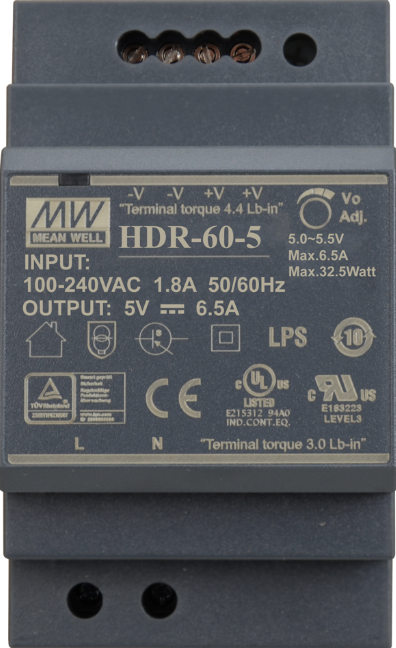
The MEAN WELL HDR-60-5 is a 60W, 5V DC-DC power supply designed for a wide range of applications. Its compact and efficient design makes it ideal for use in industrial automation, LED lighting systems, and other low-voltage DC applications. The HDR-60-5 is part of MEAN WELL's HDR series, which is known for its reliability, high efficiency, and compliance with international safety standards.
Explore Projects Built with MEAN WELL HDR-60-5
 Open Project in Cirkit Designer
 Open Project in Cirkit Designer
 Open Project in Cirkit Designer
 Open Project in Cirkit Designer
Explore Projects Built with MEAN WELL HDR-60-5
Open Project in Cirkit DesignerOpen Project in Cirkit DesignerOpen Project in Cirkit DesignerOpen Project in Cirkit DesignerCommon Applications
- LED lighting systems
- Industrial automation equipment
- Home automation and smart devices
- Security systems
- Communication devices
- General-purpose low-voltage DC power supply
Technical Specifications
The following table outlines the key technical specifications of the MEAN WELL HDR-60-5:
| Parameter | Value |
|---|---|
| Input Voltage Range | 85-264 VAC / 120-370 VDC |
| Output Voltage | 5V DC |
| Output Current | 10A |
| Output Power | 60W |
| Efficiency | Up to 87% |
| Ripple and Noise | ≤ 80mVp-p |
| Operating Temperature | -30°C to +70°C |
| Dimensions | 35mm (W) x 90mm (H) x 54.5mm (D) |
| Weight | 0.2 kg |
| Safety Standards | UL62368-1, EN62368-1, IEC62368-1 |
| Protection Features | Overload, Overvoltage, Short Circuit |
Pin Configuration and Descriptions
The HDR-60-5 features a screw terminal block for easy wiring. The pin configuration is as follows:
| Pin | Label | Description |
|---|---|---|
| 1 | L | AC Line Input |
| 2 | N | AC Neutral Input |
| 3 | -V | DC Output Negative (-) |
| 4 | +V | DC Output Positive (+) |
| 5 | Ground | Earth Ground (optional connection) |
Usage Instructions
How to Use the Component in a Circuit
- Input Connection: Connect the AC input terminals (L and N) to the mains power supply. Ensure the input voltage is within the specified range (85-264 VAC).
- Output Connection: Connect the DC output terminals (+V and -V) to the load. Ensure the load does not exceed the maximum output current of 10A.
- Grounding: For safety, connect the Earth Ground terminal to a proper grounding point.
- Mounting: The HDR-60-5 is designed for DIN rail mounting. Secure it onto a standard DIN rail for proper installation.
Important Considerations and Best Practices
- Load Requirements: Ensure the connected load does not exceed the rated output power (60W) or current (10A).
- Ventilation: Install the power supply in a well-ventilated area to prevent overheating. Avoid enclosing it in tight spaces without airflow.
- Wiring: Use appropriately rated wires for both input and output connections. Double-check all connections before powering on.
- Safety: Always disconnect the power supply from the mains before making any wiring changes.
- Voltage Adjustment: The HDR-60-5 includes a small potentiometer for fine-tuning the output voltage. Use this feature if precise voltage adjustment is required.
Example: Using HDR-60-5 with an Arduino UNO
The HDR-60-5 can be used to power an Arduino UNO and other peripherals. Below is an example wiring setup and Arduino code:
Wiring
- Connect the +V terminal of the HDR-60-5 to the Arduino's 5V pin.
- Connect the -V terminal of the HDR-60-5 to the Arduino's GND pin.
- Ensure the HDR-60-5 is properly connected to the mains power supply.
Arduino Code
// Example code to blink an LED connected to pin 13 of the Arduino UNO
// Ensure the HDR-60-5 is providing a stable 5V to the Arduino

void setup() {
  pinMode(13, OUTPUT); // Set pin 13 as an output pin
}

void loop() {
  digitalWrite(13, HIGH); // Turn the LED on
  delay(1000);            // Wait for 1 second
  digitalWrite(13, LOW);  // Turn the LED off
  delay(1000);            // Wait for 1 second
}
Troubleshooting and FAQs
Common Issues and Solutions
No Output Voltage
- Cause: Incorrect wiring or no AC input.
- Solution: Verify the AC input connections (L and N) and ensure the mains power is on.
Overheating
- Cause: Insufficient ventilation or excessive load.
- Solution: Ensure proper airflow around the power supply and reduce the load if it exceeds 60W.
Output Voltage Fluctuations
- Cause: Unstable input voltage or overloaded output.
- Solution: Check the input voltage stability and ensure the load is within the rated limits.
Short Circuit Protection Triggered
- Cause: A short circuit in the connected load.
- Solution: Disconnect the load, identify the short circuit, and resolve it before reconnecting.
FAQs
Q1: Can the HDR-60-5 be used outdoors?
A1: No, the HDR-60-5 is not designed for outdoor use. It must be installed in a dry, indoor environment.
Q2: Is the output voltage adjustable?
A2: Yes, the output voltage can be fine-tuned using the built-in potentiometer.
Q3: What happens if the load exceeds 60W?
A3: The HDR-60-5 includes overload protection. If the load exceeds the rated power, the power supply will shut down to prevent damage.
Q4: Can I use the HDR-60-5 to power multiple devices?
A4: Yes, as long as the total current draw does not exceed 10A and the devices are compatible with a 5V DC supply.
Q5: Does the HDR-60-5 require a fuse?
A5: The HDR-60-5 has built-in protection features, but it is recommended to use an external fuse on the AC input for additional safety.