
How to Use Fermion | 10 DOF IMU Sensor - ADXL345+ITG3205+VCM5883L+BMP280: Examples, Pinouts, and Specs
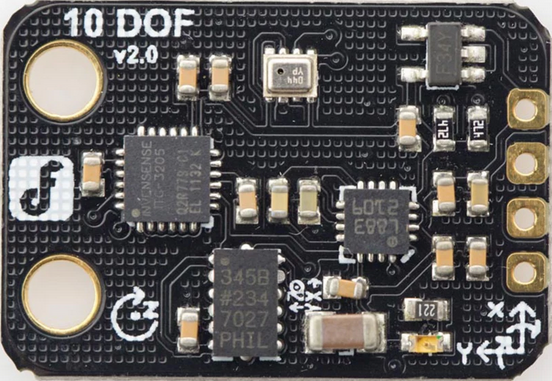
 Design with Fermion | 10 DOF IMU Sensor - ADXL345+ITG3205+VCM5883L+BMP280 in Cirkit Designer
Introduction
The Fermion 10 DOF IMU Sensor is a highly integrated module that combines four powerful sensors:
- ADXL345: A 3-axis accelerometer for measuring linear acceleration.
- ITG3205: A 3-axis gyroscope for angular velocity measurements.
- VCM5883L: A 3-axis magnetometer for detecting magnetic fields.
- BMP280: A barometric pressure sensor for altitude and environmental pressure data.
This sensor provides comprehensive motion and environmental data, making it ideal for applications such as:
- Robotics and autonomous systems
- Drones and UAVs for navigation and stabilization
- Wearable devices for motion tracking
- Environmental monitoring systems
The module communicates via I2C, making it easy to interface with microcontrollers like the Arduino UNO.
Explore Projects Built with Fermion | 10 DOF IMU Sensor - ADXL345+ITG3205+VCM5883L+BMP280
 Open Project in Cirkit Designer
 Open Project in Cirkit Designer
 Open Project in Cirkit Designer
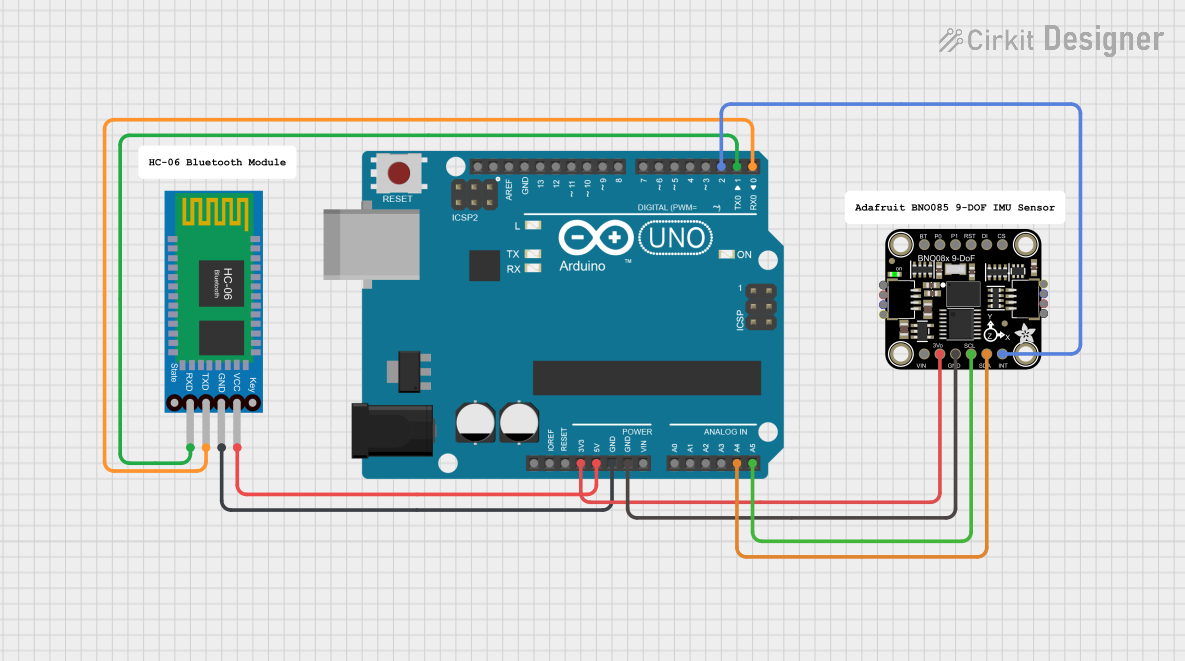 Open Project in Cirkit Designer
Explore Projects Built with Fermion | 10 DOF IMU Sensor - ADXL345+ITG3205+VCM5883L+BMP280
Open Project in Cirkit DesignerOpen Project in Cirkit DesignerOpen Project in Cirkit DesignerOpen Project in Cirkit DesignerTechnical Specifications
Key Technical Details
| Parameter | Value |
|---|---|
| Supply Voltage | 3.3V to 5V |
| Communication Interface | I2C (default address: 0x68 for ITG3205, 0x53 for ADXL345, etc.) |
| Accelerometer Range | ±2g, ±4g, ±8g, ±16g (configurable) |
| Gyroscope Range | ±250°/s, ±500°/s, ±1000°/s, ±2000°/s (configurable) |
| Magnetometer Range | ±8 Gauss |
| Barometric Pressure Range | 300 hPa to 1100 hPa |
| Operating Temperature Range | -40°C to +85°C |
| Dimensions | 25mm x 25mm |
Pin Configuration
| Pin | Name | Description |
|---|---|---|
| 1 | VCC | Power supply input (3.3V to 5V) |
| 2 | GND | Ground |
| 3 | SDA | I2C data line |
| 4 | SCL | I2C clock line |
| 5 | INT | Interrupt pin (optional, for motion detection or data-ready signals) |
Usage Instructions
Connecting the Sensor to an Arduino UNO
Wiring:
- Connect the VCC pin to the Arduino's 5V pin.
- Connect the GND pin to the Arduino's GND pin.
- Connect the SDA pin to the Arduino's A4 pin (I2C data line).
- Connect the SCL pin to the Arduino's A5 pin (I2C clock line).
Install Required Libraries:
- Install the following libraries in the Arduino IDE:
Adafruit_SensorAdafruit_ADXL345Adafruit_BMP280Wire.h
- Install the following libraries in the Arduino IDE:
Sample Code:
Below is an example Arduino sketch to read data from the sensor:#include <Wire.h> #include <Adafruit_Sensor.h> #include <Adafruit_ADXL345_U.h> #include <Adafruit_BMP280.h> // Create sensor objects Adafruit_ADXL345_Unified accel = Adafruit_ADXL345_Unified(12345); Adafruit_BMP280 bmp; void setup() { Serial.begin(9600); Serial.println("Initializing 10 DOF IMU Sensor..."); // Initialize accelerometer if (!accel.begin()) { Serial.println("Failed to initialize ADXL345 accelerometer!"); while (1); } Serial.println("ADXL345 initialized."); // Initialize barometric pressure sensor if (!bmp.begin(0x76)) { // Default I2C address for BMP280 Serial.println("Failed to initialize BMP280!"); while (1); } Serial.println("BMP280 initialized."); } void loop() { // Read accelerometer data sensors_event_t event; accel.getEvent(&event); Serial.print("Accel X: "); Serial.print(event.acceleration.x); Serial.print(" m/s^2, "); Serial.print("Y: "); Serial.print(event.acceleration.y); Serial.print(" m/s^2, "); Serial.print("Z: "); Serial.print(event.acceleration.z); Serial.println(" m/s^2"); // Read barometric pressure and temperature Serial.print("Pressure: "); Serial.print(bmp.readPressure()); Serial.println(" Pa"); Serial.print("Temperature: "); Serial.print(bmp.readTemperature()); Serial.println(" °C"); delay(1000); // Wait 1 second before next reading }
Important Considerations
- Power Supply: Ensure the module is powered with a stable voltage between 3.3V and 5V.
- I2C Address Conflicts: If using multiple I2C devices, ensure their addresses do not conflict.
- Interrupt Pin: The INT pin can be used for advanced features like motion detection, but it is optional.
Troubleshooting and FAQs
Common Issues
Sensor Not Detected:
- Ensure the wiring is correct and matches the pin configuration.
- Verify that the I2C addresses in the code match the sensor's default addresses.
Incorrect or No Data:
- Check the power supply voltage (3.3V to 5V).
- Ensure the required libraries are installed and up to date.
I2C Communication Errors:
- Use pull-up resistors (4.7kΩ to 10kΩ) on the SDA and SCL lines if communication is unstable.
FAQs
Q: Can I use this sensor with a 3.3V microcontroller?
A: Yes, the sensor is compatible with both 3.3V and 5V systems.
Q: How do I change the accelerometer or gyroscope range?
A: The range can be configured by writing to specific registers in the ADXL345 or ITG3205. Refer to their datasheets for details.
Q: Can I use this sensor for GPS-based navigation?
A: While the sensor provides motion and environmental data, it does not include GPS functionality. However, it can complement a GPS module for navigation systems.
This documentation provides a comprehensive guide to using the Fermion 10 DOF IMU Sensor. For further assistance, refer to the manufacturer's datasheets or community forums.