
How to Use Sabertooth 2x60: Examples, Pinouts, and Specs
 Design with Sabertooth 2x60 in Cirkit Designer
Introduction
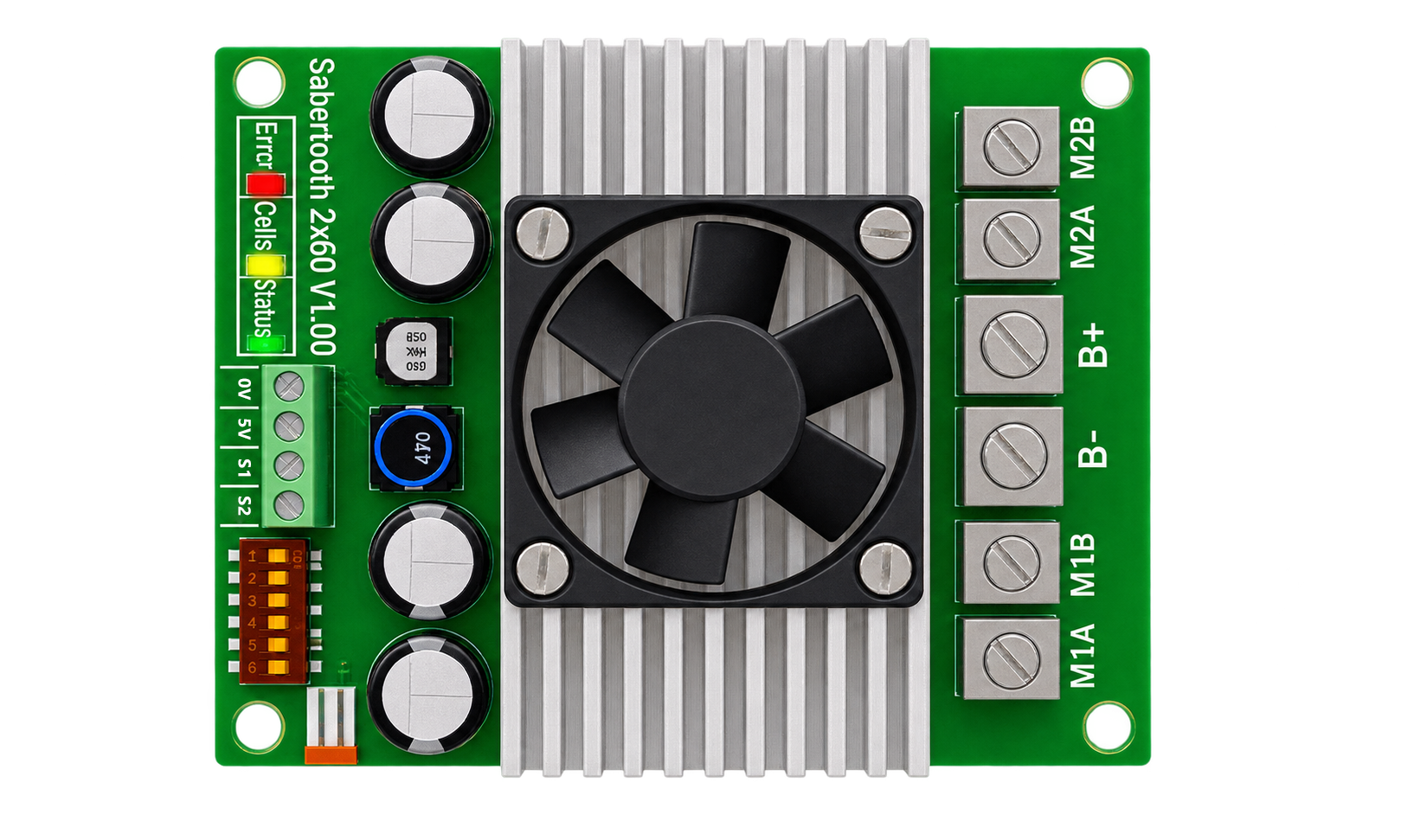
The Sabertooth 2x60 by Dimension Engineering is a dual-channel motor driver designed to control two DC motors with a maximum continuous current of 60A per channel. It is a versatile and robust motor driver, ideal for high-power robotics, automation systems, and other applications requiring precise motor control. The Sabertooth 2x60 supports multiple control modes, including analog, R/C, serial, and packetized serial, making it compatible with a wide range of microcontrollers and control systems.
Explore Projects Built with Sabertooth 2x60
 Open Project in Cirkit Designer
 Open Project in Cirkit Designer
 Open Project in Cirkit Designer
 Open Project in Cirkit Designer
Explore Projects Built with Sabertooth 2x60
Open Project in Cirkit DesignerOpen Project in Cirkit DesignerOpen Project in Cirkit DesignerOpen Project in Cirkit DesignerCommon Applications
- Robotics (e.g., mobile robots, robotic arms)
- Automated guided vehicles (AGVs)
- Electric wheelchairs
- Conveyor systems
- Remote-controlled vehicles and boats
Technical Specifications
Below are the key technical details of the Sabertooth 2x60 motor driver:
| Parameter | Value |
|---|---|
| Manufacturer | Dimension Engineering |
| Part Number | Sabertooth 2x60 |
| Motor Channels | 2 |
| Maximum Continuous Current | 60A per channel |
| Peak Current | 120A per channel (for a few seconds) |
| Input Voltage Range | 6V to 30V DC |
| Control Modes | Analog, R/C, Simplified Serial, Packetized Serial |
| Operating Temperature Range | -40°C to +85°C |
| Dimensions | 3.5" x 3.0" x 1.0" (89mm x 76mm x 25mm) |
| Weight | 150g |
| Protection Features | Overcurrent, thermal, and undervoltage protection |
Pin Configuration and Descriptions
The Sabertooth 2x60 has several connectors and pins for power, motor outputs, and control signals. Below is a summary of the key connections:
Power and Motor Connections
| Pin/Connector | Description |
|---|---|
| B+ | Positive terminal for the power supply (6V to 30V DC). |
| B- | Negative terminal for the power supply (ground). |
| M1A, M1B | Motor 1 output terminals. Connect to the first DC motor. |
| M2A, M2B | Motor 2 output terminals. Connect to the second DC motor. |
Control Signal Connections
| Pin/Connector | Description |
|---|---|
| S1 | Signal input 1. Used for control signals (e.g., analog, R/C, or serial). |
| S2 | Signal input 2. Used for control signals (e.g., analog, R/C, or serial). |
| 0V | Ground reference for control signals. |
| 5V | 5V output for powering external devices (up to 50mA). |
Usage Instructions
The Sabertooth 2x60 can be used in various control modes. Below are general instructions for using the motor driver in a circuit:
Basic Setup
- Power Supply: Connect a DC power supply (6V to 30V) to the B+ and B- terminals. Ensure the power supply can handle the current requirements of your motors.
- Motor Connections: Connect the DC motors to the M1A/M1B and M2A/M2B terminals. Ensure proper polarity for the desired motor direction.
- Control Signals: Depending on the control mode, connect the appropriate control signals to the S1 and S2 pins.
Using with an Arduino UNO (Simplified Serial Mode)
The Sabertooth 2x60 can be controlled via an Arduino UNO using the simplified serial mode. Below is an example code snippet to control two motors:
// Include the SoftwareSerial library for communication
#include <SoftwareSerial.h>

// Define the TX pin for communication with the Sabertooth
#define SABERTOOTH_TX_PIN 10

// Create a SoftwareSerial object for Sabertooth communication
SoftwareSerial sabertoothSerial(SABERTOOTH_TX_PIN, -1); // TX only

void setup() {
  // Begin serial communication with the Sabertooth at 9600 baud
  sabertoothSerial.begin(9600);
}

void loop() {
  // Send commands to control the motors
  // Motor 1 forward at 50% speed (range: 1-127)
  sabertoothSerial.write(64);

  // Motor 2 forward at 75% speed (range: 1-127)
  sabertoothSerial.write(96);

  delay(2000); // Run motors for 2 seconds

  // Stop both motors
  sabertoothSerial.write(0); // Motor 1 stop
  sabertoothSerial.write(128); // Motor 2 stop

  delay(2000); // Wait for 2 seconds before repeating
}
Important Considerations
- Power Supply: Use a power supply capable of providing sufficient current for both motors.
- Heat Dissipation: Ensure adequate ventilation or cooling for the motor driver, especially under high loads.
- Control Mode Selection: Configure the DIP switches on the Sabertooth 2x60 to select the desired control mode. Refer to the user manual for DIP switch settings.
Troubleshooting and FAQs
Common Issues
Motors Not Running
- Cause: Incorrect wiring or insufficient power supply.
- Solution: Double-check all connections and ensure the power supply meets the voltage and current requirements.
Overheating
- Cause: Prolonged operation at high currents without proper cooling.
- Solution: Add a heatsink or fan to improve heat dissipation.
Erratic Motor Behavior
- Cause: Noise or interference in control signals.
- Solution: Use shielded cables for control signals and ensure proper grounding.
No Response in Serial Mode
- Cause: Incorrect baud rate or wiring.
- Solution: Verify the baud rate (default is 9600) and ensure the TX pin of the microcontroller is connected to the S1 pin.
FAQs
Can the Sabertooth 2x60 drive brushless motors?
- No, the Sabertooth 2x60 is designed for brushed DC motors only.
What happens if the current exceeds 60A per channel?
- The Sabertooth 2x60 has built-in overcurrent protection and will shut down temporarily to prevent damage.
Can I use the 5V output to power my Arduino?
- Yes, but ensure the total current draw does not exceed 50mA.
How do I reverse motor direction?
- Swap the connections on the motor terminals (e.g., M1A and M1B) or send reverse commands via the control signal.
By following this documentation, users can effectively integrate the Sabertooth 2x60 into their projects and troubleshoot common issues.