
How to Use solar charge controller: Examples, Pinouts, and Specs
 Design with solar charge controller in Cirkit Designer
Introduction
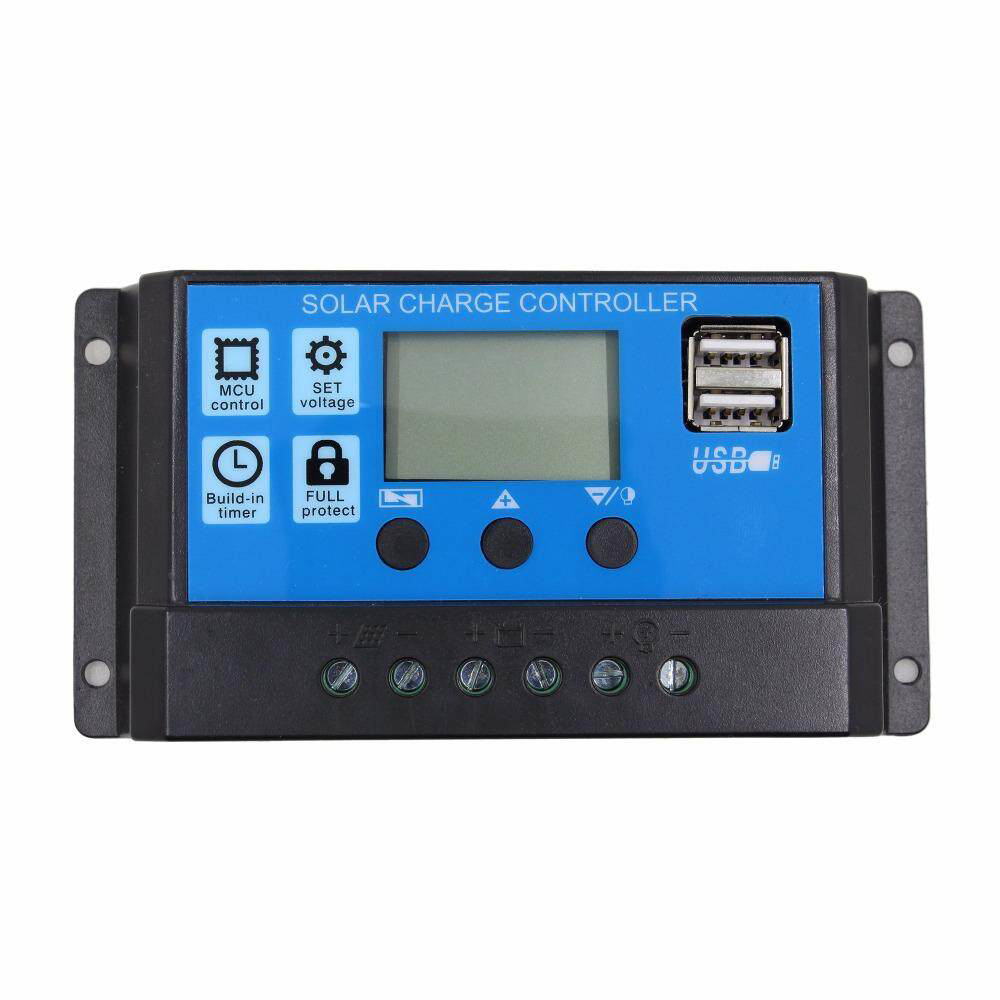
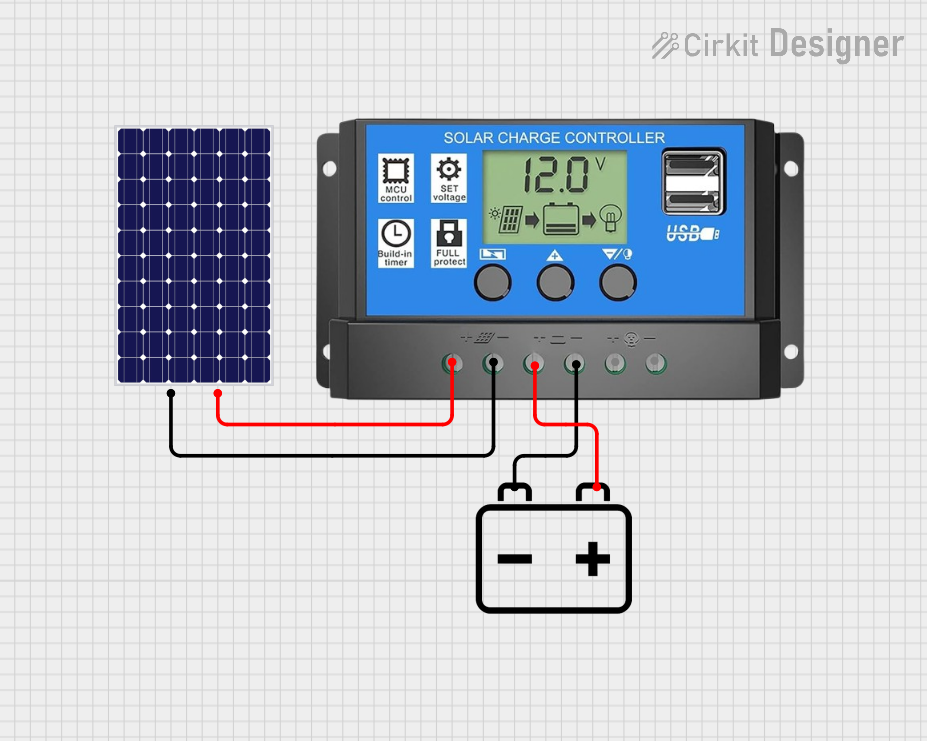
The SFijd-0 DMGOWFOW Solar Charge Controller is a critical component in solar power systems. It regulates the voltage and current coming from solar panels to the batteries, ensuring safe charging and preventing overcharging. By managing the energy flow, it extends battery life and improves the overall efficiency of the solar power system.
Explore Projects Built with solar charge controller
 Open Project in Cirkit Designer
 Open Project in Cirkit Designer
 Open Project in Cirkit Designer
 Open Project in Cirkit Designer
Explore Projects Built with solar charge controller
Open Project in Cirkit DesignerOpen Project in Cirkit DesignerOpen Project in Cirkit DesignerOpen Project in Cirkit DesignerCommon Applications and Use Cases
- Off-grid solar power systems
- Solar-powered lighting systems
- RVs, boats, and caravans with solar setups
- Backup power systems with solar integration
- Small-scale renewable energy projects
Technical Specifications
The following table outlines the key technical details of the SFijd-0 DMGOWFOW Solar Charge Controller:
| Parameter | Value |
|---|---|
| Input Voltage Range | 12V/24V auto-detect |
| Maximum Input Current | 20A |
| Maximum Solar Panel Power | 260W (12V system), 520W (24V system) |
| Battery Voltage Range | 9V to 32V |
| Charging Algorithm | PWM (Pulse Width Modulation) |
| Operating Temperature | -20°C to +50°C |
| Efficiency | ≥ 98% |
| Dimensions | 150mm x 78mm x 35mm |
| Weight | 200g |
Pin Configuration and Descriptions
The SFijd-0 DMGOWFOW Solar Charge Controller has the following terminal connections:
| Pin/Terminal | Label | Description |
|---|---|---|
| 1 | Solar Panel (+) | Positive terminal for solar panel input |
| 2 | Solar Panel (-) | Negative terminal for solar panel input |
| 3 | Battery (+) | Positive terminal for battery connection |
| 4 | Battery (-) | Negative terminal for battery connection |
| 5 | Load (+) | Positive terminal for DC load output |
| 6 | Load (-) | Negative terminal for DC load output |
Usage Instructions
How to Use the Component in a Circuit
- Connect the Solar Panel: Attach the positive and negative terminals of the solar panel to the corresponding "Solar Panel (+)" and "Solar Panel (-)" inputs on the charge controller.
- Connect the Battery: Connect the battery's positive and negative terminals to the "Battery (+)" and "Battery (-)" terminals on the charge controller.
- Connect the Load (Optional): If you wish to power a DC load directly, connect the load's positive and negative terminals to the "Load (+)" and "Load (-)" terminals.
- Power On: Once all connections are secure, the charge controller will automatically detect the system voltage (12V or 24V) and begin regulating the energy flow.
Important Considerations and Best Practices
- Battery Type: Ensure the charge controller is compatible with your battery type (e.g., lead-acid, lithium-ion).
- System Voltage: The controller automatically detects 12V or 24V systems, but ensure your solar panel and battery are compatible with the same voltage.
- Wiring: Use appropriately rated wires to handle the current and minimize voltage drops.
- Placement: Install the charge controller in a well-ventilated area to prevent overheating.
- Reverse Polarity: Double-check all connections to avoid reverse polarity, which can damage the controller.
Arduino UNO Integration Example
The SFijd-0 DMGOWFOW Solar Charge Controller can be monitored using an Arduino UNO by reading the battery voltage and load current. Below is an example code snippet:
// Example: Monitor battery voltage and load current using Arduino UNO
// Ensure proper connections between the charge controller and Arduino

const int batteryVoltagePin = A0; // Analog pin for battery voltage
const int loadCurrentPin = A1;   // Analog pin for load current

void setup() {
  Serial.begin(9600); // Initialize serial communication
}

void loop() {
  // Read battery voltage (assuming a voltage divider is used)
  int batteryVoltageRaw = analogRead(batteryVoltagePin);
  float batteryVoltage = (batteryVoltageRaw / 1023.0) * 25.0;
  // Adjust the multiplier based on your voltage divider ratio

  // Read load current (assuming a current sensor is used)
  int loadCurrentRaw = analogRead(loadCurrentPin);
  float loadCurrent = (loadCurrentRaw / 1023.0) * 10.0;
  // Adjust the multiplier based on your current sensor specifications

  // Print the readings to the Serial Monitor
  Serial.print("Battery Voltage: ");
  Serial.print(batteryVoltage);
  Serial.println(" V");

  Serial.print("Load Current: ");
  Serial.print(loadCurrent);
  Serial.println(" A");

  delay(1000); // Wait for 1 second before the next reading
}
Troubleshooting and FAQs
Common Issues and Solutions
No Power Output to Load
- Cause: The battery voltage may be too low.
- Solution: Check the battery voltage and ensure it is above the low-voltage cutoff threshold.
Overheating
- Cause: The charge controller may be operating in a poorly ventilated area.
- Solution: Relocate the controller to a cooler, well-ventilated space.
Incorrect Voltage Detection
- Cause: Faulty connections or incompatible solar panel/battery voltage.
- Solution: Verify all connections and ensure the solar panel and battery are of the same voltage system (12V or 24V).
Reverse Polarity Damage
- Cause: Incorrect wiring of the solar panel, battery, or load.
- Solution: Always double-check connections before powering on the system.
FAQs
Q: Can this charge controller handle lithium-ion batteries?
A: Yes, but ensure the charge controller is configured for lithium-ion batteries and matches the battery's voltage and charging requirements.
Q: What happens if the solar panel produces more power than the battery can handle?
A: The charge controller will regulate the current to prevent overcharging and protect the battery.
Q: Can I use this charge controller for a 48V system?
A: No, the SFijd-0 DMGOWFOW Solar Charge Controller is designed for 12V and 24V systems only.
Q: How do I know if the battery is fully charged?
A: The charge controller's LED indicators or display (if available) will show the battery's charging status.
This concludes the documentation for the SFijd-0 DMGOWFOW Solar Charge Controller.