
How to Use Bluetooth Stereo Amplifier: Examples, Pinouts, and Specs
 Design with Bluetooth Stereo Amplifier in Cirkit Designer
Introduction
The Fosi Audio BT20A is a compact and powerful Bluetooth stereo amplifier designed to amplify audio signals and enable wireless streaming from Bluetooth-enabled devices. It delivers high-quality sound output, making it ideal for home audio systems, DIY speaker projects, and other audio applications. With its user-friendly design and robust performance, the BT20A is a versatile solution for enhancing your audio experience.
Explore Projects Built with Bluetooth Stereo Amplifier
 Open Project in Cirkit Designer
 Open Project in Cirkit Designer
 Open Project in Cirkit Designer
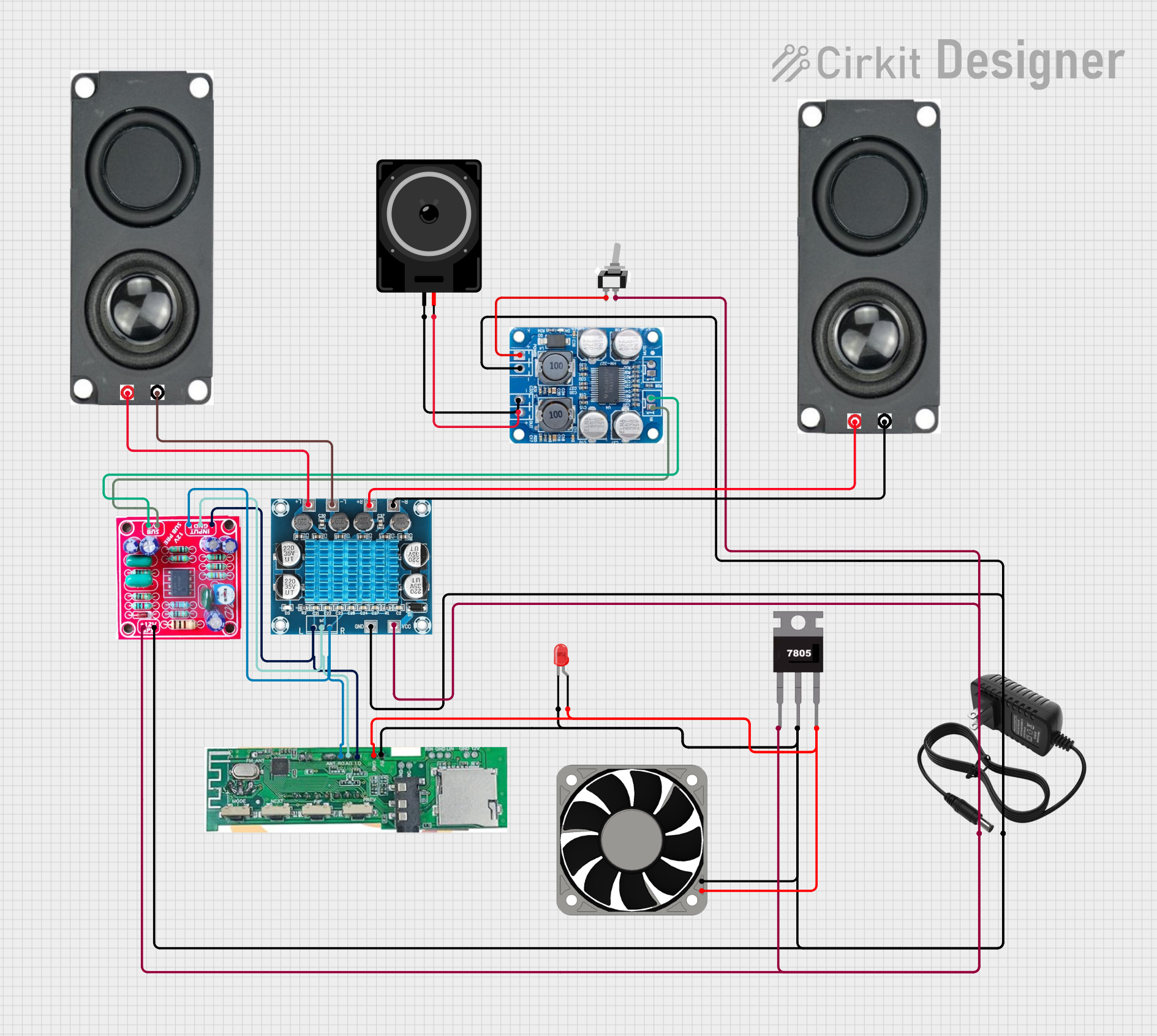 Open Project in Cirkit Designer
Explore Projects Built with Bluetooth Stereo Amplifier
Open Project in Cirkit DesignerOpen Project in Cirkit DesignerOpen Project in Cirkit DesignerOpen Project in Cirkit DesignerCommon Applications and Use Cases
- Home audio systems for wireless music streaming
- DIY speaker projects and upgrades
- Amplification for bookshelf or floor-standing speakers
- Audio enhancement for TVs, computers, and gaming setups
- Portable sound systems for small events or gatherings
Technical Specifications
The following table outlines the key technical details of the Fosi Audio BT20A:
| Parameter | Specification |
|---|---|
| Bluetooth Version | 5.0 |
| Output Power | 100W x 2 (4Ω, 20Hz-20kHz, 0.04% THD) |
| Input Voltage | DC 24V/4.5A (via included power adapter) |
| Audio Inputs | Bluetooth, RCA (Line-In) |
| Speaker Impedance | 2Ω - 8Ω |
| Frequency Response | 20Hz - 20kHz |
| Signal-to-Noise Ratio | ≥98dB |
| Dimensions | 5.3 x 3.5 x 1.4 inches (135 x 88 x 36 mm) |
| Weight | 1.2 lbs (0.54 kg) |
Pin Configuration and Descriptions
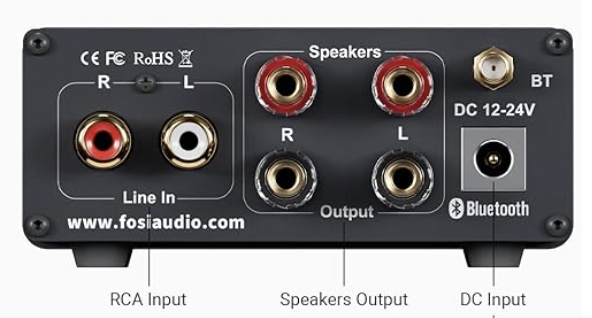
The Fosi Audio BT20A does not have traditional pins like ICs but features the following input/output connectors:
| Connector | Description |
|---|---|
| Bluetooth Antenna | Built-in antenna for wireless audio streaming |
| RCA Input | Stereo line-in for wired audio sources |
| Speaker Terminals | Binding posts for connecting left and right speakers |
| DC Power Input | 24V power input for the amplifier |
Usage Instructions
How to Use the BT20A in a Circuit
- Power Connection: Connect the included 24V DC power adapter to the amplifier's power input.
- Speaker Connection: Attach the left and right speaker wires to the corresponding binding posts on the amplifier. Ensure proper polarity (positive to positive, negative to negative).
- Audio Input:
- For Bluetooth: Pair your Bluetooth-enabled device with the BT20A. The amplifier will appear as "BT20A" in the device's Bluetooth settings.
- For RCA: Connect the RCA cable from your audio source (e.g., TV, computer) to the amplifier's RCA input.
- Volume Control: Use the volume knob on the amplifier to adjust the output level.
Important Considerations and Best Practices
- Ensure the total speaker impedance is within the supported range (2Ω - 8Ω).
- Avoid short-circuiting the speaker terminals to prevent damage to the amplifier.
- Place the amplifier in a well-ventilated area to prevent overheating.
- Use high-quality speaker cables and RCA cables for optimal audio performance.
- Disconnect the power adapter when the amplifier is not in use for extended periods.
Arduino UNO Integration
While the BT20A is not directly programmable or controlled via Arduino, it can be used in projects where an Arduino UNO controls audio sources or other peripherals. For example, you can use an Arduino to control a Bluetooth audio module that streams to the BT20A.
Here is an example Arduino sketch to control a Bluetooth module (e.g., HC-05) for audio streaming:
#include <SoftwareSerial.h>

// Define RX and TX pins for the HC-05 Bluetooth module
SoftwareSerial bluetooth(10, 11); // RX = pin 10, TX = pin 11

void setup() {
  Serial.begin(9600); // Initialize serial communication with the PC
  bluetooth.begin(9600); // Initialize Bluetooth module communication
  Serial.println("Bluetooth module ready. Pair with 'BT20A' to stream audio.");
}

void loop() {
  // Forward data from Bluetooth to Serial Monitor
  if (bluetooth.available()) {
    Serial.write(bluetooth.read());
  }

  // Forward data from Serial Monitor to Bluetooth
  if (Serial.available()) {
    bluetooth.write(Serial.read());
  }
}
Note: This code demonstrates how to set up a Bluetooth module for communication. The actual audio streaming is handled by the BT20A once paired with a Bluetooth device.
Troubleshooting and FAQs
Common Issues and Solutions
No Sound Output:
- Ensure the speakers are properly connected to the amplifier.
- Verify that the audio source is playing and the volume is not muted.
- Check the amplifier's volume knob and increase the level if necessary.
Bluetooth Pairing Issues:
- Ensure the BT20A is powered on and in pairing mode.
- Remove any previously paired devices from your Bluetooth settings and try reconnecting.
- Restart both the amplifier and the Bluetooth device.
Distorted Audio:
- Check that the speaker impedance matches the amplifier's supported range (2Ω - 8Ω).
- Reduce the volume on the amplifier or the audio source to prevent clipping.
- Ensure the power adapter is providing sufficient voltage and current.
Overheating:
- Place the amplifier in a well-ventilated area.
- Avoid operating the amplifier at maximum volume for extended periods.
FAQs
Q: Can I use the BT20A with passive speakers?
A: Yes, the BT20A is designed to drive passive speakers with an impedance of 2Ω to 8Ω.
Q: Does the BT20A support aptX or other advanced Bluetooth codecs?
A: The BT20A supports standard Bluetooth audio streaming but does not explicitly list support for aptX or other advanced codecs.
Q: Can I connect a subwoofer to the BT20A?
A: The BT20A does not have a dedicated subwoofer output. However, you can use a passive subwoofer with a built-in crossover or an external subwoofer amplifier.
Q: Is the BT20A compatible with smart home systems?
A: The BT20A can be used with smart home systems indirectly by connecting it to a smart audio source (e.g., Amazon Echo, Google Home) via Bluetooth or RCA.
By following this documentation, you can effectively set up and use the Fosi Audio BT20A Bluetooth Stereo Amplifier for a wide range of audio applications.