
How to Use Air780E LTE Cat‑1 Module: Examples, Pinouts, and Specs
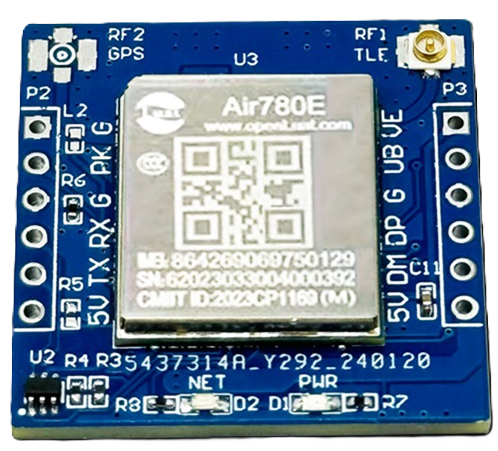
 Design with Air780E LTE Cat‑1 Module in Cirkit Designer
Introduction
The Air780E LTE Cat‑1 Module is a compact and efficient cellular communication module designed for Internet of Things (IoT) applications. Manufactured under the part ID AIR780E LTE Cat-1 Communication Module, this device provides reliable wireless connectivity with low power consumption and high data rates. It is ideal for applications requiring remote monitoring, control, and data transmission.
Explore Projects Built with Air780E LTE Cat‑1 Module
 Open Project in Cirkit Designer
 Open Project in Cirkit Designer
 Open Project in Cirkit Designer
 Open Project in Cirkit Designer
Explore Projects Built with Air780E LTE Cat‑1 Module
Open Project in Cirkit DesignerOpen Project in Cirkit DesignerOpen Project in Cirkit DesignerOpen Project in Cirkit DesignerCommon Applications and Use Cases
- Smart metering and utility monitoring
- Asset tracking and fleet management
- Industrial automation and control systems
- Smart home devices and security systems
- Environmental monitoring and agricultural IoT solutions
Technical Specifications
Key Technical Details
| Parameter | Specification |
|---|---|
| Cellular Technology | LTE Cat-1 |
| Frequency Bands | LTE FDD: B1/B3/B5/B8 |
| Data Rate | Uplink: 5 Mbps, Downlink: 10 Mbps |
| Operating Voltage | 3.3V to 4.2V |
| Power Consumption | Idle: ~1.5mA, Active: ~300mA |
| Operating Temperature | -40°C to +85°C |
| Dimensions | 24mm x 24mm x 2.6mm |
| Interface | UART, GPIO, ADC, I2C, SPI |
| Antenna Interface | 50Ω impedance, external antenna required |
| Certifications | CE, FCC, RoHS |
Pin Configuration and Descriptions
The Air780E module has a total of 42 pins. Below is a summary of the key pins and their functions:
| Pin Number | Pin Name | Description |
|---|---|---|
| 1 | VCC | Power supply input (3.3V to 4.2V) |
| 2 | GND | Ground |
| 3 | TXD | UART Transmit |
| 4 | RXD | UART Receive |
| 5 | RESET | Reset input (active low) |
| 6 | PWRKEY | Power-on key (active low) |
| 7 | GPIO1 | General-purpose I/O |
| 8 | GPIO2 | General-purpose I/O |
| 9 | ADC | Analog-to-digital converter input |
| 10 | SPI_CLK | SPI clock |
| 11 | SPI_MOSI | SPI master-out, slave-in |
| 12 | SPI_MISO | SPI master-in, slave-out |
| 13 | I2C_SCL | I2C clock |
| 14 | I2C_SDA | I2C data |
| 15 | ANT | Antenna interface |
For a complete pinout, refer to the manufacturer's datasheet.
Usage Instructions
How to Use the Air780E in a Circuit
- Power Supply: Connect the VCC pin to a regulated 3.3V to 4.2V power source and GND to ground.
- UART Communication: Use the TXD and RXD pins to interface with a microcontroller or PC for serial communication.
- Antenna Connection: Attach an external antenna to the ANT pin for optimal signal reception.
- Power-On Sequence:
- Pull the PWRKEY pin low for at least 1 second to power on the module.
- Wait for the module to initialize (indicated by UART responses or status LEDs, if available).
- Data Transmission:
- Use AT commands over UART to configure the module and send/receive data.
- Example AT commands include
AT+CSQ(signal quality) andAT+CGATT(attach to network).
Important Considerations and Best Practices
- Power Supply Stability: Ensure a stable power supply with minimal ripple to avoid module resets.
- Antenna Placement: Position the antenna away from noise sources and metal objects for better signal quality.
- Firmware Updates: Periodically check for firmware updates from the manufacturer to ensure optimal performance and security.
- ESD Protection: Implement proper ESD protection on all external interfaces to prevent damage.
Example: Connecting to an Arduino UNO
The Air780E can be connected to an Arduino UNO via UART. Below is an example of how to send an AT command to the module:
Wiring Diagram
| Air780E Pin | Arduino UNO Pin |
|---|---|
| TXD | RX (Pin 0) |
| RXD | TX (Pin 1) |
| GND | GND |
| VCC | 3.3V |
| PWRKEY | Digital Pin 7 |
Arduino Code Example
#include <SoftwareSerial.h>

// Define RX and TX pins for SoftwareSerial
SoftwareSerial air780e(10, 11); // RX = Pin 10, TX = Pin 11

void setup() {
  // Initialize serial communication with Air780E
  air780e.begin(9600); // Default baud rate for Air780E
  Serial.begin(9600);  // Serial monitor for debugging

  // Power on the Air780E module
  pinMode(7, OUTPUT);  // PWRKEY connected to Pin 7
  digitalWrite(7, LOW);
  delay(1000);         // Hold PWRKEY low for 1 second
  digitalWrite(7, HIGH);

  // Wait for the module to initialize
  delay(5000);
  Serial.println("Air780E initialized.");
}

void loop() {
  // Send an AT command to check signal quality
  air780e.println("AT+CSQ");
  delay(1000);

  // Read and print the response from the module
  while (air780e.available()) {
    char c = air780e.read();
    Serial.print(c);
  }
}
Troubleshooting and FAQs
Common Issues and Solutions
Module Not Powering On:
- Ensure the PWRKEY pin is held low for at least 1 second during power-on.
- Verify the power supply voltage is within the 3.3V to 4.2V range.
No Response to AT Commands:
- Check the UART connections (TXD and RXD) and ensure they are not swapped.
- Confirm the baud rate matches the module's default (9600 bps).
Poor Signal Quality:
- Verify the antenna is securely connected to the ANT pin.
- Relocate the module to an area with better network coverage.
Frequent Resets:
- Check for power supply stability and ensure sufficient decoupling capacitors are used.
FAQs
Q: Can the Air780E operate on 5V logic levels?
A: No, the Air780E operates on 3.3V logic levels. Use a level shifter if interfacing with 5V systems.
Q: How do I update the firmware?
A: Firmware updates can be performed via the UART interface using the manufacturer's update tool. Refer to the official documentation for detailed instructions.
Q: What is the maximum data rate supported?
A: The Air780E supports a maximum uplink data rate of 5 Mbps and a downlink data rate of 10 Mbps.
Q: Is the module compatible with 2G networks?
A: No, the Air780E is designed specifically for LTE Cat-1 networks and does not support 2G connectivity.