
How to Use 12V/24V to 5V convertor(6A): Examples, Pinouts, and Specs
 Design with 12V/24V to 5V convertor(6A) in Cirkit Designer
Introduction
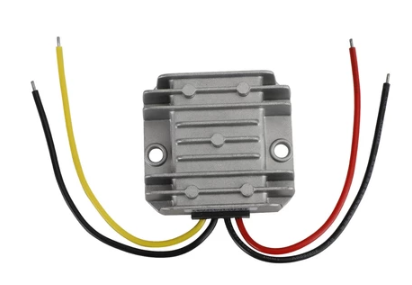
The 12V/24V to 5V Converter (6A) is a DC-DC step-down voltage regulator designed to convert input voltages of 12V or 24V to a stable 5V output. With a maximum current capacity of 6A, this converter is ideal for powering 5V devices such as microcontrollers, sensors, single-board computers (e.g., Raspberry Pi), USB-powered devices, and other low-voltage electronics from higher voltage sources like car batteries or solar panels.
Explore Projects Built with 12V/24V to 5V convertor(6A)
 Open Project in Cirkit Designer
 Open Project in Cirkit Designer
 Open Project in Cirkit Designer
 Open Project in Cirkit Designer
Explore Projects Built with 12V/24V to 5V convertor(6A)
Open Project in Cirkit DesignerOpen Project in Cirkit DesignerOpen Project in Cirkit DesignerOpen Project in Cirkit DesignerCommon Applications
- Powering 5V devices in automotive systems (e.g., GPS, dash cams, USB chargers)
- Supplying power to microcontrollers and development boards
- Providing regulated 5V output in solar-powered systems
- Industrial applications requiring 5V logic or control circuits
Technical Specifications
| Parameter | Value |
|---|---|
| Input Voltage Range | 8V to 40V |
| Output Voltage | 5V ± 0.1V |
| Maximum Output Current | 6A |
| Efficiency | Up to 95% |
| Ripple and Noise | ≤ 50mV |
| Operating Temperature | -40°C to +85°C |
| Protection Features | Overcurrent, Overvoltage, Overheat, Short Circuit |
| Dimensions | Varies by model (e.g., 60mm x 40mm x 20mm) |
Pin Configuration and Descriptions
| Pin Name | Description |
|---|---|
| VIN+ | Positive input voltage (12V or 24V) |
| VIN- | Negative input voltage (ground) |
| VOUT+ | Positive regulated 5V output |
| VOUT- | Negative regulated output (ground) |
Usage Instructions
How to Use the Converter in a Circuit
- Connect the Input Voltage:
- Connect the VIN+ pin to the positive terminal of your 12V or 24V power source.
- Connect the VIN- pin to the ground terminal of your power source.
- Connect the Output Voltage:
- Connect the VOUT+ pin to the positive terminal of your 5V device.
- Connect the VOUT- pin to the ground terminal of your 5V device.
- Verify Connections:
- Double-check all connections to ensure proper polarity and secure wiring.
- Power On:
- Turn on the input power source. The converter will regulate the input voltage to provide a stable 5V output.
Important Considerations and Best Practices
- Heat Dissipation: At high currents (e.g., 6A), the converter may generate heat. Ensure adequate ventilation or use a heatsink if necessary.
- Input Voltage Range: Ensure the input voltage is within the specified range (8V to 40V). Exceeding this range may damage the converter.
- Load Current: Do not exceed the maximum output current of 6A to avoid triggering overcurrent protection or damaging the device.
- Polarity: Always connect the input and output terminals with the correct polarity to prevent damage.
- Testing: Before connecting sensitive devices, test the output voltage with a multimeter to confirm it is stable at 5V.
Example: Using the Converter with an Arduino UNO
The 12V/24V to 5V Converter can be used to power an Arduino UNO from a 12V car battery. Below is an example circuit and Arduino code to blink an LED.
Circuit Connections
- Connect the VIN+ pin of the converter to the positive terminal of the 12V car battery.
- Connect the VIN- pin of the converter to the negative terminal of the car battery.
- Connect the VOUT+ pin of the converter to the 5V pin of the Arduino UNO.
- Connect the VOUT- pin of the converter to the GND pin of the Arduino UNO.
- Connect an LED to pin 13 of the Arduino UNO with a 220-ohm resistor in series.
Arduino Code
// Simple LED Blink Example
// This code blinks an LED connected to pin 13 of the Arduino UNO.

void setup() {
  pinMode(13, OUTPUT); // Set pin 13 as an output pin
}

void loop() {
  digitalWrite(13, HIGH); // Turn the LED on
  delay(1000);            // Wait for 1 second
  digitalWrite(13, LOW);  // Turn the LED off
  delay(1000);            // Wait for 1 second
}
Troubleshooting and FAQs
Common Issues and Solutions
No Output Voltage:
- Cause: Incorrect wiring or insufficient input voltage.
- Solution: Verify all connections and ensure the input voltage is within the specified range (8V to 40V).
Overheating:
- Cause: High current draw or poor ventilation.
- Solution: Reduce the load current or improve heat dissipation using a heatsink or fan.
Output Voltage Fluctuations:
- Cause: Input voltage instability or excessive load.
- Solution: Ensure the input voltage is stable and the load does not exceed 6A.
Device Not Powering On:
- Cause: Incorrect polarity or damaged converter.
- Solution: Check polarity and replace the converter if necessary.
FAQs
Q: Can this converter be used with a 24V solar panel?
A: Yes, as long as the panel's output voltage is within the 8V to 40V range.
Q: Is the output voltage adjustable?
A: No, this converter provides a fixed 5V output.
Q: Can I use this converter to charge USB devices?
A: Yes, it can be used to power USB devices, but ensure the total current draw does not exceed 6A.
Q: Does the converter have reverse polarity protection?
A: Most models include reverse polarity protection, but it is recommended to verify this in the product datasheet. Always connect with the correct polarity to avoid damage.