
How to Use DIN Rail 24V Power supply: Examples, Pinouts, and Specs
 Design with DIN Rail 24V Power supply in Cirkit Designer
Introduction
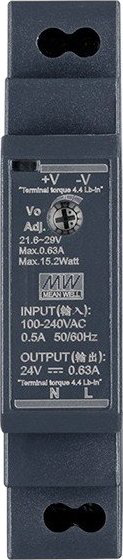
The MW HDR-15-24 is a compact and reliable DIN rail-mounted power supply designed to deliver a stable 24V DC output. It is ideal for industrial and automation applications where space-saving and efficient power delivery are critical. This power supply is part of MW's HDR series, known for its high performance, durability, and compliance with international safety standards.
Explore Projects Built with DIN Rail 24V Power supply
 Open Project in Cirkit Designer
 Open Project in Cirkit Designer
 Open Project in Cirkit Designer
 Open Project in Cirkit Designer
Explore Projects Built with DIN Rail 24V Power supply
Open Project in Cirkit DesignerOpen Project in Cirkit DesignerOpen Project in Cirkit DesignerOpen Project in Cirkit DesignerCommon Applications and Use Cases
- Industrial control systems
- Building automation
- PLCs (Programmable Logic Controllers)
- Sensors and actuators
- LED lighting systems
- Communication equipment
Technical Specifications
The following table outlines the key technical details of the MW HDR-15-24 power supply:
| Parameter | Value |
|---|---|
| Input Voltage Range | 85-264 VAC / 120-370 VDC |
| Output Voltage | 24V DC |
| Output Current | 0.63A |
| Output Power | 15W |
| Efficiency | Up to 88% |
| Operating Temperature | -30°C to +70°C |
| Dimensions (L x W x H) | 17.5mm x 90mm x 54.5mm |
| Mounting Type | DIN Rail (TS-35/7.5 or TS-35/15) |
| Protection Features | Overload, Overvoltage, Short Circuit |
| Certifications | UL, CE, EAC, RoHS |
Pin Configuration and Descriptions
The MW HDR-15-24 has the following terminal connections:
| Pin | Label | Description |
|---|---|---|
| 1 | L | AC Line Input (Live) |
| 2 | N | AC Neutral Input |
| 3 | -V | DC Output Negative Terminal |
| 4 | +V | DC Output Positive Terminal |
Usage Instructions
How to Use the Component in a Circuit
Mounting the Power Supply:
Secure the MW HDR-15-24 onto a standard DIN rail (TS-35/7.5 or TS-35/15). Ensure the power supply is firmly attached to avoid vibrations or disconnections.Connecting the Input:
- Connect the AC line (live) wire to the L terminal.
- Connect the AC neutral wire to the N terminal.
- Ensure the input voltage is within the specified range (85-264 VAC).
Connecting the Output:
- Connect the load's positive terminal to the +V terminal.
- Connect the load's negative terminal to the -V terminal.
- Verify that the load does not exceed the maximum output current of 0.63A.
Adjusting the Output Voltage (if needed):
The HDR-15-24 includes a small potentiometer for fine-tuning the output voltage. Use a small screwdriver to adjust the voltage within the range of ±10% of the nominal 24V.Powering On:
After all connections are secure, supply AC power to the unit. The power supply will automatically regulate the output voltage to 24V DC.
Important Considerations and Best Practices
- Ventilation: Ensure adequate airflow around the power supply to prevent overheating. Avoid enclosing the unit in tight spaces without ventilation.
- Load Compatibility: Verify that the connected load does not exceed the power supply's maximum output power (15W).
- Safety Precautions: Always disconnect the power supply from the mains before making any wiring changes. Use insulated tools to avoid electric shock.
- Grounding: Proper grounding is essential for safety and to minimize electrical noise. Connect the ground wire to the DIN rail or a dedicated grounding point.
Example: Using with an Arduino UNO
The MW HDR-15-24 can be used to power an Arduino UNO and other peripherals. Below is an example circuit and code:
Circuit Connections
- Connect the +V terminal of the power supply to the Arduino UNO's Vin pin.
- Connect the -V terminal of the power supply to the Arduino UNO's GND pin.
- Ensure the power supply is properly connected to the AC mains.
Example Code
// Example code to blink an LED connected to pin 13 of the Arduino UNO
// Ensure the Arduino is powered by the MW HDR-15-24 power supply

void setup() {
  pinMode(13, OUTPUT); // Set pin 13 as an output
}

void loop() {
  digitalWrite(13, HIGH); // Turn the LED on
  delay(1000);            // Wait for 1 second
  digitalWrite(13, LOW);  // Turn the LED off
  delay(1000);            // Wait for 1 second
}
Troubleshooting and FAQs
Common Issues and Solutions
| Issue | Possible Cause | Solution |
|---|---|---|
| No output voltage | Incorrect wiring or no AC input | Verify input connections and AC power supply. |
| Output voltage too low or unstable | Overloaded power supply | Reduce the load to within the rated capacity. |
| Power supply overheating | Poor ventilation or excessive ambient temp | Improve airflow or reduce ambient temperature. |
| Load not functioning properly | Incorrect polarity or loose connections | Check and correct wiring polarity. |
FAQs
Can the HDR-15-24 be used with DC input?
Yes, the power supply supports DC input in the range of 120-370 VDC.What happens if the load exceeds 0.63A?
The power supply's overload protection will activate, reducing the output voltage or shutting down temporarily to protect the unit.Is the HDR-15-24 suitable for outdoor use?
No, the power supply is designed for indoor use only. Use a weatherproof enclosure if outdoor operation is required.Can I use this power supply to charge batteries?
The HDR-15-24 is not designed for direct battery charging. Use a dedicated battery charger for this purpose.
By following this documentation, users can safely and effectively integrate the MW HDR-15-24 DIN rail power supply into their projects.