
How to Use Keyestudio PIR motion: Examples, Pinouts, and Specs
 Design with Keyestudio PIR motion in Cirkit Designer
Introduction
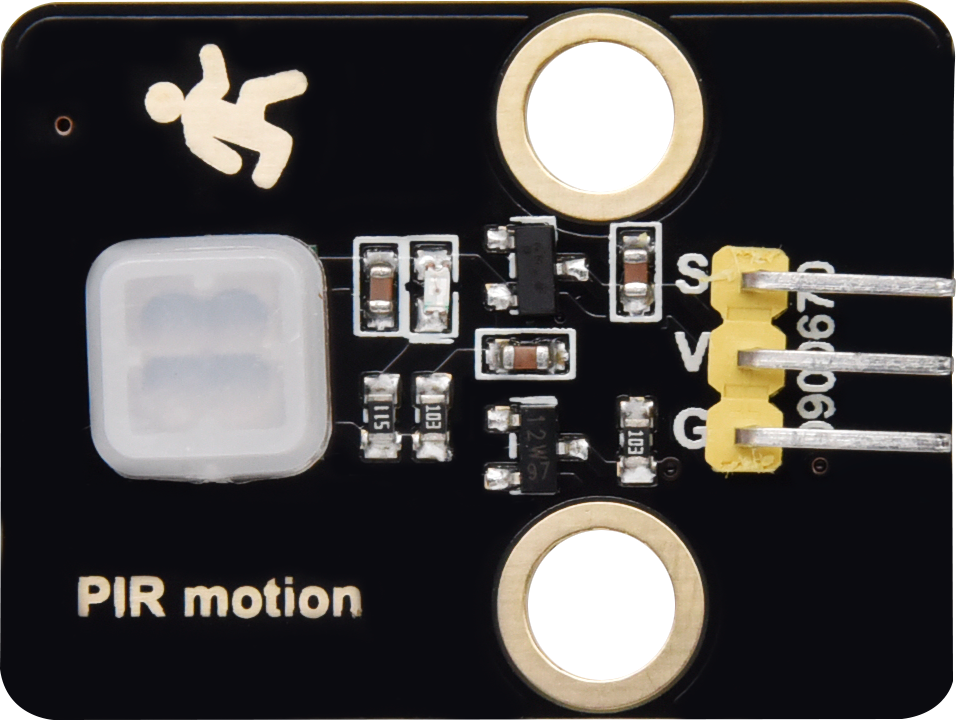
The Keyestudio PIR Motion Sensor is a Passive Infrared (PIR) sensor designed to detect motion by measuring changes in infrared radiation. It is highly sensitive to human movement and is commonly used in security systems, home automation, and energy-saving applications such as automatic lighting systems. This sensor is compact, easy to use, and compatible with microcontrollers like Arduino, making it an excellent choice for both beginners and advanced users.
Explore Projects Built with Keyestudio PIR motion
 Open Project in Cirkit Designer
 Open Project in Cirkit Designer
 Open Project in Cirkit Designer
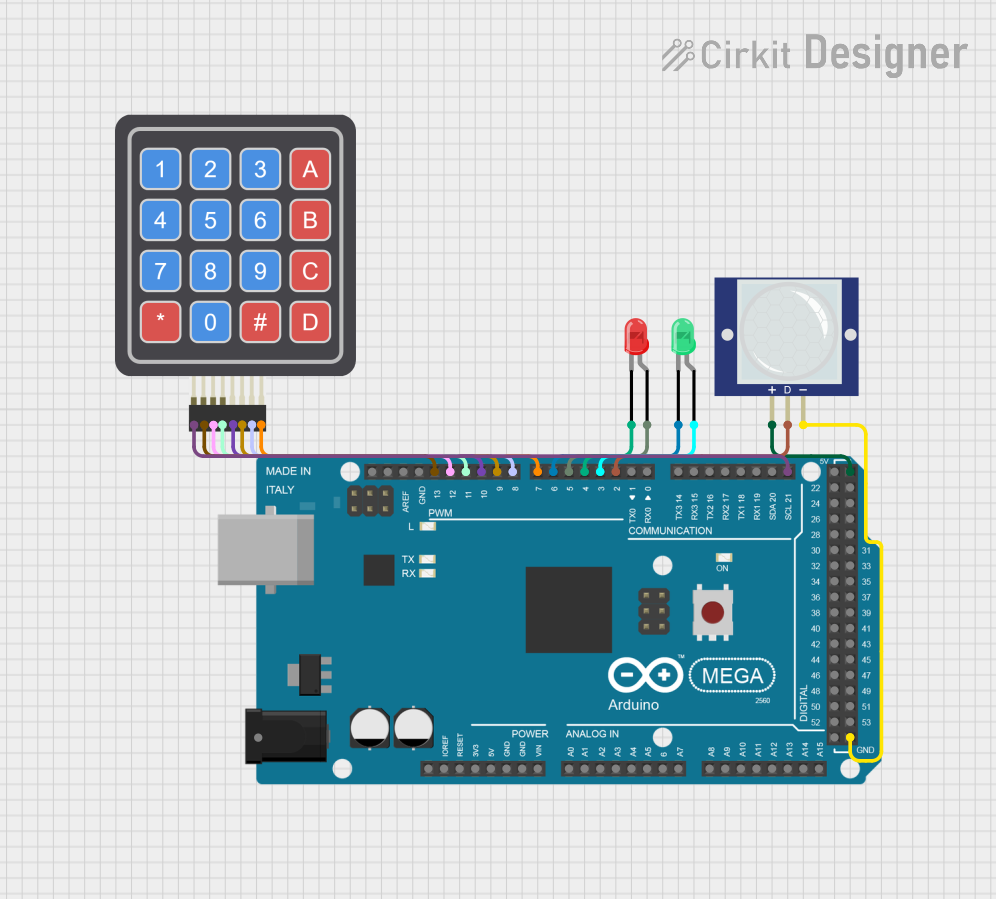 Open Project in Cirkit Designer
Explore Projects Built with Keyestudio PIR motion
Open Project in Cirkit DesignerOpen Project in Cirkit DesignerOpen Project in Cirkit DesignerOpen Project in Cirkit DesignerCommon Applications
- Security systems (e.g., motion-activated alarms)
- Automatic lighting control
- Smart home automation
- Energy-saving devices
- Robotics and interactive projects
Technical Specifications
The Keyestudio PIR Motion Sensor has the following technical specifications:
| Parameter | Value |
|---|---|
| Operating Voltage | 5V DC |
| Operating Current | < 60 µA |
| Detection Range | Up to 7 meters |
| Detection Angle | 120° |
| Output Signal | Digital (High: 3.3V, Low: 0V) |
| Trigger Modes | Repeatable (default) |
| Warm-up Time | ~30 seconds |
| Dimensions | 32mm x 24mm x 25mm |
Pin Configuration
The Keyestudio PIR Motion Sensor has a 3-pin interface:
| Pin | Name | Description |
|---|---|---|
| 1 | VCC | Power supply input (5V DC) |
| 2 | OUT | Digital output signal (High when motion is detected) |
| 3 | GND | Ground connection |
Usage Instructions
Connecting the Sensor
- Power the Sensor: Connect the
VCCpin to a 5V power source and theGNDpin to ground. - Read the Output: Connect the
OUTpin to a digital input pin on your microcontroller (e.g., Arduino). - Warm-up Period: Allow the sensor to stabilize for approximately 30 seconds after powering it on. During this time, the sensor may output random signals.
Example Circuit
Below is an example of how to connect the Keyestudio PIR Motion Sensor to an Arduino UNO:
- Connect the
VCCpin of the sensor to the5Vpin on the Arduino. - Connect the
GNDpin of the sensor to theGNDpin on the Arduino. - Connect the
OUTpin of the sensor to digital pin2on the Arduino.
Example Code
Here is a sample Arduino sketch to use the Keyestudio PIR Motion Sensor:
// Define the pin connected to the PIR sensor's output
const int pirPin = 2; // Digital pin 2
const int ledPin = 13; // Built-in LED pin for indication

void setup() {
  pinMode(pirPin, INPUT); // Set PIR sensor pin as input
  pinMode(ledPin, OUTPUT); // Set LED pin as output
  Serial.begin(9600); // Initialize serial communication for debugging
}

void loop() {
  int motionDetected = digitalRead(pirPin); // Read the PIR sensor output

  if (motionDetected == HIGH) { // If motion is detected
    digitalWrite(ledPin, HIGH); // Turn on the LED
    Serial.println("Motion detected!"); // Print message to serial monitor
  } else {
    digitalWrite(ledPin, LOW); // Turn off the LED
    Serial.println("No motion detected."); // Print message to serial monitor
  }

  delay(500); // Small delay to avoid rapid toggling
}
Important Considerations
- Warm-up Time: Always allow the sensor to stabilize for ~30 seconds after powering it on.
- Environmental Factors: Avoid placing the sensor near heat sources, direct sunlight, or areas with strong airflow, as these can cause false triggers.
- Trigger Mode: The sensor is set to "repeatable trigger" mode by default, meaning it will continue to output a HIGH signal as long as motion is detected.
Troubleshooting and FAQs
Common Issues
No Output Signal:
- Ensure the sensor is properly powered (5V to
VCCandGNDconnected). - Check the wiring to the microcontroller and ensure the
OUTpin is connected to the correct digital input pin. - Verify that the sensor has completed its warm-up period (~30 seconds).
- Ensure the sensor is properly powered (5V to
False Triggers:
- Ensure the sensor is not exposed to heat sources, direct sunlight, or strong airflow.
- Check for electrical noise or interference in the circuit.
Short Detection Range:
- Verify that the sensor is unobstructed and positioned correctly.
- Ensure the operating voltage is stable and within the specified range.
FAQs
Q: Can the detection range be adjusted?
A: No, the detection range of the Keyestudio PIR Motion Sensor is fixed at up to 7 meters. However, you can adjust the sensor's placement to optimize its coverage.
Q: Can this sensor detect stationary objects?
A: No, the PIR sensor detects motion by sensing changes in infrared radiation. It cannot detect stationary objects.
Q: Is the sensor compatible with 3.3V systems?
A: The sensor requires a 5V power supply for operation, but its output signal (3.3V HIGH) is compatible with 3.3V logic systems.
Q: How do I change the trigger mode?
A: The Keyestudio PIR Motion Sensor is set to "repeatable trigger" mode by default. Changing the trigger mode requires hardware modifications, which are not recommended for beginners.
By following this documentation, you can effectively integrate the Keyestudio PIR Motion Sensor into your projects and troubleshoot common issues with ease.