Cirkit Designer Logo
Cirkit Designer
Your all-in-one circuit design IDE
Home / 
Component Documentation

How to Use 5V PSU: Examples, Pinouts, and Specs
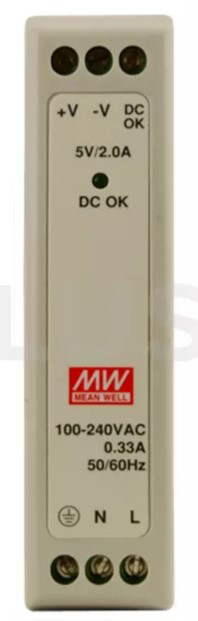

Image of 5V PSU
Cirkit Designer LogoDesign with 5V PSU in Cirkit Designer

Introduction

The MEANWELL MDR-10-5 is a reliable and efficient 5V Power Supply Unit (PSU) designed to deliver a constant voltage output of 5V, which is essential for powering a wide range of electronic circuits and devices. This PSU is commonly used in industrial automation systems, communication equipment, and various other applications where a stable 5V power source is required.

Explore Projects Built with 5V PSU

Use Cirkit Designer to design, explore, and prototype these projects online. Some projects support real-time simulation. Click "Open Project" to start designing instantly!
12V to 5V Power Supply with LED Indicator and Push Switch
Image of Power Supply LVCO: A project utilizing 5V PSU in a practical application
This circuit is a 12V to 5V regulated power supply with an LED indicator. It uses a 5408 diode for reverse polarity protection, an LM340T5 7805 voltage regulator to step down the voltage to 5V, and a push switch to control the LED indicator. The circuit also includes capacitors for filtering and a resistor to limit the current through the LED.
Cirkit Designer LogoOpen Project in Cirkit Designer
Battery-Powered USB Charger with LED Indicator and DC Motor
Image of Copy of Hand Crank mobile charger : A project utilizing 5V PSU in a practical application
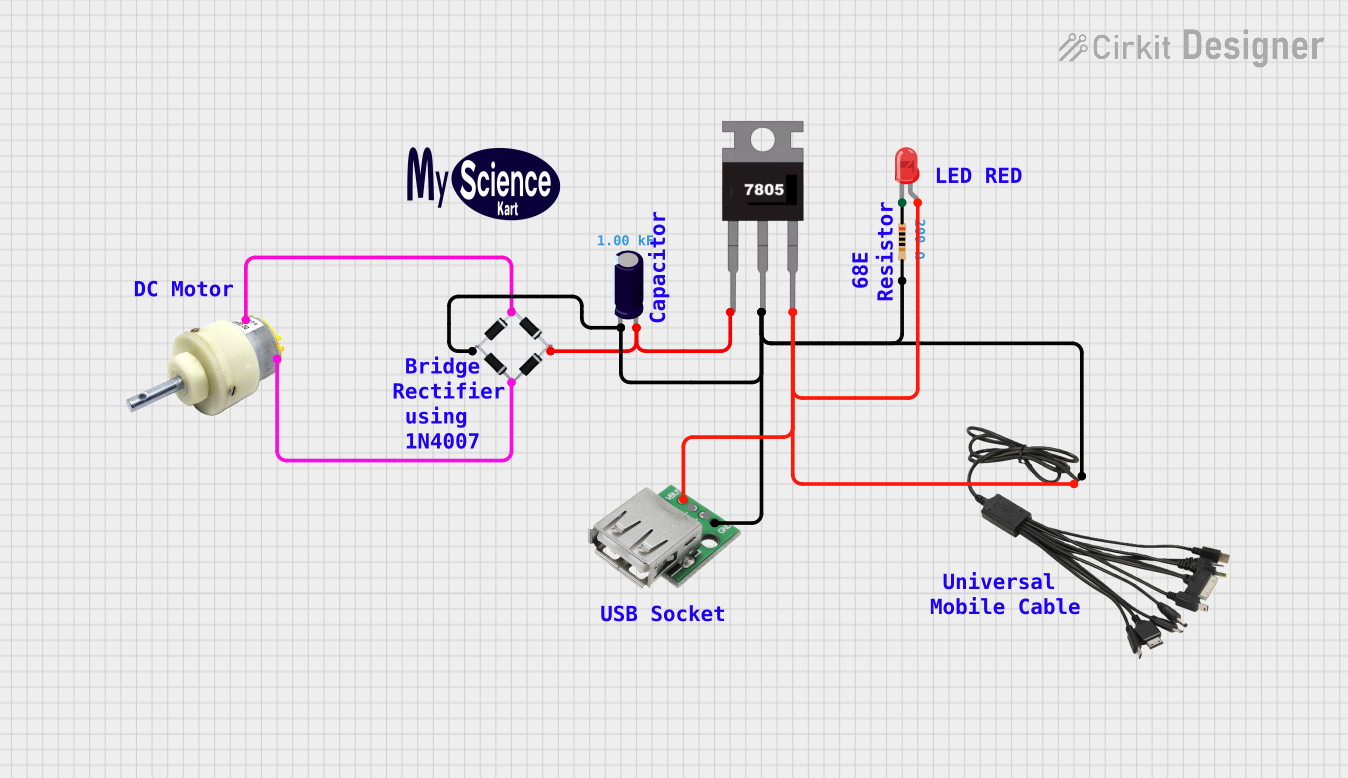
This circuit converts AC power to DC using a bridge rectifier and regulates the voltage to 5V with a 7805 voltage regulator. It powers a USB port and indicates power status with an LED, while also providing a charging interface through a multi-charging cable.
Cirkit Designer LogoOpen Project in Cirkit Designer
Dual 5V Power Supply Distribution Circuit with Toggle Switch Control
Image of rfdriver: A project utilizing 5V PSU in a practical application
This circuit consists of two 5V 5A power supplies connected to an AC wall plug point, providing DC output through a 12-way connector. The ground connections from both power supplies are interconnected and also connected to the ground pins of two toggle switches. The DC outputs from the power supplies are separately connected to different pins on the 12-way connector, with each power supply output being switchable via one of the toggle switches.
Cirkit Designer LogoOpen Project in Cirkit Designer
USB-Powered DC Gear Motor with LED Indicator
Image of Hand Crank mobile charger : A project utilizing 5V PSU in a practical application
This circuit appears to be a power supply unit with a bridge rectifier connected to a DC gear motor, indicating it is designed to convert AC to DC power for the motor. An electrolytic capacitor is used for smoothing the DC output, and a 7805 voltage regulator is included to provide a stable 5V output. Additionally, there is an LED with a series resistor, likely serving as a power indicator light.
Cirkit Designer LogoOpen Project in Cirkit Designer

Explore Projects Built with 5V PSU

Use Cirkit Designer to design, explore, and prototype these projects online. Some projects support real-time simulation. Click "Open Project" to start designing instantly!
Image of Power Supply LVCO: A project utilizing 5V PSU in a practical application
12V to 5V Power Supply with LED Indicator and Push Switch
This circuit is a 12V to 5V regulated power supply with an LED indicator. It uses a 5408 diode for reverse polarity protection, an LM340T5 7805 voltage regulator to step down the voltage to 5V, and a push switch to control the LED indicator. The circuit also includes capacitors for filtering and a resistor to limit the current through the LED.
Cirkit Designer LogoOpen Project in Cirkit Designer
Image of Copy of Hand Crank mobile charger : A project utilizing 5V PSU in a practical application
Battery-Powered USB Charger with LED Indicator and DC Motor
This circuit converts AC power to DC using a bridge rectifier and regulates the voltage to 5V with a 7805 voltage regulator. It powers a USB port and indicates power status with an LED, while also providing a charging interface through a multi-charging cable.
Cirkit Designer LogoOpen Project in Cirkit Designer
Image of rfdriver: A project utilizing 5V PSU in a practical application
Dual 5V Power Supply Distribution Circuit with Toggle Switch Control
This circuit consists of two 5V 5A power supplies connected to an AC wall plug point, providing DC output through a 12-way connector. The ground connections from both power supplies are interconnected and also connected to the ground pins of two toggle switches. The DC outputs from the power supplies are separately connected to different pins on the 12-way connector, with each power supply output being switchable via one of the toggle switches.
Cirkit Designer LogoOpen Project in Cirkit Designer
Image of Hand Crank mobile charger : A project utilizing 5V PSU in a practical application
USB-Powered DC Gear Motor with LED Indicator
This circuit appears to be a power supply unit with a bridge rectifier connected to a DC gear motor, indicating it is designed to convert AC to DC power for the motor. An electrolytic capacitor is used for smoothing the DC output, and a 7805 voltage regulator is included to provide a stable 5V output. Additionally, there is an LED with a series resistor, likely serving as a power indicator light.
Cirkit Designer LogoOpen Project in Cirkit Designer

Technical Specifications

General Features

  • Model: MDR-10-5
  • Manufacturer: MEANWELL
  • Output Voltage: 5V DC
  • Output Current: 2A
  • Power: 10W
  • Input Voltage Range: 85 to 264V AC, 120 to 370V DC
  • Efficiency: 80%
  • Operating Temperature: -20 to +70°C
  • Dimensions: 22.5 x 90 x 100 mm (W x H x D)
  • Certifications: UL, CE, CB, TUV

Pin Configuration and Descriptions

Pin No. Description Note
1 AC/L AC input line
2 AC/N AC input neutral
3 FG Frame ground
4 -V DC output negative
5 +V DC output positive

Usage Instructions

Integration into a Circuit

  1. Connection: Connect the AC input line (Pin 1) and neutral (Pin 2) to your AC power source. Ensure that the power source matches the PSU's input voltage range.
  2. Grounding: Connect the frame ground (Pin 3) to the earth ground of your system to prevent electrical noise and potential shock hazards.
  3. Output: Connect the DC output positive (Pin 5) and negative (Pin 4) to your electronic circuit or device that requires 5V.

Best Practices

  • Ensure that the total current draw of the connected devices does not exceed 2A.
  • Provide adequate ventilation around the PSU to maintain optimal operating temperature and prevent overheating.
  • Use proper cable thickness to handle the current for both AC input and DC output connections.
  • Install a fuse or circuit breaker on the AC input line for additional safety.

Troubleshooting and FAQs

Common Issues

  • PSU does not power on: Check the AC input connections and ensure the voltage is within the specified range. Verify that the PSU switch is in the ON position.
  • Output voltage is unstable: Ensure that the load does not exceed the rated current of 2A. Check for loose connections on the output terminals.
  • PSU overheats: Make sure there is enough space around the PSU for air circulation. Check if the ambient temperature is within the operating range.

FAQs

Q: Can the MDR-10-5 PSU be used with an Arduino UNO? A: Yes, the MDR-10-5 can power an Arduino UNO, which operates at 5V. However, ensure that the current draw is within the PSU's capacity.

Q: Is it possible to adjust the output voltage of the PSU? A: The MDR-10-5 is designed to provide a fixed 5V output. If an adjustable voltage is required, a different model with that feature should be used.

Q: What is the warranty period for the MDR-10-5 PSU? A: The warranty period may vary. Please refer to the manufacturer's documentation or contact MEANWELL directly for warranty information.

For further assistance, please refer to the MEANWELL MDR-10-5 user manual or contact technical support.


Note: This documentation is for informational purposes only. Always consult the manufacturer's datasheet and safety guidelines before integrating the PSU into your system.