
How to Use PCM1802 / MCU-1802: Examples, Pinouts, and Specs
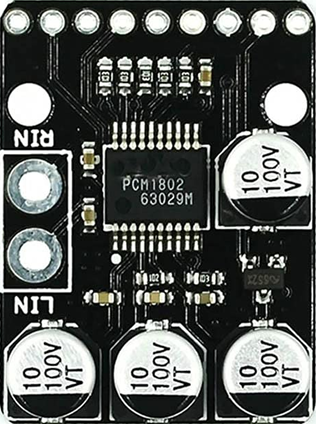
 Design with PCM1802 / MCU-1802 in Cirkit Designer
Introduction
The PCM1802 is a high-performance stereo analog-to-digital converter (ADC) designed for audio applications. It converts analog audio signals into digital data with high precision, making it ideal for use in audio recording, processing, and playback systems. The PCM1802 supports a wide range of sampling rates and provides excellent signal-to-noise ratio (SNR) and low distortion, ensuring high-quality audio conversion.
Explore Projects Built with PCM1802 / MCU-1802
 Open Project in Cirkit Designer
 Open Project in Cirkit Designer
 Open Project in Cirkit Designer
 Open Project in Cirkit Designer
Explore Projects Built with PCM1802 / MCU-1802
Open Project in Cirkit DesignerOpen Project in Cirkit DesignerOpen Project in Cirkit DesignerOpen Project in Cirkit DesignerCommon Applications
- Audio recording devices
- Digital audio workstations (DAWs)
- Home theater systems
- Audio signal processing
- Musical instruments with digital output
Technical Specifications
The PCM1802 is a 24-bit stereo ADC with the following key specifications:
| Parameter | Value |
|---|---|
| Resolution | 24-bit |
| Sampling Rate | 16 kHz to 96 kHz |
| Signal-to-Noise Ratio (SNR) | 105 dB (typical) |
| Total Harmonic Distortion + Noise (THD+N) | 0.002% (typical) |
| Input Voltage Range | 0.6 Vrms to 2.1 Vrms |
| Power Supply Voltage | 5 V (analog), 3.3 V (digital) |
| Power Consumption | 85 mW (typical) |
| Operating Temperature Range | -25°C to 85°C |
Pin Configuration and Descriptions
The PCM1802 is typically available in a 20-pin SSOP package. Below is the pin configuration:
| Pin Number | Pin Name | Description |
|---|---|---|
| 1 | VINL | Left channel analog input |
| 2 | VINR | Right channel analog input |
| 3 | VREF1 | Reference voltage input |
| 4 | VREF2 | Reference voltage output |
| 5 | AGND | Analog ground |
| 6 | VCC | Analog power supply (5 V) |
| 7 | DGND | Digital ground |
| 8 | VDD | Digital power supply (3.3 V) |
| 9 | BCK | Bit clock input for I2S |
| 10 | LRCK | Left-right clock input for I2S |
| 11 | DATA | Serial audio data output |
| 12 | SCKI | System clock input |
| 13 | MODE0 | Mode selection pin 0 |
| 14 | MODE1 | Mode selection pin 1 |
| 15 | MODE2 | Mode selection pin 2 |
| 16 | PDWN | Power-down control (active low) |
| 17 | FMT0 | Audio data format selection pin 0 |
| 18 | FMT1 | Audio data format selection pin 1 |
| 19 | TEST | Test pin (leave unconnected in normal operation) |
| 20 | NC | No connection |
Usage Instructions
Using the PCM1802 in a Circuit
- Power Supply: Connect the analog power supply (VCC) to 5 V and the digital power supply (VDD) to 3.3 V. Ensure proper decoupling capacitors are placed near the power pins to reduce noise.
- Analog Inputs: Connect the left and right analog audio signals to the VINL and VINR pins, respectively. Use appropriate coupling capacitors to block DC components.
- Clock Signals: Provide a system clock (SCKI) and configure the bit clock (BCK) and left-right clock (LRCK) according to the desired sampling rate and audio format.
- Audio Data Output: The digital audio data is output through the DATA pin in I2S or other supported formats. Configure the FMT0 and FMT1 pins to select the desired format.
- Mode Selection: Use the MODE pins to configure the operating mode, such as master or slave mode.
- Power-Down Control: Use the PDWN pin to enable or disable the power-down mode. Pull this pin low to enter power-down mode.
Important Considerations
- Ensure the input audio signals are within the specified voltage range (0.6 Vrms to 2.1 Vrms) to avoid distortion or damage.
- Use low-noise power supplies and proper grounding techniques to minimize noise and interference.
- Configure the clock signals correctly to ensure proper synchronization between the ADC and the rest of the system.
Example: Connecting PCM1802 to Arduino UNO
The PCM1802 can be interfaced with an Arduino UNO to capture audio data. Below is an example Arduino sketch to read I2S data from the PCM1802:
#include <I2S.h> // Include the I2S library for Arduino

void setup() {
  // Initialize serial communication for debugging
  Serial.begin(9600);

  // Initialize I2S in slave mode to receive audio data
  if (!I2S.begin(I2S_PHILIPS_MODE, 44100)) {
    Serial.println("Failed to initialize I2S!");
    while (1); // Halt if initialization fails
  }

  Serial.println("I2S initialized successfully.");
}

void loop() {
  // Check if audio data is available
  if (I2S.available()) {
    int sample = I2S.read(); // Read a single audio sample

    // Print the sample value to the serial monitor
    Serial.println(sample);
  }
}
Note: The Arduino UNO requires an external I2S interface module to communicate with the PCM1802, as it does not natively support I2S.
Troubleshooting and FAQs
Common Issues
No Audio Output:
- Verify that the clock signals (SCKI, BCK, LRCK) are correctly configured and synchronized.
- Check the power supply connections and ensure proper voltage levels.
Distorted Audio:
- Ensure the input audio signals are within the specified voltage range.
- Check for noise or interference in the analog input lines.
I2S Communication Failure:
- Verify the audio format configuration (FMT0, FMT1) matches the receiving device.
- Ensure proper wiring of the I2S signals (BCK, LRCK, DATA).
FAQs
Q: Can the PCM1802 operate without an external clock source?
A: No, the PCM1802 requires an external system clock (SCKI) for operation. Ensure the clock frequency matches the desired sampling rate.
Q: What is the maximum sampling rate supported by the PCM1802?
A: The PCM1802 supports sampling rates up to 96 kHz.
Q: How do I select the audio data format?
A: Use the FMT0 and FMT1 pins to configure the desired audio data format (e.g., I2S, left-justified, right-justified).
Q: Can I use the PCM1802 with a 3.3 V analog power supply?
A: No, the analog power supply (VCC) must be 5 V. Only the digital power supply (VDD) operates at 3.3 V.