A charge controller is an essential component in solar power systems. It regulates the voltage and current coming from solar panels to the batteries, ensuring that the batteries are not overcharged or excessively discharged. By maintaining optimal charging conditions, the charge controller extends the lifespan of the batteries and improves the overall efficiency of the solar power system.
Explore Projects Built with charge controller
Use Cirkit Designer to design, explore, and prototype these projects online. Some projects support real-time simulation. Click "Open Project" to start designing instantly!
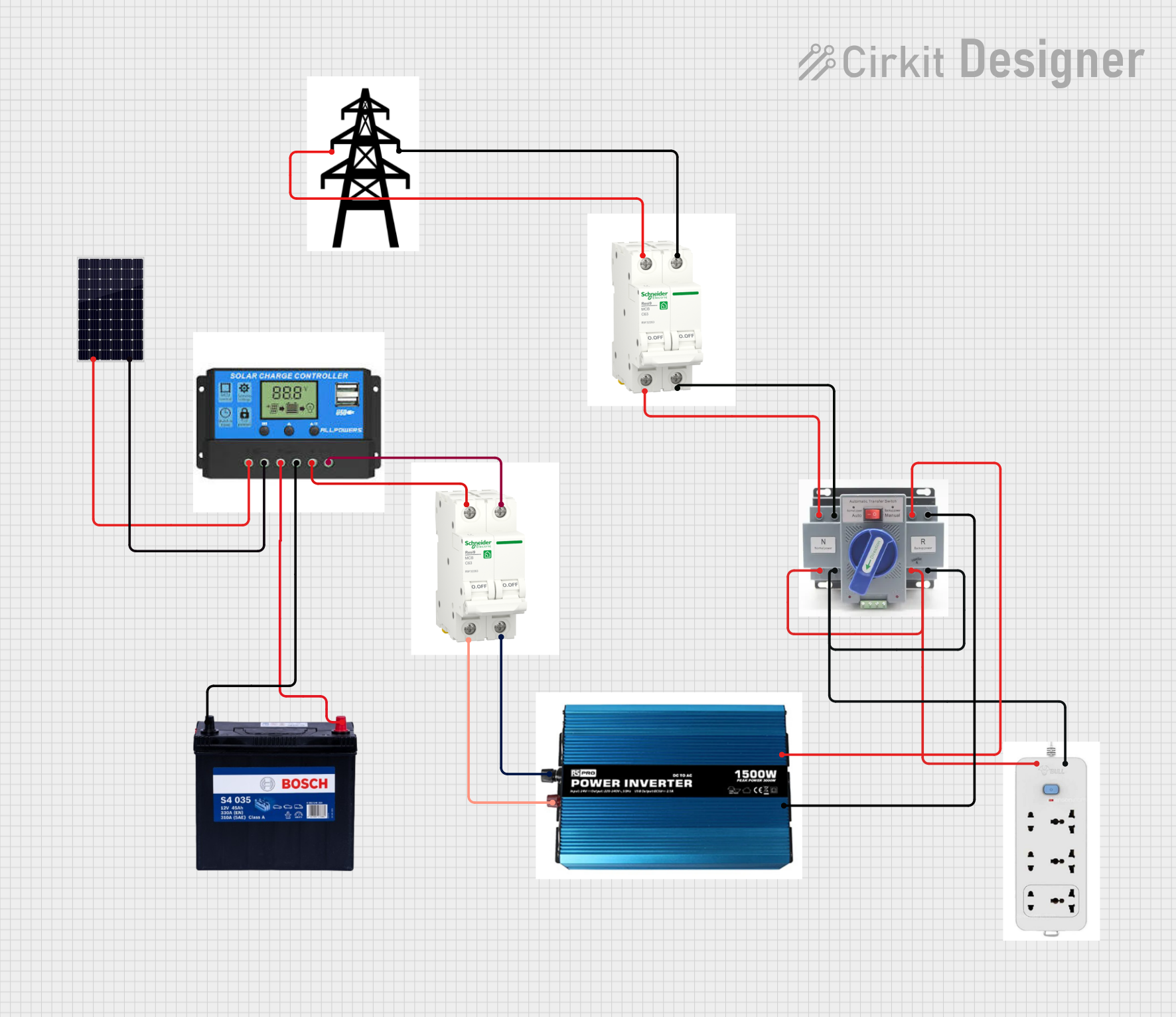
This circuit is designed for a solar power system that charges a 12V 200Ah battery using a solar panel. The charge controller manages the charging process, ensuring the battery is charged safely. The system includes an inverter to convert DC to AC, breakers for circuit protection, an Automatic Transfer Switch (ATS) for power source management, and an extension for additional connectivity, with a transmission tower indicating potential for power distribution or communication.
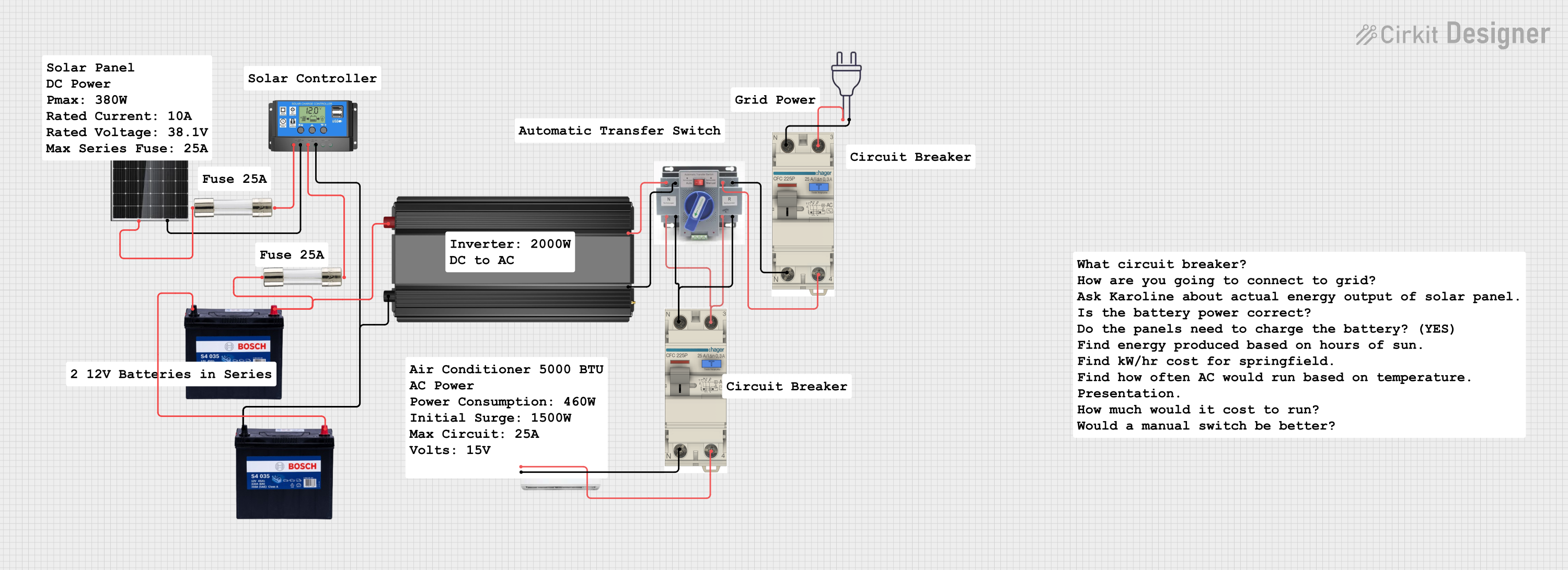
This circuit is a solar power system designed to charge a 12V battery using a 380W solar panel and a solar charge controller. The stored energy is then used to power an inverter, which supplies AC power to an air conditioner through an automatic transfer switch (ATS) and circuit breakers for safety.
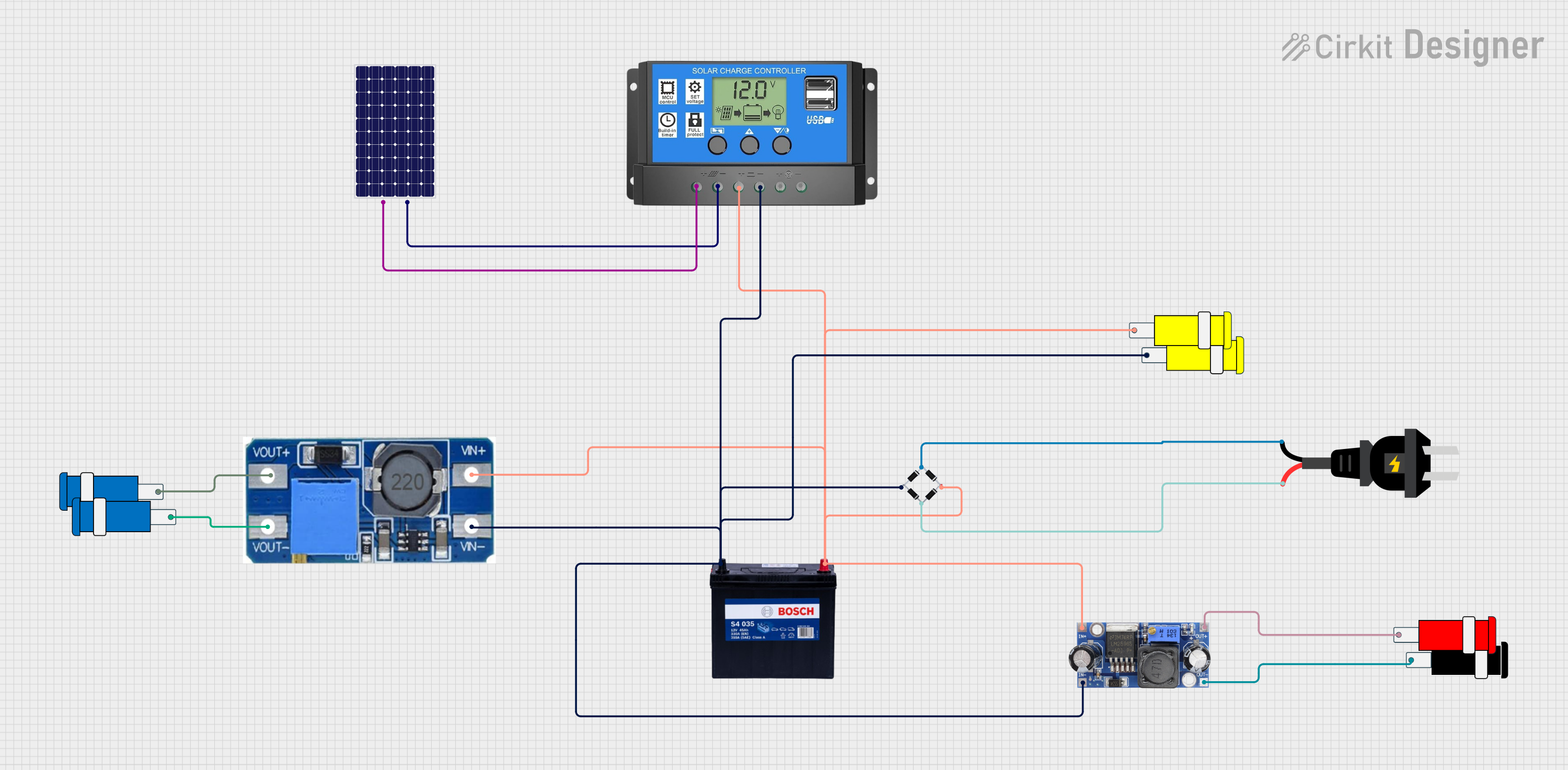
This circuit is designed to charge a 12V 200Ah battery using power from a solar panel, with a solar charge controller regulating the charging process. An AC source is rectified to DC using a bridge rectifier, which then feeds into a step-up boost power converter to produce a higher voltage output, possibly for an external AC load. Additionally, a DC-DC converter is used to step down the voltage to 5V for use with a 5V connector, likely for low-power devices or logic circuits.
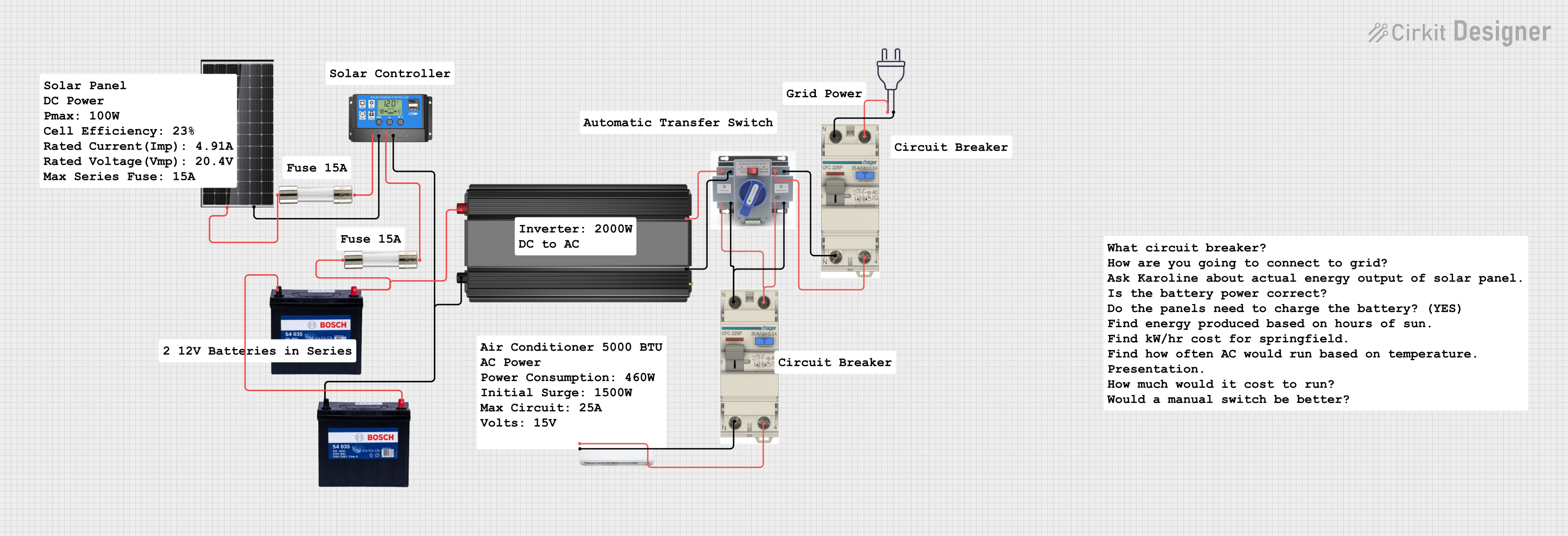
This circuit is a solar power system designed to charge a 12V battery using a 380W solar panel, with a solar charge controller managing the charging process. The stored energy is then converted to AC power via a power inverter, which can be used to power an air conditioner through an automatic transfer switch (ATS) and AC circuit breakers for safety.
Solar power systems for residential, commercial, and off-grid applications
Battery management in renewable energy setups
Portable solar chargers for camping and outdoor activities
Hybrid energy systems combining solar, wind, and other renewable sources
Technical Specifications
Below are the general technical specifications for a typical charge controller. Specific models may vary, so always refer to the manufacturer's datasheet for precise details.
Key Technical Details
Input Voltage Range: 12V to 48V (depending on the model)
Output Voltage: Matches the battery system (e.g., 12V, 24V, or 48V)
Maximum Input Current: 10A to 60A (varies by model)
Efficiency: Up to 98% (for MPPT controllers)
Operating Temperature: -20°C to 60°C
Battery Type Compatibility: Lead-acid, lithium-ion, gel, AGM, etc.
Controller Type: PWM (Pulse Width Modulation) or MPPT (Maximum Power Point Tracking)
Pin Configuration and Descriptions
The charge controller typically has the following terminals for connections:
Pin/Terminal
Label
Description
1
Solar Panel (+)
Positive terminal for connecting the solar panel input.
2
Solar Panel (-)
Negative terminal for connecting the solar panel input.
3
Battery (+)
Positive terminal for connecting the battery.
4
Battery (-)
Negative terminal for connecting the battery.
5
Load (+)
Positive terminal for connecting the DC load (optional, if supported).
6
Load (-)
Negative terminal for connecting the DC load (optional, if supported).
7
Ground (GND)
Ground connection for safety and system stability (if available).
8
Communication
Optional communication port for monitoring (e.g., RS485, USB, or Bluetooth).
Usage Instructions
How to Use the Charge Controller in a Circuit
Connect the Battery First: Always connect the battery to the charge controller before connecting the solar panel. This ensures the controller detects the correct battery voltage.
Connect the positive terminal of the battery to the Battery (+) pin.
Connect the negative terminal of the battery to the Battery (-) pin.
Connect the Solar Panel: After the battery is connected, attach the solar panel to the charge controller.
Connect the positive terminal of the solar panel to the Solar Panel (+) pin.
Connect the negative terminal of the solar panel to the Solar Panel (-) pin.
Optional Load Connection: If the charge controller supports load output, connect the DC load to the Load (+) and Load (-) terminals.
Power On: Once all connections are secure, the charge controller will automatically regulate the charging process.
Important Considerations and Best Practices
Battery Type Selection: Ensure the charge controller is configured for the correct battery type (e.g., lead-acid or lithium-ion). Many controllers have a switch or software setting for this purpose.
Avoid Reverse Polarity: Double-check all connections to prevent damage caused by reverse polarity.
Use Proper Wire Gauges: Select wires with appropriate thickness to handle the current without overheating.
Ventilation: Install the charge controller in a well-ventilated area to prevent overheating.
Firmware Updates: If the charge controller supports firmware updates, keep it updated for optimal performance.
Example: Connecting a Charge Controller to an Arduino UNO
Some advanced charge controllers support communication protocols like RS485 or UART, allowing integration with microcontrollers like Arduino for monitoring. Below is an example of how to read data from a charge controller using an Arduino UNO and the Modbus RTU protocol.
Arduino Code Example
#include <ModbusMaster.h> // Include the Modbus library

// Create a ModbusMaster object
ModbusMaster node;

void setup() {
  Serial.begin(9600); // Initialize serial communication for debugging
  Serial.println("Initializing Charge Controller Communication...");

  // Initialize Modbus communication (RS485 or UART)
  node.begin(1, Serial); // Set Modbus ID to 1 (check your charge controller's ID)
}

void loop() {
  uint8_t result;
  uint16_t data;

  // Read battery voltage (example register address: 0x3100)
  result = node.readInputRegisters(0x3100, 1);
  if (result == node.ku8MBSuccess) {
    data = node.getResponseBuffer(0);
    float batteryVoltage = data / 100.0; // Convert to volts
    Serial.print("Battery Voltage: ");
    Serial.print(batteryVoltage);
    Serial.println(" V");
  } else {
    Serial.println("Failed to read data from charge controller.");
  }

  delay(1000); // Wait 1 second before the next read
}
Note: The register address (e.g., 0x3100) and Modbus ID may vary depending on the charge controller model. Refer to the manufacturer's documentation for the correct values.
Troubleshooting and FAQs
Common Issues and Solutions
No Power Output from the Controller
Cause: Incorrect wiring or loose connections.
Solution: Verify all connections and ensure the battery is connected first.
Battery Overcharging
Cause: Incorrect battery type configuration.
Solution: Check the charge controller settings and select the correct battery type.
Controller Overheating
Cause: Poor ventilation or excessive current.
Solution: Install the controller in a well-ventilated area and ensure the current does not exceed the rated limit.
Communication Failure with Arduino
Cause: Incorrect Modbus ID or wiring.
Solution: Verify the Modbus ID, baud rate, and wiring connections.
FAQs
Q: Can I use a charge controller without a battery?
A: No, most charge controllers require a battery to function properly. The battery stabilizes the system and stores energy.
Q: What is the difference between PWM and MPPT charge controllers?
A: PWM controllers are simpler and less expensive but less efficient. MPPT controllers are more advanced and maximize the power extracted from solar panels, especially in varying sunlight conditions.
Q: How do I know if my charge controller is working?
A: Most charge controllers have LED indicators or an LCD screen to display system status. Check these indicators for proper operation.
By following this documentation, you can effectively integrate and troubleshoot a charge controller in your solar power system.

 Open Project in Cirkit Designer