
How to Use Battery Shield 18650: Examples, Pinouts, and Specs
 Design with Battery Shield 18650 in Cirkit Designer
Introduction
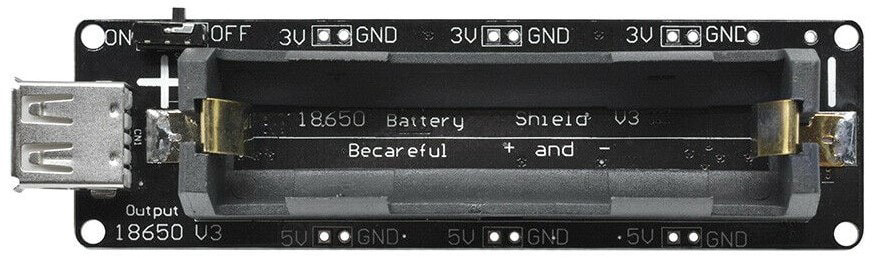
The Battery Shield 18650 is a versatile and compact protective circuit board designed to hold and manage one or more 18650 lithium-ion batteries. It provides essential features such as overcharge protection, over-discharge protection, and short-circuit protection, ensuring the safe and efficient operation of your batteries. This shield is commonly used in portable electronic projects, IoT devices, and DIY power banks, offering a reliable power source for various applications.
Explore Projects Built with Battery Shield 18650
 Open Project in Cirkit Designer
 Open Project in Cirkit Designer
 Open Project in Cirkit Designer
 Open Project in Cirkit Designer
Explore Projects Built with Battery Shield 18650
Open Project in Cirkit DesignerOpen Project in Cirkit DesignerOpen Project in Cirkit DesignerOpen Project in Cirkit DesignerCommon Applications and Use Cases
- Powering Arduino, Raspberry Pi, and other microcontroller-based projects
- DIY power banks and portable chargers
- IoT devices and wireless sensor networks
- Robotics and small motorized systems
- LED lighting and wearable electronics
Technical Specifications
The following table outlines the key technical details of the Battery Shield 18650:
| Parameter | Specification |
|---|---|
| Input Voltage | 5V (via micro-USB or Type-C port) |
| Output Voltage | 5V (regulated) |
| Battery Type | 18650 lithium-ion battery |
| Charging Current | 1A (typical) |
| Output Current | 1A (maximum) |
| Protection Features | Overcharge, over-discharge, short-circuit |
| USB Ports | 1x micro-USB or Type-C (input), 1x USB-A (output) |
| Dimensions | Varies by model, typically compact |
Pin Configuration and Descriptions
The Battery Shield 18650 typically includes the following pins and connectors:
| Pin/Connector | Description |
|---|---|
+ (Battery +) |
Positive terminal for the 18650 battery. |
- (Battery -) |
Negative terminal for the 18650 battery. |
5V OUT |
Regulated 5V output for powering external devices. |
GND |
Ground connection for external devices. |
USB-A Port |
Standard USB output for powering or charging external devices. |
Micro-USB/Type-C |
Input port for charging the 18650 battery using a 5V power source. |
Usage Instructions
How to Use the Battery Shield 18650 in a Circuit
- Insert the Battery: Place a fully charged 18650 lithium-ion battery into the battery holder, ensuring correct polarity (
+and-terminals). - Connect a Power Source: Use a micro-USB or Type-C cable to connect the shield to a 5V power source for charging the battery.
- Power Your Device: Connect your device to the
5V OUTpin or USB-A port to supply regulated 5V power. - Monitor the LEDs: Most Battery Shields include indicator LEDs:
- Red LED: Battery is charging.
- Green LED: Battery is fully charged.
Important Considerations and Best Practices
- Battery Compatibility: Only use high-quality 18650 lithium-ion batteries with built-in protection circuits for added safety.
- Heat Management: Avoid using the shield in high-temperature environments, as excessive heat can damage the battery or circuit.
- Current Limitations: Do not exceed the maximum output current (1A) to prevent damage to the shield or connected devices.
- Polarity Check: Always ensure the correct polarity when inserting the battery to avoid short circuits or damage.
Example: Using the Battery Shield 18650 with an Arduino UNO
The Battery Shield 18650 can be used to power an Arduino UNO via its 5V and GND pins. Below is an example of how to connect and use the shield:
- Connect the
5V OUTpin of the Battery Shield to the5Vpin of the Arduino UNO. - Connect the
GNDpin of the Battery Shield to theGNDpin of the Arduino UNO. - Upload the following code to the Arduino UNO to blink an LED:
// Simple LED Blink Example
// This code blinks an LED connected to pin 13 of the Arduino UNO.
// Ensure the Battery Shield 18650 is properly connected to power the Arduino.

void setup() {
  pinMode(13, OUTPUT); // Set pin 13 as an output
}

void loop() {
  digitalWrite(13, HIGH); // Turn the LED on
  delay(1000);            // Wait for 1 second
  digitalWrite(13, LOW);  // Turn the LED off
  delay(1000);            // Wait for 1 second
}
Troubleshooting and FAQs
Common Issues and Solutions
Battery Not Charging
- Cause: Faulty battery or incorrect polarity.
- Solution: Check the battery's polarity and ensure it is compatible with the shield.
No Output Voltage
- Cause: Battery is discharged or not properly connected.
- Solution: Charge the battery or ensure it is securely inserted into the holder.
Overheating
- Cause: Excessive current draw or poor ventilation.
- Solution: Reduce the load on the shield and ensure proper airflow around the device.
LED Indicators Not Working
- Cause: Faulty LEDs or damaged circuit.
- Solution: Verify the shield's functionality with a multimeter and replace if necessary.
FAQs
Q: Can I use multiple 18650 batteries with this shield?
A: Most Battery Shields are designed for a single 18650 battery. Using multiple batteries may require a different shield or additional circuitry.
Q: Is the Battery Shield 18650 compatible with all 18650 batteries?
A: The shield is compatible with standard 18650 lithium-ion batteries. However, it is recommended to use batteries with built-in protection circuits for added safety.
Q: Can I charge the battery and power a device simultaneously?
A: Yes, most Battery Shields support simultaneous charging and discharging, but ensure the total current draw does not exceed the shield's maximum output.
Q: What happens if I insert the battery with reversed polarity?
A: The shield includes protection against reverse polarity, but it is always best to double-check the battery orientation to avoid potential damage.