
How to Use SHT45 Digital Temperature and Humidity Sensor Module I2C Communication High Accuracy: Examples, Pinouts, and Specs
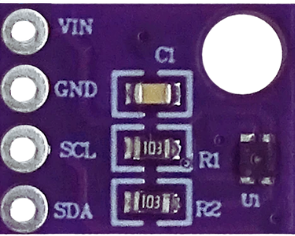
 Design with SHT45 Digital Temperature and Humidity Sensor Module I2C Communication High Accuracy in Cirkit Designer
Introduction
The SHT45 is a high-accuracy digital temperature and humidity sensor module manufactured by Sensirion. It is designed to provide precise environmental measurements with minimal power consumption. The sensor communicates via the I2C protocol, making it easy to integrate into a wide range of microcontroller-based projects. Its compact size and high reliability make it ideal for applications such as HVAC systems, weather monitoring, industrial automation, and IoT devices.
Explore Projects Built with SHT45 Digital Temperature and Humidity Sensor Module I2C Communication High Accuracy
 Open Project in Cirkit Designer
 Open Project in Cirkit Designer
 Open Project in Cirkit Designer
 Open Project in Cirkit Designer
Explore Projects Built with SHT45 Digital Temperature and Humidity Sensor Module I2C Communication High Accuracy
Open Project in Cirkit DesignerOpen Project in Cirkit DesignerOpen Project in Cirkit DesignerOpen Project in Cirkit DesignerCommon Applications
- Environmental monitoring systems
- Smart home devices
- Industrial process control
- Data loggers
- Weather stations
- IoT-based temperature and humidity sensing
Technical Specifications
Key Technical Details
| Parameter | Value |
|---|---|
| Manufacturer | Sensirion |
| Part Number | SHT45 |
| Measurement Range | Temperature: -40°C to +125°C |
| Humidity: 0% RH to 100% RH | |
| Accuracy | Temperature: ±0.1°C |
| Humidity: ±1.0% RH | |
| Supply Voltage (VDD) | 2.4V to 5.5V |
| Current Consumption | 0.4 µA (standby), 1.0 mA (measurement) |
| Communication Interface | I2C |
| I2C Address (default) | 0x44 |
| Operating Temperature Range | -40°C to +125°C |
| Dimensions | 1.5 mm x 1.5 mm x 0.5 mm |
Pin Configuration and Descriptions
The SHT45 module typically has four pins for connection. Below is the pinout:
| Pin Name | Pin Number | Description |
|---|---|---|
| VDD | 1 | Power supply input (2.4V to 5.5V) |
| GND | 2 | Ground |
| SDA | 3 | I2C data line |
| SCL | 4 | I2C clock line |
Usage Instructions
How to Use the SHT45 in a Circuit
- Power Supply: Connect the VDD pin to a 3.3V or 5V power source and the GND pin to ground.
- I2C Communication: Connect the SDA and SCL pins to the corresponding I2C pins on your microcontroller. Use pull-up resistors (typically 4.7kΩ) on both SDA and SCL lines if not already present on the module.
- Initialization: Configure the I2C interface on your microcontroller to communicate with the SHT45 at its default address (0x44).
- Data Reading: Send the appropriate I2C commands to initiate a measurement and read the temperature and humidity data.
Important Considerations and Best Practices
- Power Supply Stability: Ensure a stable power supply to avoid measurement inaccuracies.
- I2C Pull-Up Resistors: Verify that pull-up resistors are present on the SDA and SCL lines to ensure proper I2C communication.
- Sensor Placement: Place the sensor in an area with good airflow for accurate readings. Avoid placing it near heat sources or in direct sunlight.
- Startup Time: Allow the sensor to stabilize for at least 1 second after power-up before taking measurements.
- Avoid Contamination: Protect the sensor from dust, water, and other contaminants to maintain accuracy and longevity.
Example Code for Arduino UNO
Below is an example of how to use the SHT45 with an Arduino UNO:
#include <Wire.h>
#include "SparkFun_SHTC3.h" // Include the SHT45 library (compatible with SHTC3)

SHTC3 mySensor; // Create an instance of the sensor

void setup() {
  Serial.begin(9600); // Initialize serial communication
  Wire.begin();       // Initialize I2C communication

  if (mySensor.begin() == false) {
    Serial.println("SHT45 not detected. Check wiring or I2C address!");
    while (1); // Halt execution if sensor is not found
  }
  Serial.println("SHT45 initialized successfully!");
}

void loop() {
  if (mySensor.update() == SHTC3_Status_Nominal) {
    // Print temperature and humidity readings
    Serial.print("Temperature: ");
    Serial.print(mySensor.toDegC());
    Serial.println(" °C");

    Serial.print("Humidity: ");
    Serial.print(mySensor.toPercent());
    Serial.println(" %RH");
  } else {
    Serial.println("Error reading from SHT45 sensor!");
  }

  delay(2000); // Wait 2 seconds before the next reading
}
Troubleshooting and FAQs
Common Issues and Solutions
Sensor Not Detected on I2C Bus:
- Cause: Incorrect wiring or I2C address mismatch.
- Solution: Verify the connections and ensure the default I2C address (0x44) is used. Check for proper pull-up resistors on SDA and SCL lines.
Inaccurate Readings:
- Cause: Sensor exposed to contaminants or unstable power supply.
- Solution: Clean the sensor area and ensure a stable power source. Avoid placing the sensor in extreme environmental conditions.
Intermittent Communication Failures:
- Cause: Noisy I2C lines or incorrect pull-up resistor values.
- Solution: Use appropriate pull-up resistors (4.7kΩ recommended) and ensure proper grounding.
FAQs
Q1: Can the SHT45 operate at 5V logic levels?
A1: Yes, the SHT45 supports a supply voltage range of 2.4V to 5.5V, making it compatible with both 3.3V and 5V systems.
Q2: How often can I take measurements?
A2: The SHT45 can perform measurements as frequently as every 1 second. However, for most applications, a 2-second interval is sufficient.
Q3: Is the SHT45 waterproof?
A3: No, the SHT45 is not waterproof. It should be protected from water and other contaminants to ensure accurate readings and longevity.
Q4: Can I change the I2C address of the SHT45?
A4: No, the SHT45 has a fixed I2C address of 0x44 and does not support address modification.
This concludes the documentation for the SHT45 Digital Temperature and Humidity Sensor Module. For further details, refer to the official datasheet provided by Sensirion.