
How to Use KIPAS 3 CM: Examples, Pinouts, and Specs
 Design with KIPAS 3 CM in Cirkit Designer
Introduction
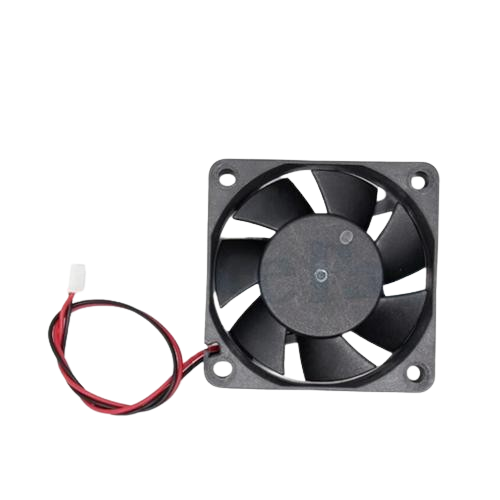
The KIPAS 3 CM is a compact cooling fan designed for efficient airflow in electronic enclosures. It is commonly used to dissipate heat and maintain optimal operating temperatures in various electronic systems. With its small size and reliable performance, the KIPAS 3 CM is ideal for applications such as computer cases, power supplies, and other heat-sensitive electronic devices.
Explore Projects Built with KIPAS 3 CM
 Open Project in Cirkit Designer
 Open Project in Cirkit Designer
 Open Project in Cirkit Designer
 Open Project in Cirkit Designer
Explore Projects Built with KIPAS 3 CM
Open Project in Cirkit DesignerOpen Project in Cirkit DesignerOpen Project in Cirkit DesignerOpen Project in Cirkit DesignerCommon Applications
- Cooling for microcontrollers, processors, and power electronics
- Heat dissipation in compact enclosures
- Ventilation in 3D printers, robotics, and IoT devices
- General-purpose cooling for small electronic projects
Technical Specifications
The following table outlines the key technical details of the KIPAS 3 CM cooling fan:
| Parameter | Specification |
|---|---|
| Operating Voltage | 5V DC |
| Current Consumption | 0.15A (150mA) |
| Power Consumption | 0.75W |
| Dimensions | 30mm x 30mm x 10mm |
| Airflow | 5 CFM (Cubic Feet per Minute) |
| Noise Level | 25 dBA |
| Bearing Type | Sleeve Bearing |
| Connector Type | 2-pin JST or bare wires |
| Operating Temperature | -10°C to 70°C |
| Weight | 10 grams |
Pin Configuration
The KIPAS 3 CM has a simple 2-pin configuration for power input:
| Pin | Wire Color | Description |
|---|---|---|
| 1 | Red | Positive Voltage (VCC) |
| 2 | Black | Ground (GND) |
Usage Instructions
How to Use the KIPAS 3 CM in a Circuit
- Power Supply: Connect the red wire to a 5V DC power source and the black wire to ground (GND). Ensure the power supply can provide at least 150mA of current.
- Mounting: Secure the fan in place using screws or adhesive mounts. Ensure the airflow direction aligns with your cooling requirements (airflow direction is typically indicated by an arrow on the fan housing).
- Wiring: If using a microcontroller like an Arduino, you can control the fan using a transistor or MOSFET for on/off switching or PWM (Pulse Width Modulation) for speed control.
Example: Controlling the Fan with an Arduino UNO
The following example demonstrates how to control the KIPAS 3 CM using an Arduino UNO and a transistor for on/off control.
Circuit Diagram
- Connect the red wire of the fan to the collector of an NPN transistor (e.g., 2N2222).
- Connect the black wire of the fan to GND.
- Connect the emitter of the transistor to GND.
- Connect a 1kΩ resistor between the base of the transistor and Arduino pin 9.
- Connect a diode (e.g., 1N4007) across the fan terminals to protect against voltage spikes (cathode to VCC, anode to GND).
Arduino Code
// Define the pin connected to the transistor base
const int fanPin = 9;

void setup() {
  pinMode(fanPin, OUTPUT); // Set the fan control pin as an output
}

void loop() {
  digitalWrite(fanPin, HIGH); // Turn the fan ON
  delay(5000);               // Keep the fan ON for 5 seconds
  digitalWrite(fanPin, LOW);  // Turn the fan OFF
  delay(5000);               // Keep the fan OFF for 5 seconds
}
Important Considerations
- Voltage Compatibility: Ensure the fan is powered with 5V DC. Exceeding this voltage may damage the fan.
- Airflow Direction: Verify the airflow direction to ensure proper cooling.
- Noise: The fan operates at 25 dBA, which is relatively quiet, but consider placement to minimize noise impact.
- Heat Dissipation: Avoid obstructing the fan's intake or exhaust to maintain optimal airflow.
Troubleshooting and FAQs
Common Issues and Solutions
Fan Does Not Spin
- Cause: Insufficient power supply or incorrect wiring.
- Solution: Verify the power supply provides 5V DC and at least 150mA. Check the wiring for proper connections.
Fan Spins Slowly
- Cause: Voltage drop or excessive load on the power supply.
- Solution: Ensure the power supply is not overloaded and provides a stable 5V output.
Excessive Noise
- Cause: Dust accumulation or misalignment.
- Solution: Clean the fan blades and ensure it is securely mounted.
Fan Stops Intermittently
- Cause: Loose connections or overheating.
- Solution: Check all connections and ensure the fan is operating within its temperature range.
FAQs
Q: Can I use the KIPAS 3 CM with a 12V power supply?
A: No, the KIPAS 3 CM is designed for 5V DC operation. Using a 12V power supply may damage the fan.
Q: How do I control the fan speed?
A: You can use PWM (Pulse Width Modulation) with a microcontroller like Arduino to control the fan speed. This requires a transistor or MOSFET for switching.
Q: Is the fan waterproof?
A: No, the KIPAS 3 CM is not waterproof. Avoid exposing it to liquids or high humidity environments.
Q: Can I use the fan for continuous operation?
A: Yes, the KIPAS 3 CM is designed for continuous operation within its specified temperature range.
By following this documentation, you can effectively integrate the KIPAS 3 CM into your electronic projects for reliable cooling performance.