
How to Use Fusível 250v 5a: Examples, Pinouts, and Specs
 Design with Fusível 250v 5a in Cirkit Designer
Introduction
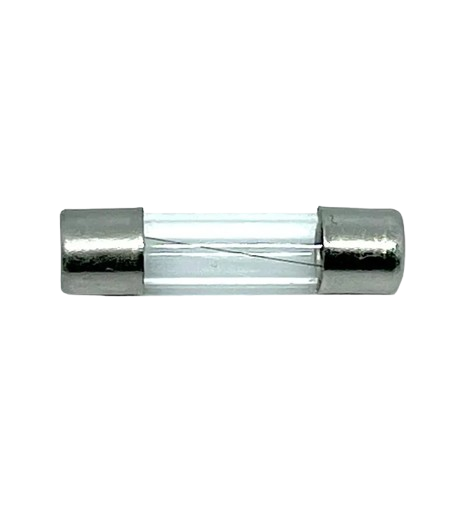
The Fusível 250V 5A is a safety device designed to protect electrical circuits from overcurrent conditions. It operates by breaking the electrical connection when the current flowing through the circuit exceeds 5 amperes. This prevents damage to sensitive components, reduces the risk of fire, and ensures the longevity of the overall system. Fuses are essential in a wide range of applications, including household appliances, industrial equipment, and electronic devices.
Explore Projects Built with Fusível 250v 5a
 Open Project in Cirkit Designer
 Open Project in Cirkit Designer
 Open Project in Cirkit Designer
 Open Project in Cirkit Designer
Explore Projects Built with Fusível 250v 5a
Open Project in Cirkit DesignerOpen Project in Cirkit DesignerOpen Project in Cirkit DesignerOpen Project in Cirkit DesignerCommon Applications
- Protection of power supplies in electronic circuits
- Safeguarding household appliances such as microwaves and refrigerators
- Industrial machinery and motor protection
- Automotive electrical systems
- Circuit protection in DIY electronics projects
Technical Specifications
The following table outlines the key technical details of the Fusível 250V 5A:
| Parameter | Specification |
|---|---|
| Rated Voltage | 250V |
| Rated Current | 5A |
| Breaking Capacity | 1000A (typical) |
| Fuse Type | Cartridge, Fast-Acting |
| Material | Glass or Ceramic Body |
| Dimensions | 5mm x 20mm (standard) |
| Operating Temperature | -55°C to +125°C |
| Mounting Type | Through-hole or clip-in |
Pin Configuration and Description
The Fusível 250V 5A does not have traditional pins like an IC or transistor. Instead, it features two metallic end caps for electrical connection. These end caps are designed to fit into fuse holders or clips. Below is a description of the connections:
| Connection | Description |
|---|---|
| End Cap 1 | Connects to the input side of the circuit |
| End Cap 2 | Connects to the output side of the circuit |
Usage Instructions
How to Use the Fusível 250V 5A in a Circuit
- Determine the Fuse Rating: Ensure the 5A rating is appropriate for your circuit. The fuse should be rated slightly higher than the normal operating current of the circuit but lower than the maximum current the components can handle.
- Select a Fuse Holder: Use a compatible fuse holder or clip that matches the 5mm x 20mm dimensions of the fuse.
- Insert the Fuse: Place the fuse into the holder, ensuring a secure connection between the end caps and the holder terminals.
- Connect to the Circuit: Wire the fuse holder in series with the circuit's power supply. This ensures that all current flows through the fuse.
- Test the Circuit: Power on the circuit and verify that it operates correctly. If the fuse blows, check for overcurrent conditions or short circuits.
Important Considerations
- Voltage Rating: Never use a fuse with a lower voltage rating than the circuit's operating voltage.
- Current Rating: Avoid using a fuse with a higher current rating than required, as it may not provide adequate protection.
- Replacement: Always replace a blown fuse with one of the same type, voltage, and current rating.
- Mounting: Ensure the fuse is securely mounted to prevent loose connections, which can cause overheating.
Example: Using the Fuse with an Arduino UNO
When working with an Arduino UNO, the Fusível 250V 5A can be used to protect the power supply circuit. Below is an example of how to integrate the fuse into a simple Arduino project:
- Connect the positive terminal of the power supply to one end of the fuse.
- Connect the other end of the fuse to the VIN pin of the Arduino UNO.
- Connect the negative terminal of the power supply to the GND pin of the Arduino UNO.
// Example Arduino code for a simple LED circuit
// This assumes the fuse is protecting the power supply to the Arduino

int ledPin = 13; // Pin connected to the LED

void setup() {
  pinMode(ledPin, OUTPUT); // Set the LED pin as an output
}

void loop() {
  digitalWrite(ledPin, HIGH); // Turn the LED on
  delay(1000);                // Wait for 1 second
  digitalWrite(ledPin, LOW);  // Turn the LED off
  delay(1000);                // Wait for 1 second
}
Troubleshooting and FAQs
Common Issues
Fuse Blows Frequently
- Cause: Overcurrent in the circuit or a short circuit.
- Solution: Check the circuit for faults, such as shorted components or excessive load. Ensure the fuse rating matches the circuit's requirements.
Fuse Does Not Blow During Overcurrent
- Cause: Incorrect fuse rating or a faulty fuse.
- Solution: Verify the fuse's current rating and replace it if necessary.
Fuse Overheats Without Blowing
- Cause: Loose connections or poor-quality fuse holder.
- Solution: Ensure the fuse is securely mounted and the holder is in good condition.
FAQs
Q: Can I use a higher-rated fuse (e.g., 10A) in place of the 5A fuse?
A: No, using a higher-rated fuse may not protect your circuit adequately, as it will allow higher currents to flow before breaking the connection.
Q: How do I know if the fuse is blown?
A: A blown fuse typically has a visible break in the internal filament (for glass fuses) or shows no continuity when tested with a multimeter.
Q: Can the fuse be reused after it blows?
A: No, fuses are single-use components. Replace a blown fuse with a new one of the same type and rating.
Q: Is the Fusível 250V 5A suitable for DC circuits?
A: Yes, as long as the circuit's voltage and current do not exceed the fuse's ratings. Always verify the specifications before use.