
How to Use Buck Boost Converter: Examples, Pinouts, and Specs
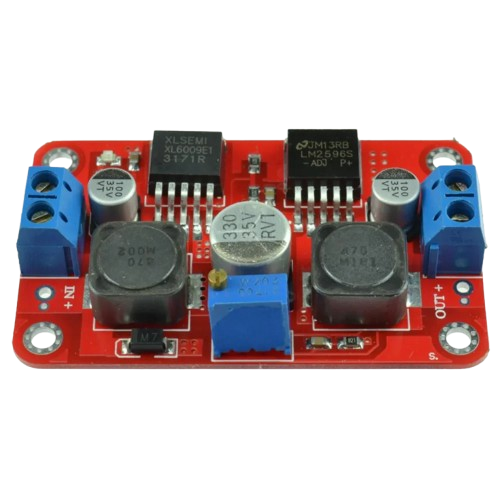
 Design with Buck Boost Converter in Cirkit Designer
Introduction
A Buck Boost Converter is a type of DC-DC converter that can step up (boost) or step down (buck) an input voltage to a desired output voltage level. This versatility makes it an essential component in power supply applications where the input voltage may vary but a stable output voltage is required. It is widely used in battery-powered devices, renewable energy systems, and embedded electronics.
Explore Projects Built with Buck Boost Converter
 Open Project in Cirkit Designer
 Open Project in Cirkit Designer
 Open Project in Cirkit Designer
 Open Project in Cirkit Designer
Explore Projects Built with Buck Boost Converter
Open Project in Cirkit DesignerOpen Project in Cirkit DesignerOpen Project in Cirkit DesignerOpen Project in Cirkit DesignerCommon Applications and Use Cases
- Battery-powered devices (e.g., smartphones, laptops, and portable gadgets)
- Renewable energy systems (e.g., solar panels and wind turbines)
- Automotive electronics
- LED drivers
- Embedded systems requiring stable voltage for microcontrollers and sensors
Technical Specifications
Below are the general technical specifications for a typical Buck Boost Converter. Note that specific models may vary, so always refer to the datasheet of the exact component you are using.
Key Technical Details
- Input Voltage Range: 2V to 36V (varies by model)
- Output Voltage Range: 1.2V to 24V (adjustable or fixed, depending on the model)
- Output Current: Up to 3A (varies by model)
- Efficiency: Up to 95% (depending on load and input/output conditions)
- Switching Frequency: 100kHz to 1MHz
- Operating Temperature: -40°C to +85°C
Pin Configuration and Descriptions
The pin configuration of a Buck Boost Converter IC (e.g., LM2577 or XL6009) typically includes the following:
| Pin Name | Description |
|---|---|
| VIN | Input voltage pin. Connect the input power source here. |
| GND | Ground pin. Connect to the ground of the circuit. |
| VOUT | Output voltage pin. Provides the regulated output voltage. |
| FB | Feedback pin. Used to set and stabilize the output voltage via a resistor divider. |
| EN (optional) | Enable pin. Used to turn the converter on or off (active high). |
| SW | Switch pin. Connects to the inductor and manages the switching operation. |
Usage Instructions
How to Use the Component in a Circuit
- Connect the Input Voltage: Attach the input voltage source to the VIN pin and ground to the GND pin.
- Set the Output Voltage: If the converter has an adjustable output, use a resistor divider network connected to the FB pin to set the desired output voltage. Refer to the datasheet for the formula to calculate resistor values.
- Connect the Load: Attach the load to the VOUT pin and ground.
- Add External Components: Include an inductor, input/output capacitors, and a diode as specified in the datasheet to ensure stable operation.
- Enable the Converter: If the converter has an EN pin, ensure it is pulled high to enable the device.
Important Considerations and Best Practices
- Inductor Selection: Choose an inductor with the appropriate current rating and inductance value to avoid saturation and ensure efficient operation.
- Capacitor Selection: Use low-ESR capacitors for input and output filtering to minimize voltage ripple.
- Thermal Management: Ensure adequate heat dissipation, especially for high-power applications. Use a heatsink or proper PCB layout for thermal management.
- Input Voltage Range: Ensure the input voltage stays within the specified range to avoid damaging the converter.
- Load Regulation: Test the converter with the intended load to verify stable output voltage.
Example: Using a Buck Boost Converter with Arduino UNO
Below is an example of connecting a Buck Boost Converter to an Arduino UNO to power it with a stable 5V output.
Circuit Connections
- Connect the input voltage source (e.g., a 9V battery) to the VIN and GND pins of the converter.
- Set the output voltage to 5V using the feedback resistor network.
- Connect the VOUT pin of the converter to the 5V pin of the Arduino UNO.
- Connect the GND pin of the converter to the GND pin of the Arduino UNO.
Arduino Code Example
// Example code to read a sensor powered by a Buck Boost Converter
// connected to an Arduino UNO. The converter provides a stable 5V output.

const int sensorPin = A0; // Analog pin connected to the sensor
int sensorValue = 0;      // Variable to store the sensor reading

void setup() {
  Serial.begin(9600); // Initialize serial communication at 9600 baud
  pinMode(sensorPin, INPUT); // Set the sensor pin as input
}

void loop() {
  sensorValue = analogRead(sensorPin); // Read the sensor value
  Serial.print("Sensor Value: ");
  Serial.println(sensorValue); // Print the sensor value to the Serial Monitor
  delay(1000); // Wait for 1 second before the next reading
}
Troubleshooting and FAQs
Common Issues and Solutions
No Output Voltage
- Cause: Incorrect wiring or insufficient input voltage.
- Solution: Double-check all connections and ensure the input voltage is within the specified range.
Excessive Heat
- Cause: Overloading the converter or insufficient cooling.
- Solution: Reduce the load current or improve heat dissipation using a heatsink or better airflow.
Output Voltage Instability
- Cause: Poor capacitor selection or incorrect feedback resistor values.
- Solution: Use low-ESR capacitors and verify the resistor values for the desired output voltage.
High Voltage Ripple
- Cause: Insufficient input/output filtering.
- Solution: Add or replace capacitors with higher capacitance or lower ESR.
FAQs
Q1: Can I use a Buck Boost Converter to power a microcontroller directly?
A1: Yes, as long as the output voltage is set to match the microcontroller's operating voltage (e.g., 3.3V or 5V) and the converter can supply sufficient current.
Q2: How do I calculate the feedback resistor values for an adjustable converter?
A2: Refer to the formula in the datasheet, typically:
[
V_{OUT} = V_{REF} \times \left(1 + \frac{R1}{R2}\right)
]
where ( V_{REF} ) is the reference voltage of the converter.
Q3: Can I use the Buck Boost Converter with an unregulated power source?
A3: Yes, the converter is designed to handle varying input voltages, but ensure the input voltage stays within the specified range.
Q4: What is the efficiency of a Buck Boost Converter?
A4: Efficiency typically ranges from 85% to 95%, depending on the load and input/output voltage conditions.