
How to Use Protected Li-ion Battery 3.7 V 10,000 mAh: Examples, Pinouts, and Specs
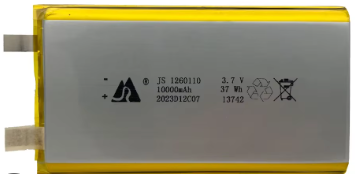
 Design with Protected Li-ion Battery 3.7 V 10,000 mAh in Cirkit Designer
Introduction
The Protected Li-ion Battery 3.7 V 10,000 mAh is a high-capacity rechargeable lithium-ion battery designed for reliable and safe operation. It features a nominal voltage of 3.7 volts and a large capacity of 10,000 mAh, making it suitable for powering a wide range of electronic devices. The built-in protection circuitry ensures safety by preventing overcharging, over-discharging, and short circuits, which are common risks associated with lithium-ion batteries.
Explore Projects Built with Protected Li-ion Battery 3.7 V 10,000 mAh
 Open Project in Cirkit Designer
 Open Project in Cirkit Designer
 Open Project in Cirkit Designer
 Open Project in Cirkit Designer
Explore Projects Built with Protected Li-ion Battery 3.7 V 10,000 mAh
Open Project in Cirkit DesignerOpen Project in Cirkit DesignerOpen Project in Cirkit DesignerOpen Project in Cirkit DesignerCommon Applications and Use Cases
- Portable electronic devices (e.g., tablets, handheld gaming consoles)
- DIY electronics projects and prototyping
- Power banks and backup power supplies
- Robotics and IoT devices
- LED lighting systems
Technical Specifications
The following table outlines the key technical details of the Protected Li-ion Battery 3.7 V 10,000 mAh:
| Parameter | Value |
|---|---|
| Nominal Voltage | 3.7 V |
| Capacity | 10,000 mAh |
| Maximum Charging Voltage | 4.2 V |
| Discharge Cut-off Voltage | 2.75 V |
| Maximum Discharge Current | 3 A |
| Protection Features | Overcharge, over-discharge, short circuit |
| Dimensions | Varies by manufacturer (e.g., 65mm x 18mm x 18mm) |
| Weight | ~90-100 g |
| Chemistry | Lithium-ion |
Pin Configuration and Descriptions
The battery typically has two terminals:
| Pin | Label | Description |
|---|---|---|
| 1 | + (Positive) | Positive terminal for power output and charging |
| 2 | - (Negative) | Negative terminal for power output and charging |
Usage Instructions
How to Use the Component in a Circuit
Connecting the Battery:
- Connect the positive terminal (
+) of the battery to the positive input of your circuit. - Connect the negative terminal (
-) of the battery to the ground or negative input of your circuit. - Ensure proper polarity to avoid damage to the battery or connected components.
- Connect the positive terminal (
Charging the Battery:
- Use a compatible lithium-ion battery charger with a maximum charging voltage of 4.2 V.
- Ensure the charger has a current limit suitable for the battery (e.g., 1 A for safe charging).
- Avoid using chargers without built-in safety features.
Discharging the Battery:
- Do not exceed the maximum discharge current of 3 A to prevent overheating or damage.
- Monitor the voltage to ensure it does not drop below the discharge cut-off voltage of 2.75 V.
Mounting and Handling:
- Secure the battery in a holder or enclosure to prevent physical damage.
- Avoid exposing the battery to extreme temperatures, moisture, or direct sunlight.
Important Considerations and Best Practices
- Safety First: Always use the battery with devices or circuits that include proper voltage and current regulation.
- Avoid Short Circuits: Ensure that the terminals do not come into contact with conductive materials.
- Storage: Store the battery in a cool, dry place at a partial charge (around 40-60%) for long-term storage.
- Disposal: Dispose of the battery responsibly at a certified recycling facility.
Example: Using the Battery with an Arduino UNO
The Protected Li-ion Battery can be used to power an Arduino UNO via its VIN pin. Below is an example circuit and code:
Circuit Connection
- Connect the positive terminal of the battery to the VIN pin of the Arduino UNO.
- Connect the negative terminal of the battery to the GND pin of the Arduino UNO.
- Optionally, use a switch between the battery and the Arduino for easy power control.
Example Code
// Example code to blink an LED using an Arduino UNO powered by the battery

const int ledPin = 13; // Pin connected to the built-in LED

void setup() {
  pinMode(ledPin, OUTPUT); // Set the LED pin as an output
}

void loop() {
  digitalWrite(ledPin, HIGH); // Turn the LED on
  delay(1000);                // Wait for 1 second
  digitalWrite(ledPin, LOW);  // Turn the LED off
  delay(1000);                // Wait for 1 second
}
Troubleshooting and FAQs
Common Issues Users Might Face
Battery Not Charging:
- Cause: Faulty charger or incorrect charging voltage.
- Solution: Verify the charger specifications and ensure it outputs 4.2 V.
Battery Drains Quickly:
- Cause: Excessive current draw or aging battery.
- Solution: Check the connected load and ensure it does not exceed 3 A. Replace the battery if it is old or damaged.
Battery Overheats:
- Cause: Overcharging or excessive discharge current.
- Solution: Use a charger with proper current regulation and avoid exceeding the maximum discharge current.
No Output Voltage:
- Cause: Protection circuitry activated due to over-discharge or short circuit.
- Solution: Recharge the battery to reset the protection circuit.
Solutions and Tips for Troubleshooting
- Always use a multimeter to check the battery voltage and ensure it is within the operating range.
- If the battery protection circuit is triggered, allow the battery to rest for a few minutes before recharging.
- Avoid using damaged or swollen batteries, as they pose safety risks.
By following these guidelines, you can safely and effectively use the Protected Li-ion Battery 3.7 V 10,000 mAh in your projects.