
How to Use cp2112: Examples, Pinouts, and Specs
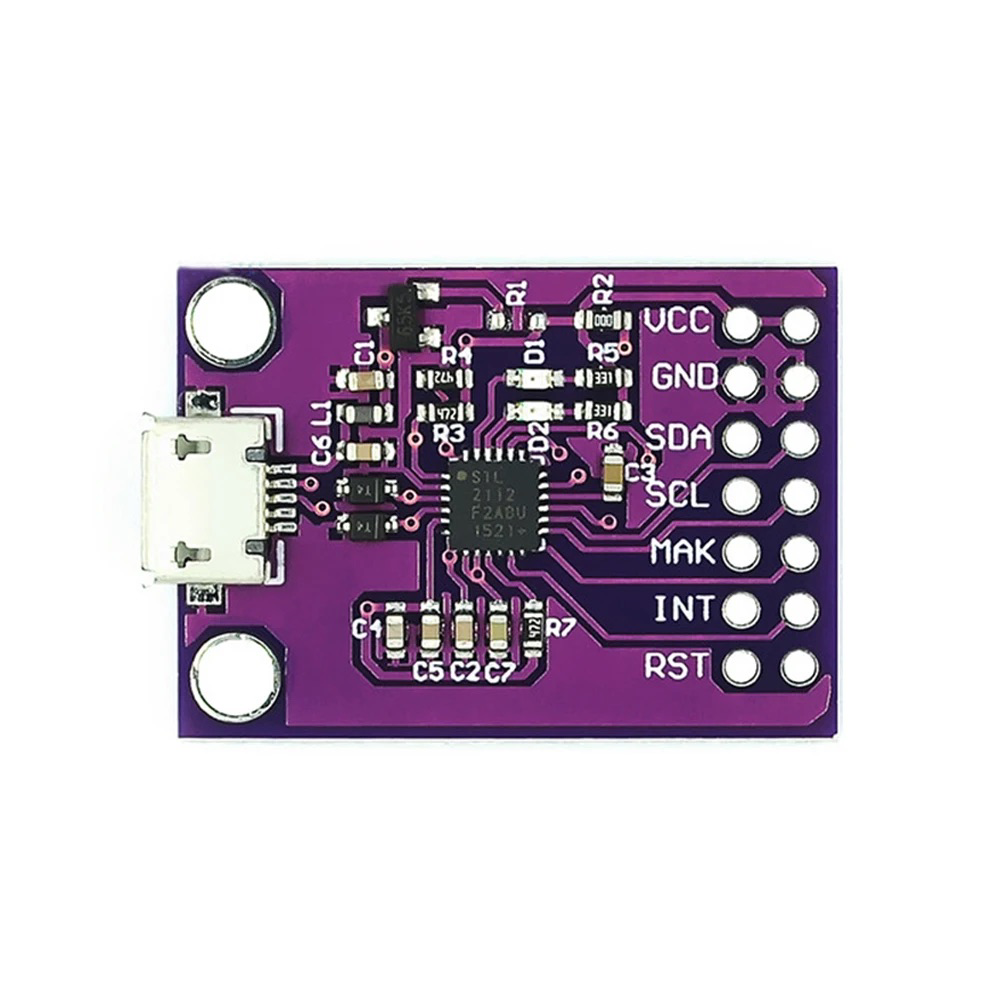
 Design with cp2112 in Cirkit Designer
Introduction
The CP2112 is a USB to I2C bridge controller manufactured by Amazon, with the part ID CP2112. This versatile component enables seamless communication between USB devices and I2C peripherals, making it an essential tool for applications requiring USB-to-I2C conversion. The CP2112 features a built-in oscillator, supports multiple I2C speeds, and can be configured via USB for a wide range of use cases.
Explore Projects Built with cp2112
 Open Project in Cirkit Designer
 Open Project in Cirkit Designer
 Open Project in Cirkit Designer
 Open Project in Cirkit Designer
Explore Projects Built with cp2112
Open Project in Cirkit DesignerOpen Project in Cirkit DesignerOpen Project in Cirkit DesignerOpen Project in Cirkit DesignerCommon Applications and Use Cases
- USB-to-I2C communication for embedded systems
- Debugging and testing I2C devices
- Interfacing USB devices with sensors, EEPROMs, or other I2C peripherals
- Prototyping and development of I2C-based systems
- Industrial automation and control systems
Technical Specifications
The CP2112 is designed to provide reliable and efficient USB-to-I2C communication. Below are its key technical specifications:
| Parameter | Value |
|---|---|
| USB Interface | USB 2.0 Full-Speed |
| I2C Interface | Master Mode |
| I2C Clock Speeds | 100 kHz, 400 kHz, 1 MHz |
| Operating Voltage | 3.3 V (core) |
| GPIO Pins | 8 configurable GPIO pins |
| Built-in Oscillator | Yes |
| Operating Temperature Range | -40°C to +85°C |
| Package Type | QFN-24 |
Pin Configuration and Descriptions
The CP2112 comes in a 24-pin QFN package. Below is the pin configuration and description:
| Pin Number | Pin Name | Description |
|---|---|---|
| 1 | VDD | Power supply input (3.3 V) |
| 2 | GND | Ground |
| 3 | SDA | I2C data line |
| 4 | SCL | I2C clock line |
| 5-12 | GPIO.0-7 | Configurable GPIO pins |
| 13 | USB_DP | USB data positive |
| 14 | USB_DM | USB data negative |
| 15 | RSTb | Reset (active low) |
| 16-24 | NC | No connection |
Usage Instructions
The CP2112 is straightforward to use in a circuit, thanks to its USB and I2C interfaces. Below are the steps and best practices for using the CP2112:
Connecting the CP2112
- Power Supply: Connect the VDD pin to a 3.3 V power source and the GND pin to ground.
- USB Interface: Connect the USB_DP and USB_DM pins to the USB data lines of your host device.
- I2C Interface: Connect the SDA and SCL pins to the corresponding I2C lines of your peripheral device.
- GPIO Pins: Configure the GPIO pins as needed for your application (e.g., input, output, or special functions).
Important Considerations
- Pull-Up Resistors: Ensure that the SDA and SCL lines have appropriate pull-up resistors (typically 4.7 kΩ or 10 kΩ).
- I2C Speed: Configure the I2C clock speed (100 kHz, 400 kHz, or 1 MHz) based on the requirements of your peripheral device.
- Driver Installation: Install the necessary USB drivers for the CP2112 on your host device. These drivers are typically available from the manufacturer's website.
- Configuration Utility: Use the CP2112 configuration utility to set up GPIO pins, I2C parameters, and other settings.
Example: Using CP2112 with Arduino UNO
Although the CP2112 is not directly programmable like an Arduino, it can be used alongside an Arduino UNO to interface with I2C peripherals. Below is an example Arduino sketch for communicating with an I2C device:
#include <Wire.h> // Include the Wire library for I2C communication

#define I2C_ADDRESS 0x40 // Replace with the I2C address of your device

void setup() {
  Wire.begin(); // Initialize the I2C bus
  Serial.begin(9600); // Initialize serial communication for debugging
  Serial.println("CP2112 I2C Communication Example");
}

void loop() {
  Wire.beginTransmission(I2C_ADDRESS); // Start communication with the I2C device
  Wire.write(0x01); // Send a command or data byte (replace with your data)
  if (Wire.endTransmission() == 0) { // Check if the transmission was successful
    Serial.println("Data sent successfully!");
  } else {
    Serial.println("Error: Transmission failed.");
  }
  delay(1000); // Wait for 1 second before sending the next command
}
Troubleshooting and FAQs
Common Issues and Solutions
Issue: The CP2112 is not recognized by the host device.
- Solution: Ensure that the USB drivers are correctly installed. Check the USB connection and verify that the CP2112 is powered.
Issue: I2C communication is not working.
- Solution: Verify the pull-up resistors on the SDA and SCL lines. Check the I2C address of the peripheral device and ensure it matches the address used in your code.
Issue: GPIO pins are not functioning as expected.
- Solution: Use the CP2112 configuration utility to ensure the GPIO pins are correctly configured for your application.
FAQs
Q: Can the CP2112 operate at 5 V?
- A: No, the CP2112 operates at 3.3 V. Ensure that all connected devices are compatible with this voltage level.
Q: How do I change the I2C clock speed?
- A: Use the CP2112 configuration utility to set the desired I2C clock speed.
Q: Is the CP2112 compatible with Linux?
- A: Yes, the CP2112 is compatible with Linux. Ensure that the appropriate drivers are installed.
By following this documentation, you can effectively integrate the CP2112 into your projects and troubleshoot common issues.