
How to Use DB25 Connectors: Examples, Pinouts, and Specs
 Design with DB25 Connectors in Cirkit Designer
Introduction
DB25 connectors, manufactured by MetabeeAI, are 25-pin D-subminiature connectors widely used for parallel and serial communication. These connectors were historically prevalent in older computer systems and peripheral devices, such as printers, modems, and industrial equipment. Despite their reduced usage in modern consumer electronics, DB25 connectors remain relevant in legacy systems, industrial automation, and specialized communication applications.
Explore Projects Built with DB25 Connectors
 Open Project in Cirkit Designer
 Open Project in Cirkit Designer
 Open Project in Cirkit Designer
 Open Project in Cirkit Designer
Explore Projects Built with DB25 Connectors
Open Project in Cirkit DesignerOpen Project in Cirkit DesignerOpen Project in Cirkit DesignerOpen Project in Cirkit DesignerCommon Applications
- Parallel communication (e.g., connecting printers to computers)
- Serial communication (e.g., RS-232 interfaces for modems)
- Industrial control systems
- Audio and video equipment
- Test and measurement devices
Technical Specifications
Key Technical Details
- Connector Type: D-subminiature (DB25)
- Number of Pins: 25
- Gender: Male or Female (depending on the model)
- Mounting Style: Panel mount or cable mount
- Contact Material: Gold-plated or tin-plated contacts for reliable conductivity
- Current Rating: Typically 5A per pin (varies by manufacturer)
- Voltage Rating: Up to 300V
- Operating Temperature: -55°C to +105°C
- Shell Material: Metal or plastic with optional shielding for EMI/RFI protection
Pin Configuration and Descriptions
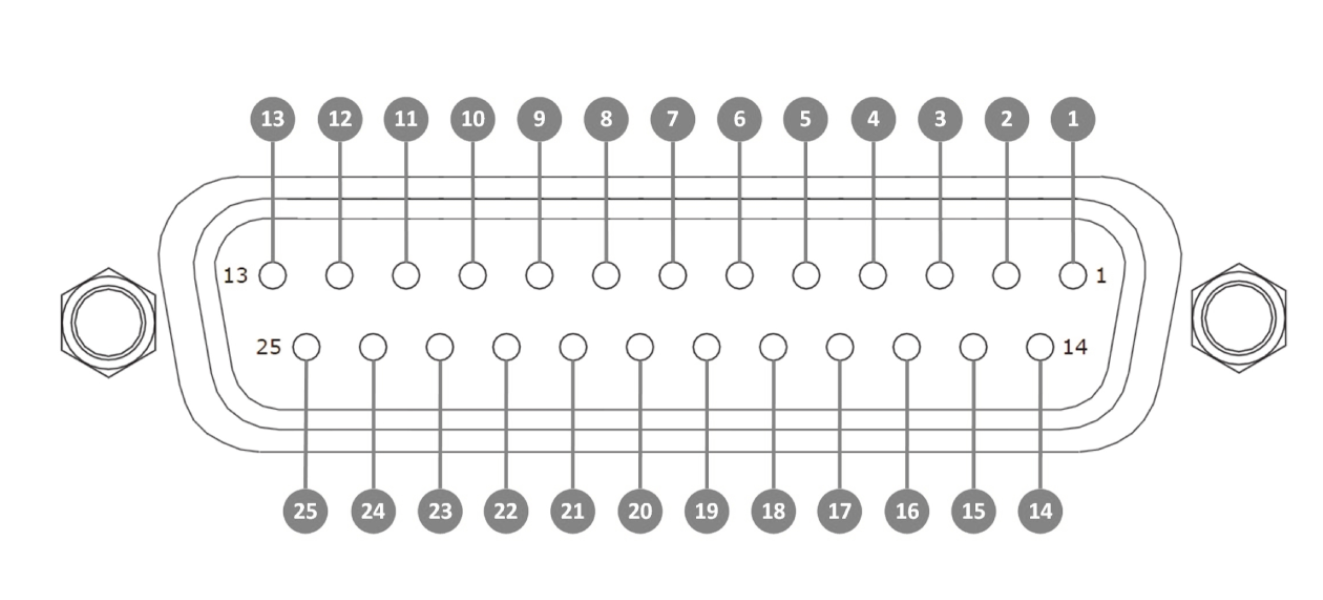
The DB25 connector has 25 pins arranged in two rows: the top row contains 13 pins, and the bottom row contains 12 pins. Below is a general pinout for DB25 connectors used in RS-232 serial communication:
| Pin Number | Signal Name | Description |
|---|---|---|
| 1 | GND | Ground |
| 2 | TXD | Transmit Data |
| 3 | RXD | Receive Data |
| 4 | RTS | Request to Send |
| 5 | CTS | Clear to Send |
| 6 | DSR | Data Set Ready |
| 7 | GND | Signal Ground |
| 8 | DCD | Data Carrier Detect |
| 9 | +V (Optional) | Positive Voltage (Optional) |
| 10 | -V (Optional) | Negative Voltage (Optional) |
| 11-25 | Reserved/Custom Use | Reserved for custom or application-specific signals |
Note: The pinout may vary depending on the application (e.g., parallel communication or custom configurations). Always refer to the specific wiring diagram for your use case.
Usage Instructions
How to Use the DB25 Connector in a Circuit
- Identify the Application: Determine whether the DB25 connector will be used for serial, parallel, or custom communication.
- Select the Correct Gender: Use a male connector for the transmitting end and a female connector for the receiving end (or vice versa, depending on the system design).
- Wiring the Pins:
- Refer to the pinout table above to connect the appropriate signals.
- Use a soldering iron or crimping tool to securely attach wires to the connector pins.
- Mounting:
- For panel-mounted connectors, secure the connector to the panel using screws.
- For cable-mounted connectors, use a strain relief or hood to protect the wires.
- Testing:
- Verify continuity between the pins and the connected device.
- Use a multimeter to ensure proper voltage levels and signal integrity.
Important Considerations
- Shielding: Use shielded cables and connectors to minimize electromagnetic interference (EMI) in noisy environments.
- Compatibility: Ensure the DB25 connector matches the pinout and voltage requirements of the connected devices.
- Cable Length: Keep cable lengths as short as possible to reduce signal degradation, especially for high-speed communication.
Example: Connecting a DB25 to an Arduino UNO
While DB25 connectors are not directly compatible with Arduino UNO, you can use a breakout board or adapter to interface the two. Below is an example of using a DB25 connector for RS-232 communication with an Arduino UNO:
#include <SoftwareSerial.h>

// Define RX and TX pins for software serial communication
SoftwareSerial mySerial(10, 11); // RX = Pin 10, TX = Pin 11

void setup() {
  // Initialize hardware serial for debugging
  Serial.begin(9600);
  // Initialize software serial for DB25 communication
  mySerial.begin(9600);
  Serial.println("DB25 Communication Initialized");
}

void loop() {
  // Send data to the DB25-connected device
  mySerial.println("Hello, DB25!");
  delay(1000);

  // Check if data is received from the DB25-connected device
  if (mySerial.available()) {
    String receivedData = mySerial.readString();
    Serial.print("Received: ");
    Serial.println(receivedData);
  }
}
Note: Use an RS-232 to TTL level shifter module to safely interface the Arduino UNO with the DB25 connector.
Troubleshooting and FAQs
Common Issues and Solutions
No Signal Transmission:
- Cause: Incorrect pin connections or loose wires.
- Solution: Double-check the pinout and ensure all connections are secure.
Signal Interference:
- Cause: Lack of shielding in the cable or connector.
- Solution: Use shielded cables and connectors with proper grounding.
Device Not Responding:
- Cause: Mismatched baud rate or communication protocol.
- Solution: Verify that both devices are configured with the same baud rate and protocol.
Overheating:
- Cause: Exceeding the current or voltage rating of the connector.
- Solution: Ensure the connected devices operate within the specified ratings.
FAQs
Q: Can DB25 connectors be used for modern devices?
- A: Yes, but they are typically used with adapters or converters for compatibility with modern interfaces like USB.
Q: Are DB25 connectors waterproof?
- A: Standard DB25 connectors are not waterproof, but waterproof versions are available for outdoor or industrial use.
Q: How do I identify the pin numbers on a DB25 connector?
- A: Pin numbers are usually labeled on the connector or can be identified using a pinout diagram.
Q: Can I use DB25 connectors for power transmission?
- A: DB25 connectors are not designed for high-power applications. Use them only for low-power signal transmission.
By following this documentation, you can effectively use MetabeeAI's DB25 connectors in your projects and troubleshoot common issues with ease.