
How to Use PANEL100W: Examples, Pinouts, and Specs
 Design with PANEL100W in Cirkit Designer
Introduction
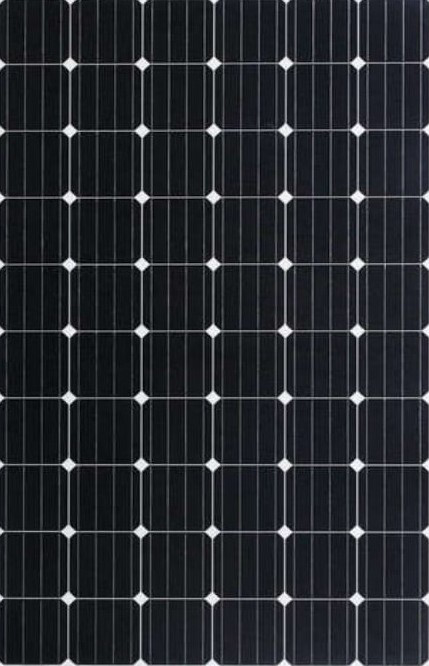
The PANEL100W is a 100-watt solar panel designed to efficiently convert sunlight into electrical energy. It is ideal for a wide range of applications, including off-grid solar systems, battery charging, and powering small electronic devices. With its durable construction and high energy conversion efficiency, the PANEL100W is suitable for both residential and portable setups.
Common applications include:
- Off-grid solar power systems for homes, cabins, and RVs
- Charging 12V batteries for backup power
- Powering small devices such as lights, fans, and USB chargers
- Integration into larger solar arrays for increased energy output
Explore Projects Built with PANEL100W
 Open Project in Cirkit Designer
 Open Project in Cirkit Designer
 Open Project in Cirkit Designer
 Open Project in Cirkit Designer
Explore Projects Built with PANEL100W
Open Project in Cirkit DesignerOpen Project in Cirkit DesignerOpen Project in Cirkit DesignerOpen Project in Cirkit DesignerTechnical Specifications
The PANEL100W is engineered to deliver reliable performance under various environmental conditions. Below are its key technical details:
| Specification | Value |
|---|---|
| Maximum Power (Pmax) | 100 W |
| Voltage at Pmax (Vmp) | 18 V |
| Current at Pmax (Imp) | 5.56 A |
| Open Circuit Voltage (Voc) | 21.6 V |
| Short Circuit Current (Isc) | 5.92 A |
| Maximum System Voltage | 1000 V DC |
| Operating Temperature | -40°C to +85°C |
| Dimensions | 1200 mm x 540 mm x 35 mm |
| Weight | 8 kg |
| Connector Type | MC4 or compatible |
| Cell Type | Monocrystalline silicon |
| Efficiency | ~20% |
Pin Configuration and Descriptions
The PANEL100W does not have traditional pins but instead uses two output cables terminated with MC4 connectors. These connectors are polarized to ensure proper connection.
| Connector | Description |
|---|---|
| Positive (+) | Red cable with MC4 male connector |
| Negative (-) | Black cable with MC4 female connector |
Usage Instructions
How to Use the PANEL100W in a Circuit
- Positioning the Panel: Place the PANEL100W in a location with maximum sunlight exposure. Ensure the panel is angled correctly based on your geographic location for optimal energy capture.
- Connecting to a Charge Controller:
- Connect the positive (+) MC4 connector of the panel to the positive input of the charge controller.
- Connect the negative (-) MC4 connector of the panel to the negative input of the charge controller.
- Ensure the charge controller is compatible with the panel's voltage and current ratings.
- Connecting to a Battery:
- Use the charge controller to regulate the voltage and current before connecting to a 12V battery.
- Follow the charge controller's instructions for proper battery connection.
- Powering Devices:
- Connect your devices to the output of the charge controller or battery, ensuring the load does not exceed the panel's power output.
Important Considerations and Best Practices
- Avoid Shading: Even partial shading can significantly reduce the panel's output.
- Use Proper Cables: Ensure cables are rated for the panel's current and voltage to prevent overheating.
- Monitor Temperature: While the panel operates in a wide temperature range, excessive heat can reduce efficiency.
- Secure Mounting: Use appropriate mounting hardware to secure the panel and prevent damage from wind or other environmental factors.
- Series or Parallel Connections: When connecting multiple panels, ensure the system voltage and current remain within the charge controller's specifications.
Example: Connecting to an Arduino UNO
The PANEL100W can be used to power an Arduino UNO indirectly by charging a 12V battery and using a voltage regulator to step down the voltage to 5V. Below is an example circuit and code:
Circuit Setup
- Connect the PANEL100W to a 12V battery via a charge controller.
- Use a 5V voltage regulator (e.g., LM7805) to step down the battery voltage to 5V.
- Power the Arduino UNO by connecting the 5V output of the regulator to the Arduino's 5V pin.
Example Code
// Example code for reading a sensor and displaying data on the Serial Monitor
// Ensure the Arduino is powered via the 5V regulator connected to the PANEL100W

const int sensorPin = A0; // Analog pin connected to the sensor
int sensorValue = 0;      // Variable to store the sensor reading

void setup() {
  Serial.begin(9600); // Initialize serial communication at 9600 baud
}

void loop() {
  sensorValue = analogRead(sensorPin); // Read the sensor value
  Serial.print("Sensor Value: ");
  Serial.println(sensorValue); // Print the sensor value to the Serial Monitor
  delay(1000); // Wait for 1 second before the next reading
}
Troubleshooting and FAQs
Common Issues and Solutions
Low Power Output:
- Cause: Insufficient sunlight or shading.
- Solution: Ensure the panel is in direct sunlight and free from obstructions.
No Output:
- Cause: Loose or incorrect connections.
- Solution: Check all connections, especially the MC4 connectors, for proper polarity and secure attachment.
Overheating:
- Cause: Poor ventilation or excessive ambient temperature.
- Solution: Ensure the panel is mounted with adequate airflow around it.
Charge Controller Not Working:
- Cause: Incompatible voltage or current ratings.
- Solution: Verify that the charge controller supports the panel's specifications.
FAQs
Can the PANEL100W be used indoors?
- The PANEL100W is designed for outdoor use. Indoor use will result in significantly reduced power output due to limited sunlight.
Can I connect multiple PANEL100W units together?
- Yes, you can connect multiple panels in series or parallel. Ensure the total voltage and current are within the limits of your charge controller and other system components.
What maintenance does the PANEL100W require?
- Regularly clean the panel surface with water and a soft cloth to remove dirt and debris. Inspect connections periodically for wear or corrosion.
By following this documentation, you can effectively integrate the PANEL100W into your solar power system and maximize its performance.