
How to Use AMIS-30543 Stepper Motor Driver Carrier: Examples, Pinouts, and Specs
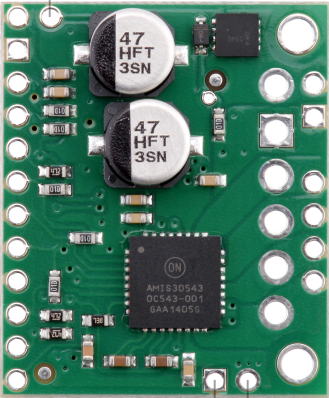
 Design with AMIS-30543 Stepper Motor Driver Carrier in Cirkit Designer
Introduction
The AMIS-30543 Stepper Motor Driver Carrier (Pololu part #2970) is a compact and versatile stepper motor driver designed for precise control of stepper motors. It features adjustable current control, microstepping capabilities, and built-in protection mechanisms, making it ideal for a wide range of applications. This driver is based on the ON Semiconductor AMIS-30543 IC and is capable of driving bipolar stepper motors with high efficiency and reliability.
Explore Projects Built with AMIS-30543 Stepper Motor Driver Carrier
 Open Project in Cirkit Designer
 Open Project in Cirkit Designer
 Open Project in Cirkit Designer
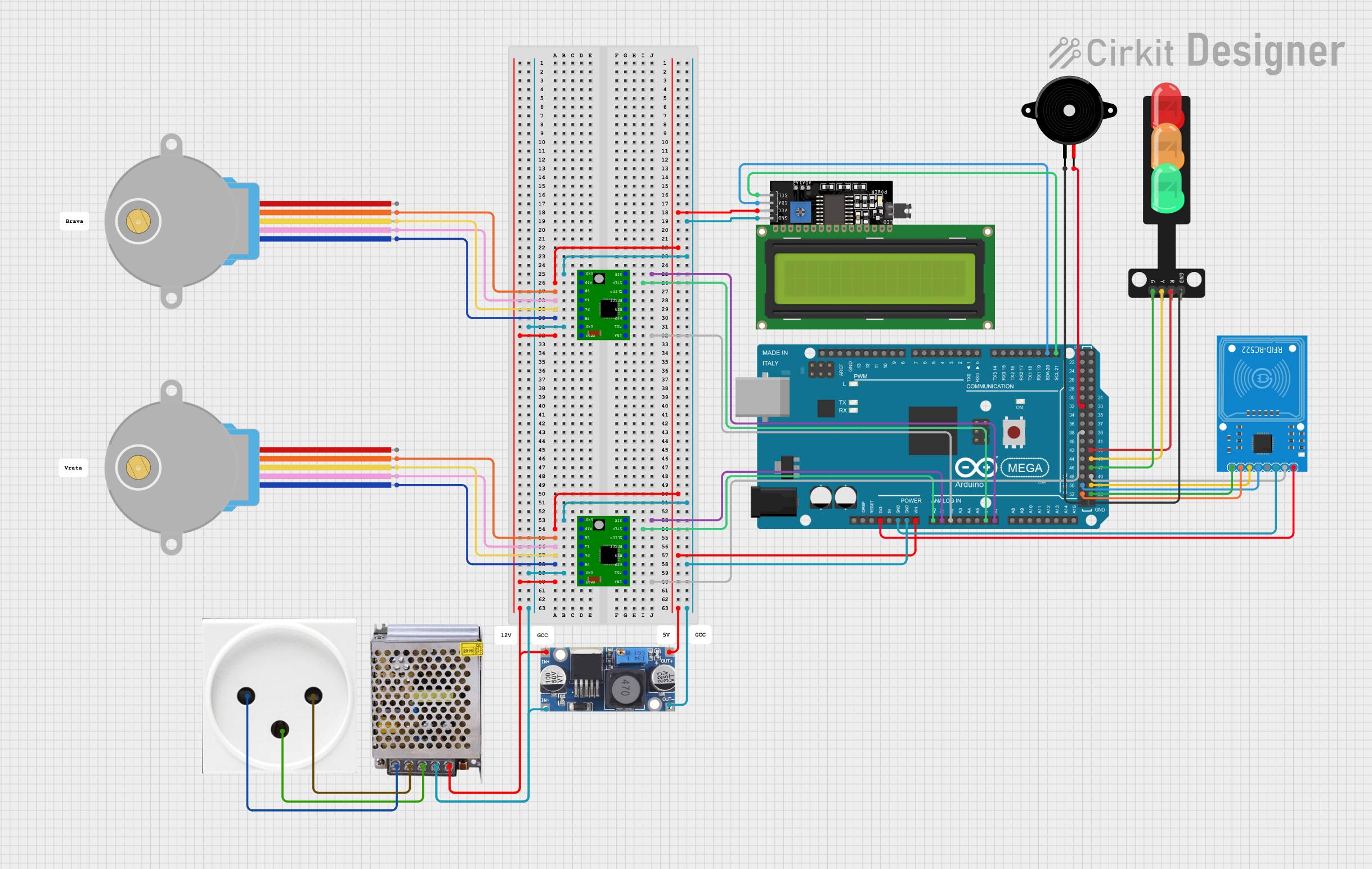 Open Project in Cirkit Designer
Explore Projects Built with AMIS-30543 Stepper Motor Driver Carrier
Open Project in Cirkit DesignerOpen Project in Cirkit DesignerOpen Project in Cirkit DesignerOpen Project in Cirkit DesignerCommon Applications
- 3D printers
- CNC machines
- Robotics
- Automated machinery
- Precision positioning systems
Technical Specifications
The following table outlines the key technical details of the AMIS-30543 Stepper Motor Driver Carrier:
| Parameter | Value |
|---|---|
| Operating Voltage | 8 V to 29 V |
| Maximum Output Current | 1.6 A per phase (continuous) |
| Microstepping Modes | Full-step, half-step, 1/4-step, 1/8-step, 1/16-step |
| Logic Voltage | 3.3 V or 5 V (logic level compatible) |
| Communication Interface | SPI (Serial Peripheral Interface) |
| Protection Features | Overcurrent, overtemperature, undervoltage lockout, and short-circuit |
| Dimensions | 0.6" × 0.8" (15 mm × 20 mm) |
Pin Configuration and Descriptions
The AMIS-30543 Stepper Motor Driver Carrier has 16 pins. The table below describes each pin:
| Pin | Name | Description |
|---|---|---|
| 1 | VBB | Motor power supply (8 V to 29 V). Connect to the positive terminal of the motor power source. |
| 2 | GND | Ground connection. Connect to the ground of the motor power source. |
| 3 | SDI | SPI data input. Used for communication with the microcontroller. |
| 4 | SDO | SPI data output. Used for communication with the microcontroller. |
| 5 | SCK | SPI clock input. |
| 6 | CS | SPI chip select. Active low. |
| 7 | EN | Enable input. Active high. Enables the driver when high. |
| 8 | DIR | Direction input. Determines the rotation direction of the stepper motor. |
| 9 | STEP | Step input. A rising edge triggers a step. |
| 10 | RESET | Reset input. Active low. Resets the driver when pulled low. |
| 11 | VDD | Logic voltage supply (3.3 V or 5 V). |
| 12 | REF | Reference voltage for current control. |
| 13-16 | OUT1A, OUT1B, OUT2A, OUT2B | Motor outputs. Connect to the stepper motor windings. |
Usage Instructions
How to Use the AMIS-30543 in a Circuit
- Power Supply: Connect the motor power supply (8 V to 29 V) to the
VBBpin and ground to theGNDpin. Ensure the power supply can provide sufficient current for your stepper motor. - Logic Voltage: Connect the
VDDpin to the logic voltage of your microcontroller (3.3 V or 5 V). - Motor Connections: Connect the stepper motor windings to the
OUT1A,OUT1B,OUT2A, andOUT2Bpins. - SPI Communication: Connect the
SDI,SDO,SCK, andCSpins to the corresponding SPI pins on your microcontroller. - Control Pins:
- Use the
STEPpin to send step pulses to the driver. - Use the
DIRpin to control the rotation direction. - Use the
ENpin to enable or disable the driver. - Optionally, use the
RESETpin to reset the driver.
- Use the
Important Considerations and Best Practices
- Current Limiting: Adjust the reference voltage on the
REFpin to set the current limit for your stepper motor. This prevents overheating and damage to the motor. - Microstepping: Configure the microstepping mode via SPI commands for smoother motor operation and higher resolution.
- Heat Dissipation: Ensure adequate cooling for the driver, especially when operating at high currents.
- Protection Features: The driver includes built-in protection features, but ensure proper wiring and avoid short circuits to prevent damage.
Example Code for Arduino UNO
Below is an example of how to control the AMIS-30543 using an Arduino UNO via SPI:
#include <SPI.h>

// Define SPI pins
const int CS_PIN = 10; // Chip Select pin
const int STEP_PIN = 9; // Step pin
const int DIR_PIN = 8; // Direction pin

void setup() {
  // Initialize SPI
  SPI.begin();
  pinMode(CS_PIN, OUTPUT);
  pinMode(STEP_PIN, OUTPUT);
  pinMode(DIR_PIN, OUTPUT);

  digitalWrite(CS_PIN, HIGH); // Deselect the driver
  digitalWrite(STEP_PIN, LOW);
  digitalWrite(DIR_PIN, LOW);

  // Configure the driver via SPI
  configureDriver();
}

void loop() {
  // Rotate the motor in one direction
  digitalWrite(DIR_PIN, HIGH); // Set direction
  for (int i = 0; i < 200; i++) { // 200 steps for one revolution
    digitalWrite(STEP_PIN, HIGH);
    delayMicroseconds(1000); // Step pulse width
    digitalWrite(STEP_PIN, LOW);
    delayMicroseconds(1000);
  }

  delay(1000); // Wait for 1 second

  // Rotate the motor in the opposite direction
  digitalWrite(DIR_PIN, LOW); // Change direction
  for (int i = 0; i < 200; i++) {
    digitalWrite(STEP_PIN, HIGH);
    delayMicroseconds(1000);
    digitalWrite(STEP_PIN, LOW);
    delayMicroseconds(1000);
  }

  delay(1000); // Wait for 1 second
}

void configureDriver() {
  digitalWrite(CS_PIN, LOW); // Select the driver
  SPI.transfer(0x00); // Example SPI command to configure the driver
  SPI.transfer(0x00); // Replace with actual configuration bytes
  digitalWrite(CS_PIN, HIGH); // Deselect the driver
}
Troubleshooting and FAQs
Common Issues
Motor Not Moving:
- Ensure the
ENpin is set high to enable the driver. - Verify the
STEPandDIRsignals are being sent correctly. - Check the motor connections and power supply.
- Ensure the
Overheating:
- Ensure the current limit is set correctly using the
REFpin. - Provide adequate cooling or a heatsink for the driver.
- Ensure the current limit is set correctly using the
SPI Communication Fails:
- Verify the SPI connections (
SDI,SDO,SCK,CS) are correct. - Ensure the microcontroller and driver share a common ground.
- Verify the SPI connections (
Motor Vibrates but Does Not Rotate:
- Check the wiring of the stepper motor windings.
- Ensure the microstepping mode is configured correctly.
Tips for Troubleshooting
- Use a multimeter to verify voltage levels at the
VBB,VDD, andREFpins. - Test the SPI communication with a logic analyzer to ensure proper data transfer.
- Start with a low current limit and gradually increase it to avoid damaging the motor or driver.
By following this documentation, you can effectively integrate the AMIS-30543 Stepper Motor Driver Carrier into your projects for precise and reliable stepper motor control.