
How to Use Speedy Bee F405: Examples, Pinouts, and Specs
 Design with Speedy Bee F405 in Cirkit Designer
Introduction
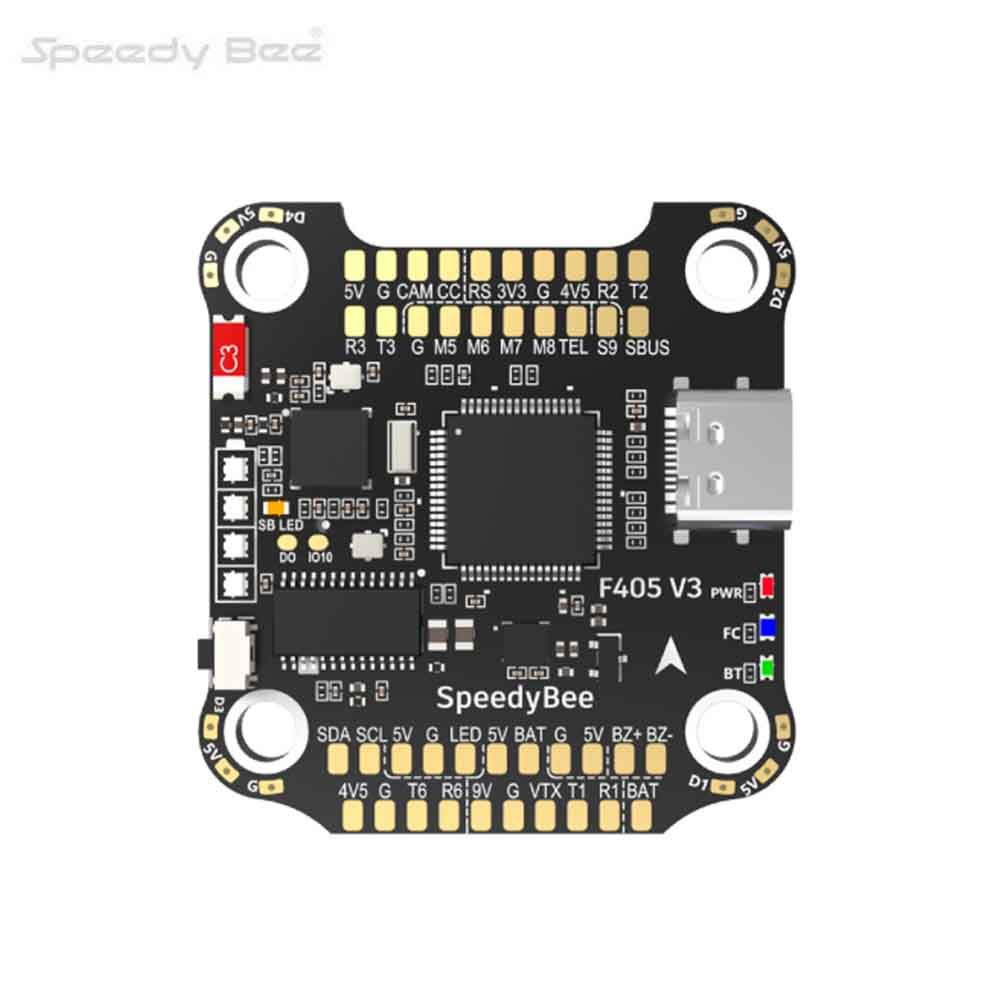
The Speedy Bee F405 (Manufacturer Part ID: F405V3) is a high-performance flight controller designed specifically for drones. It features advanced processing capabilities, multiple input/output ports, and compatibility with various firmware, making it an ideal choice for racing and freestyle drone applications. With its robust design and versatile functionality, the Speedy Bee F405 ensures precise control and reliable performance in demanding environments.
Explore Projects Built with Speedy Bee F405
 Open Project in Cirkit Designer
 Open Project in Cirkit Designer
 Open Project in Cirkit Designer
 Open Project in Cirkit Designer
Explore Projects Built with Speedy Bee F405
Open Project in Cirkit DesignerOpen Project in Cirkit DesignerOpen Project in Cirkit DesignerOpen Project in Cirkit DesignerCommon Applications and Use Cases
- High-speed racing drones
- Freestyle drone flying
- Aerial photography and videography
- Custom drone builds requiring advanced control
- Educational and research projects involving UAVs
Technical Specifications
Key Technical Details
| Parameter | Specification |
|---|---|
| Processor | STM32F405RGT6 (32-bit ARM Cortex-M4, 168 MHz) |
| IMU (Inertial Measurement Unit) | MPU6000 (6-axis gyro and accelerometer) |
| Firmware Support | Betaflight, iNav, EmuFlight |
| Input Voltage Range | 3S–6S LiPo (9V–30V) |
| BEC Output | 5V @ 2A, 9V @ 2A |
| UART Ports | 5 UARTs |
| ESC Signal Output | 8 PWM outputs |
| Flash Memory | 16 MB Blackbox data storage |
| OSD | Integrated Betaflight OSD (On-Screen Display) |
| Barometer | BMP280 |
| Dimensions | 36 mm x 36 mm (30.5 mm x 30.5 mm mounting holes) |
| Weight | 7.2 g |
Pin Configuration and Descriptions
| Pin Name | Description |
|---|---|
| GND | Ground connection for power and signal reference |
| VBAT | Battery voltage input (3S–6S LiPo) |
| 5V | 5V power output for peripherals |
| 9V | 9V power output for peripherals |
| UART1–UART5 | Serial communication ports for peripherals (e.g., GPS, telemetry, receivers) |
| PWM1–PWM8 | ESC signal outputs for motor control |
| RX1–RX5 | UART receive pins for serial communication |
| TX1–TX5 | UART transmit pins for serial communication |
| LED_STRIP | Output for programmable LED strips |
| Buzzer+/- | Connections for an external buzzer |
| I2C_SCL | I2C clock line for external sensors |
| I2C_SDA | I2C data line for external sensors |
| Boot | Bootloader mode activation pin |
Usage Instructions
How to Use the Speedy Bee F405 in a Circuit
Powering the Flight Controller:
- Connect a 3S–6S LiPo battery to the VBAT pin.
- Ensure the battery voltage is within the supported range (9V–30V).
- Use the onboard BEC outputs (5V or 9V) to power peripherals like receivers or cameras.
Connecting ESCs and Motors:
- Connect the signal wires of up to 8 ESCs to the PWM1–PWM8 pins.
- Ensure the ESCs are properly calibrated and configured for your drone setup.
Connecting Peripherals:
- Use the UART ports (RX/TX pairs) to connect peripherals such as GPS modules, telemetry radios, or receivers.
- For I2C-based sensors, connect the SCL and SDA lines to the I2C_SCL and I2C_SDA pins.
Configuring Firmware:
- Flash the desired firmware (e.g., Betaflight) using the USB port and a compatible configurator.
- Configure the flight controller settings, including motor mapping, PID tuning, and receiver setup.
Using the OSD:
- Connect a compatible FPV camera and video transmitter to the OSD input/output pins.
- Configure the OSD settings in the firmware to display telemetry data on your FPV feed.
Important Considerations and Best Practices
- Voltage Compatibility: Always verify the input voltage range of connected peripherals to avoid damage.
- Heat Management: Ensure proper airflow around the flight controller to prevent overheating during operation.
- Firmware Updates: Regularly update the firmware to access new features and bug fixes.
- Wiring: Use high-quality wires and connectors to ensure reliable connections and minimize signal interference.
- Bootloader Mode: To flash firmware, hold the Boot pin while connecting the flight controller to your computer via USB.
Example Code for Arduino UNO Integration
While the Speedy Bee F405 is not typically used with an Arduino UNO, you can use an Arduino to send commands or telemetry data via UART. Below is an example of how to send data to the flight controller:
// Example: Sending data to Speedy Bee F405 via UART
#include <SoftwareSerial.h>

// Define RX and TX pins for SoftwareSerial
SoftwareSerial mySerial(10, 11); // RX = pin 10, TX = pin 11

void setup() {
  // Initialize serial communication
  Serial.begin(9600); // Monitor communication
  mySerial.begin(115200); // UART communication with F405

  Serial.println("Arduino to Speedy Bee F405 communication started.");
}

void loop() {
  // Send a test message to the flight controller
  mySerial.println("Hello, Speedy Bee F405!");

  // Check for incoming data from the flight controller
  if (mySerial.available()) {
    String receivedData = mySerial.readString();
    Serial.println("Received from F405: " + receivedData);
  }

  delay(1000); // Wait 1 second before sending the next message
}
Troubleshooting and FAQs
Common Issues and Solutions
Flight Controller Not Powering On:
- Cause: Incorrect wiring or insufficient power supply.
- Solution: Verify the battery voltage and connections to the VBAT pin.
No Communication with Configurator:
- Cause: Incorrect USB driver or cable.
- Solution: Install the correct USB driver and use a data-capable USB cable.
Motors Not Spinning:
- Cause: ESCs not calibrated or incorrect motor mapping.
- Solution: Calibrate the ESCs and verify motor mapping in the firmware.
OSD Not Displaying:
- Cause: Incorrect camera or video transmitter wiring.
- Solution: Check the OSD input/output connections and configure the OSD settings in the firmware.
Overheating:
- Cause: Poor airflow or excessive current draw.
- Solution: Improve ventilation and ensure peripherals do not exceed the BEC output limits.
FAQs
Q: Can I use the Speedy Bee F405 with 2S LiPo batteries?
A: No, the minimum supported input voltage is 9V (3S LiPo).Q: What firmware is pre-installed on the Speedy Bee F405?
A: The flight controller typically ships with Betaflight firmware pre-installed.Q: How do I reset the flight controller to factory settings?
A: Use the "Reset Settings" option in the Betaflight Configurator or flash the firmware again.Q: Can I connect multiple peripherals to the UART ports?
A: Yes, but ensure each peripheral is assigned a unique UART port to avoid conflicts.Q: Is the Speedy Bee F405 waterproof?
A: No, it is not waterproof. Use conformal coating if operating in wet conditions.