
How to Use 12 WAY Automotive Fuse Block with LED Indicator: Examples, Pinouts, and Specs
 Design with 12 WAY Automotive Fuse Block with LED Indicator in Cirkit Designer
Introduction
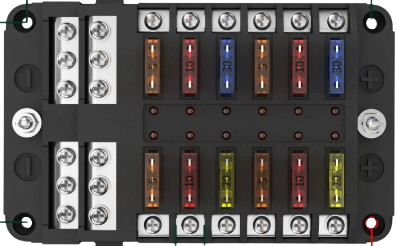
The 12 WAY Automotive Fuse Block with LED Indicator (Manufacturer: AC, Part ID: Fuse Box) is a compact and efficient solution for managing multiple electrical circuits in automotive applications. This fuse block features 12 slots for standard blade fuses and includes built-in LED indicators that illuminate when a fuse is blown, simplifying troubleshooting and maintenance. Designed for durability and ease of use, it is ideal for cars, trucks, RVs, boats, and other vehicles requiring organized circuit protection.
Explore Projects Built with 12 WAY Automotive Fuse Block with LED Indicator
 Open Project in Cirkit Designer
 Open Project in Cirkit Designer
 Open Project in Cirkit Designer
 Open Project in Cirkit Designer
Explore Projects Built with 12 WAY Automotive Fuse Block with LED Indicator
Open Project in Cirkit DesignerOpen Project in Cirkit DesignerOpen Project in Cirkit DesignerOpen Project in Cirkit DesignerCommon Applications and Use Cases
- Automotive electrical systems (cars, trucks, and motorcycles)
- Marine applications (boats and yachts)
- Recreational vehicles (RVs and campers)
- Off-road vehicles and utility equipment
- Custom electrical projects requiring multiple circuit protection
Technical Specifications
The following table outlines the key technical details of the 12 WAY Automotive Fuse Block with LED Indicator:
| Parameter | Specification |
|---|---|
| Manufacturer | AC |
| Part ID | Fuse Box |
| Number of Fuse Slots | 12 |
| Fuse Type | Standard blade fuses (ATO/ATC) |
| Voltage Rating | 12V DC / 24V DC |
| Maximum Current per Slot | 30A |
| Total Current Capacity | 100A |
| LED Indicator | Yes (illuminates when fuse is blown) |
| Input Terminal Type | M5 threaded studs |
| Output Terminal Type | Spade connectors |
| Material | Flame-retardant plastic housing |
| Mounting Style | Screw-mounted |
| Dimensions | 85mm x 140mm x 35mm |
| Operating Temperature | -20°C to 85°C |
Pin Configuration and Descriptions
The fuse block has a straightforward layout. Below is a description of its terminals:
| Terminal | Description |
|---|---|
| Input Terminal (+) | Connects to the positive terminal of the power source (e.g., battery). |
| Ground Terminal (-) | Connects to the negative terminal of the power source or vehicle chassis. |
| Fuse Slots (1–12) | Slots for inserting blade fuses to protect individual circuits. |
| Output Terminals | Spade connectors for connecting the protected circuits to the fuse block. |
| LED Indicators | One LED per fuse slot; lights up when the corresponding fuse is blown. |
Usage Instructions
How to Use the Component in a Circuit
- Mount the Fuse Block: Secure the fuse block to a flat surface using screws through the mounting holes.
- Connect the Power Source:
- Attach the positive terminal of the power source (e.g., battery) to the input terminal (+) using an appropriate cable.
- Connect the ground terminal (-) to the negative terminal of the power source or vehicle chassis.
- Insert Fuses:
- Insert standard blade fuses (ATO/ATC type) into the fuse slots. Ensure the fuse ratings match the requirements of the connected circuits.
- Connect Circuits:
- Use spade connectors to attach the output terminals to the circuits you want to protect.
- Test the Setup:
- Power on the system and verify that all circuits are functioning correctly. If a fuse is blown, the corresponding LED will illuminate.
Important Considerations and Best Practices
- Fuse Ratings: Always use fuses with appropriate current ratings for the connected circuits. Overrated fuses may not provide adequate protection, while underrated fuses may blow unnecessarily.
- Wiring: Use wires with sufficient gauge to handle the current of each circuit. Improper wiring can lead to overheating or voltage drops.
- LED Indicators: Regularly check the LED indicators to identify and replace blown fuses promptly.
- Environment: Ensure the fuse block is installed in a dry, well-ventilated area to prevent moisture or debris from affecting its performance.
- Polarity: Double-check the polarity of the input connections to avoid damage to the fuse block or connected devices.
Example: Connecting to an Arduino UNO
The fuse block can be used to protect circuits involving microcontrollers like the Arduino UNO. Below is an example of how to connect the fuse block to an Arduino-powered project:
- Connect the positive terminal of a 12V DC power source to the input terminal (+) of the fuse block.
- Connect the ground terminal (-) of the fuse block to the ground of the power source.
- Insert a 1A fuse into one of the slots to protect the Arduino UNO.
- Use a spade connector to connect the output terminal of the selected fuse slot to the VIN pin of the Arduino UNO.
- Connect the GND pin of the Arduino UNO to the ground terminal of the fuse block.
// Example Arduino code for a simple LED circuit protected by the fuse block

const int ledPin = 13; // Pin connected to an LED

void setup() {
  pinMode(ledPin, OUTPUT); // Set the LED pin as an output
}

void loop() {
  digitalWrite(ledPin, HIGH); // Turn the LED on
  delay(1000);                // Wait for 1 second
  digitalWrite(ledPin, LOW);  // Turn the LED off
  delay(1000);                // Wait for 1 second
}
Troubleshooting and FAQs
Common Issues Users Might Face
LED Indicator Not Lighting Up When Fuse is Blown:
- Cause: Faulty LED or improper wiring.
- Solution: Check the wiring and ensure the LED is functional. Replace the fuse block if necessary.
Fuses Blowing Frequently:
- Cause: Overloaded circuits or incorrect fuse ratings.
- Solution: Verify the current draw of each circuit and use appropriately rated fuses.
No Power to Connected Circuits:
- Cause: Loose connections or blown fuses.
- Solution: Inspect all connections and replace any blown fuses.
Corrosion on Terminals:
- Cause: Exposure to moisture or harsh environments.
- Solution: Clean the terminals with a contact cleaner and ensure the fuse block is installed in a dry location.
Solutions and Tips for Troubleshooting
- Use a multimeter to check for continuity across the fuse slots and output terminals.
- Label each circuit to make it easier to identify and troubleshoot issues.
- Periodically inspect the fuse block for signs of wear, damage, or corrosion.
By following this documentation, users can effectively integrate the 12 WAY Automotive Fuse Block with LED Indicator into their projects, ensuring reliable circuit protection and simplified maintenance.