
How to Use esp32 type c: Examples, Pinouts, and Specs
 Design with esp32 type c in Cirkit Designer
Introduction
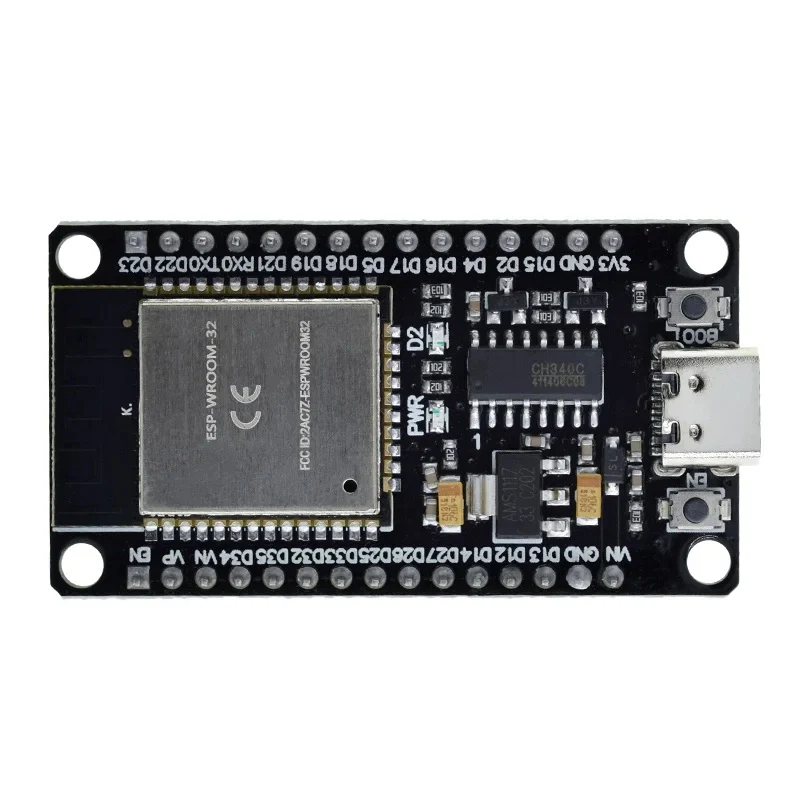
The ESP32 Type-C, manufactured by IRPANGTG, is a powerful and versatile microcontroller module designed for IoT (Internet of Things) applications. It features dual-core processing, integrated Wi-Fi and Bluetooth capabilities, and a USB Type-C interface for power and programming. This module is ideal for projects requiring wireless communication, low power consumption, and high processing power.
Common applications include:
- Smart home devices
- Wearable technology
- Industrial automation
- Wireless sensor networks
- Robotics and drones
Explore Projects Built with esp32 type c
 Open Project in Cirkit Designer
 Open Project in Cirkit Designer
 Open Project in Cirkit Designer
 Open Project in Cirkit Designer
Explore Projects Built with esp32 type c
Open Project in Cirkit DesignerOpen Project in Cirkit DesignerOpen Project in Cirkit DesignerOpen Project in Cirkit DesignerTechnical Specifications
The ESP32 Type-C offers the following key technical details:
| Parameter | Specification |
|---|---|
| Microcontroller | Dual-core Xtensa® 32-bit LX6 CPU |
| Clock Speed | Up to 240 MHz |
| Flash Memory | 4 MB (expandable) |
| SRAM | 520 KB |
| Wireless Connectivity | Wi-Fi 802.11 b/g/n, Bluetooth 4.2 + BLE |
| Operating Voltage | 3.3V |
| Input Voltage (via USB) | 5V (Type-C interface) |
| GPIO Pins | 34 (including ADC, DAC, PWM, I2C, SPI) |
| ADC Resolution | 12-bit |
| DAC Resolution | 8-bit |
| Power Consumption | Ultra-low power modes available |
| Dimensions | 25.5 mm x 18 mm |
Pin Configuration and Descriptions
The ESP32 Type-C module has a total of 34 GPIO pins, each with multiple functionalities. Below is a summary of the pin configuration:
| Pin | Name | Function |
|---|---|---|
| 1 | GND | Ground |
| 2 | 3V3 | 3.3V Power Output |
| 3 | EN | Enable Pin (Active High) |
| 4 | IO0 | GPIO0, Boot Mode Selection |
| 5 | IO1 (TX) | GPIO1, UART TX |
| 6 | IO3 (RX) | GPIO3, UART RX |
| 7 | IO4 | GPIO4, PWM, ADC |
| 8 | IO5 | GPIO5, PWM, ADC |
| ... | ... | ... (Refer to the full datasheet) |
| 34 | IO33 | GPIO33, ADC, DAC |
Note: Some GPIO pins have specific restrictions or are reserved for internal use. Refer to the IRPANGTG datasheet for detailed pin mappings.
Usage Instructions
How to Use the ESP32 Type-C in a Circuit
Powering the Module:
Connect the ESP32 Type-C to a 5V USB Type-C power source. The onboard voltage regulator will step down the voltage to 3.3V for the microcontroller.Programming the Module:
Use the USB Type-C interface to connect the ESP32 to your computer. Install the necessary drivers and use the Arduino IDE or ESP-IDF for programming.Basic Circuit Example:
Connect peripherals (e.g., sensors, LEDs) to the GPIO pins. Ensure that the voltage levels of connected devices are compatible with the 3.3V logic of the ESP32.
Important Considerations and Best Practices
- Voltage Levels: Avoid applying voltages higher than 3.3V to the GPIO pins to prevent damage.
- Boot Mode: To enter programming mode, hold the IO0 pin low while resetting the module.
- Power Consumption: Use deep sleep modes to minimize power usage in battery-powered applications.
- Antenna Placement: Ensure the onboard antenna has sufficient clearance from metal objects to maintain optimal wireless performance.
Example Code for Arduino UNO Integration
Below is an example of using the ESP32 Type-C to control an LED via Wi-Fi:
#include <WiFi.h> // Include the Wi-Fi library

// Replace with your network credentials
const char* ssid = "Your_SSID";
const char* password = "Your_PASSWORD";

void setup() {
  Serial.begin(115200); // Initialize serial communication
  pinMode(2, OUTPUT);   // Set GPIO2 as an output (connected to an LED)

  // Connect to Wi-Fi
  Serial.print("Connecting to Wi-Fi");
  WiFi.begin(ssid, password);
  while (WiFi.status() != WL_CONNECTED) {
    delay(500);
    Serial.print(".");
  }
  Serial.println("\nWi-Fi connected!");
}

void loop() {
  digitalWrite(2, HIGH); // Turn the LED on
  delay(1000);           // Wait for 1 second
  digitalWrite(2, LOW);  // Turn the LED off
  delay(1000);           // Wait for 1 second
}
Note: Replace
Your_SSIDandYour_PASSWORDwith your Wi-Fi network credentials.
Troubleshooting and FAQs
Common Issues and Solutions
ESP32 Not Detected by Computer:
- Ensure the USB Type-C cable supports data transfer (not just charging).
- Install the correct USB-to-serial drivers for the ESP32.
Wi-Fi Connection Fails:
- Double-check the SSID and password.
- Ensure the Wi-Fi network is within range and supports 2.4 GHz (ESP32 does not support 5 GHz).
GPIO Pin Malfunction:
- Verify that the pin is not being used for another function (e.g., boot mode).
- Check for short circuits or incorrect voltage levels.
High Power Consumption:
- Use deep sleep modes when the module is idle.
- Disconnect unused peripherals to reduce power draw.
FAQs
Q: Can the ESP32 Type-C be powered by a battery?
A: Yes, you can use a 3.7V LiPo battery with a suitable voltage regulator to provide 3.3V to the module.Q: Does the ESP32 Type-C support OTA (Over-The-Air) updates?
A: Yes, the ESP32 supports OTA updates, allowing you to upload new firmware wirelessly.Q: Can I use the ESP32 Type-C with MicroPython?
A: Yes, the ESP32 is compatible with MicroPython. You can flash the MicroPython firmware to the module and program it using Python.
For further assistance, refer to the official IRPANGTG ESP32 Type-C datasheet or community forums.