
How to Use IRLZ44N: Examples, Pinouts, and Specs
 Design with IRLZ44N in Cirkit Designer
Introduction
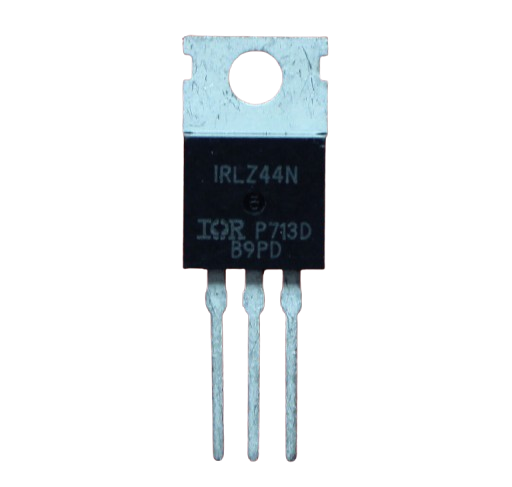
The IRLZ44N is an N-channel Power MOSFET manufactured by Infineon Technologies. It is designed for high-speed switching applications and features a low on-resistance, enabling it to handle high currents efficiently. This makes it ideal for use in power management, motor control, and other high-current electronic circuits. Its logic-level gate drive capability allows it to be directly controlled by microcontrollers like the Arduino UNO, making it a popular choice for hobbyists and professionals alike.
Explore Projects Built with IRLZ44N
 Open Project in Cirkit Designer
 Open Project in Cirkit Designer
 Open Project in Cirkit Designer
 Open Project in Cirkit Designer
Explore Projects Built with IRLZ44N
Open Project in Cirkit DesignerOpen Project in Cirkit DesignerOpen Project in Cirkit DesignerOpen Project in Cirkit DesignerCommon Applications
- DC motor control
- LED lighting systems
- Power supply circuits
- Battery management systems
- High-speed switching in industrial applications
Technical Specifications
Key Specifications
| Parameter | Value |
|---|---|
| Manufacturer | Infineon Technologies |
| Part Number | IRLZ44N |
| Type | N-Channel Power MOSFET |
| Maximum Drain-Source Voltage (VDS) | 55V |
| Maximum Gate-Source Voltage (VGS) | ±16V |
| Continuous Drain Current (ID) | 47A (at 25°C) |
| Pulsed Drain Current (IDM) | 160A |
| On-Resistance (RDS(on)) | 0.022Ω (at VGS = 10V) |
| Power Dissipation (PD) | 94W |
| Gate Threshold Voltage (VGS(th)) | 1V to 2V |
| Operating Temperature Range | -55°C to +175°C |
| Package Type | TO-220 |
Pin Configuration
The IRLZ44N comes in a TO-220 package with three pins. The pin configuration is as follows:
| Pin Number | Pin Name | Description |
|---|---|---|
| 1 | Gate | Controls the MOSFET switching |
| 2 | Drain | Current flows into this pin |
| 3 | Source | Current flows out of this pin |
Usage Instructions
How to Use the IRLZ44N in a Circuit
- Gate Control: The IRLZ44N is a logic-level MOSFET, meaning it can be directly driven by a microcontroller like an Arduino UNO. Apply a voltage of 5V to the Gate pin to turn the MOSFET on.
- Drain-Source Current Flow: When the Gate is activated, current flows from the Drain to the Source. Ensure the load is connected between the Drain and the positive voltage supply.
- Source Connection: Connect the Source pin to the ground of the circuit.
- Gate Resistor: Use a resistor (typically 220Ω to 1kΩ) between the microcontroller pin and the Gate to limit inrush current and protect the microcontroller.
- Flyback Diode: When driving inductive loads like motors or relays, connect a flyback diode across the load to protect the MOSFET from voltage spikes.
Example Circuit with Arduino UNO
Below is an example of how to use the IRLZ44N to control a DC motor with an Arduino UNO:
Circuit Connections
- Gate: Connect to Arduino digital pin (e.g., D9) through a 220Ω resistor.
- Drain: Connect to one terminal of the motor.
- Source: Connect to ground.
- Motor: Connect the other terminal to the positive voltage supply (e.g., 12V).
- Flyback Diode: Place a diode (e.g., 1N4007) across the motor terminals, with the cathode connected to the positive supply.
Arduino Code
// Define the pin connected to the MOSFET Gate
const int mosfetGatePin = 9;

void setup() {
  pinMode(mosfetGatePin, OUTPUT); // Set the Gate pin as an output
}

void loop() {
  digitalWrite(mosfetGatePin, HIGH); // Turn the MOSFET on (motor runs)
  delay(1000); // Keep the motor running for 1 second
  digitalWrite(mosfetGatePin, LOW);  // Turn the MOSFET off (motor stops)
  delay(1000); // Wait for 1 second before repeating
}
Important Considerations
- Heat Dissipation: The IRLZ44N can handle high currents, but it may generate heat. Use a heatsink if operating near its maximum current rating.
- Voltage Ratings: Ensure the voltage across the Drain-Source and Gate-Source does not exceed the maximum ratings (55V and ±16V, respectively).
- Static Sensitivity: MOSFETs are sensitive to static electricity. Handle the component with care and use anti-static precautions.
Troubleshooting and FAQs
Common Issues
MOSFET Not Switching On
- Cause: Insufficient Gate voltage.
- Solution: Ensure the Gate voltage is at least 5V for proper switching.
Excessive Heat Generation
- Cause: High current or insufficient cooling.
- Solution: Use a heatsink or reduce the load current.
Motor Not Running
- Cause: Incorrect wiring or damaged MOSFET.
- Solution: Double-check the circuit connections and replace the MOSFET if necessary.
Voltage Spikes Damaging the MOSFET
- Cause: Inductive load without a flyback diode.
- Solution: Add a flyback diode across the load.
FAQs
Can the IRLZ44N be used with a 3.3V microcontroller?
- Yes, but ensure the Gate voltage is sufficient to fully turn on the MOSFET. A Gate voltage of 3.3V may result in higher on-resistance.
What is the maximum current the IRLZ44N can handle?
- The IRLZ44N can handle up to 47A continuously at 25°C, but proper cooling is required.
Is the IRLZ44N suitable for PWM applications?
- Yes, the IRLZ44N is designed for high-speed switching and works well in PWM applications.
Do I need a Gate resistor?
- While not strictly necessary, a Gate resistor (220Ω to 1kΩ) is recommended to limit inrush current and protect the microcontroller.
By following these guidelines and best practices, the IRLZ44N can be effectively used in a wide range of electronic applications.