
Cirkit Designer
Your all-in-one circuit design IDE
Home /
Component Documentation
How to Use Sim800l: Examples, Pinouts, and Specs
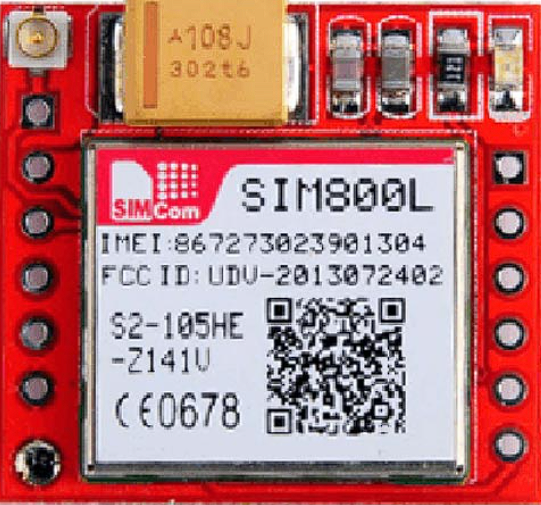
 Design with Sim800l in Cirkit Designer
Introduction
The SIM800L is a compact GSM/GPRS module that enables communication over mobile networks. It supports SMS, voice calls, and data transmission, making it an essential component for IoT applications, remote monitoring, and embedded systems. Its small size and low power consumption make it suitable for portable and battery-powered devices. The module operates on quad-band frequencies, ensuring compatibility with most mobile networks worldwide.
Explore Projects Built with Sim800l
Arduino UNO and SIM800L SMS Communication System
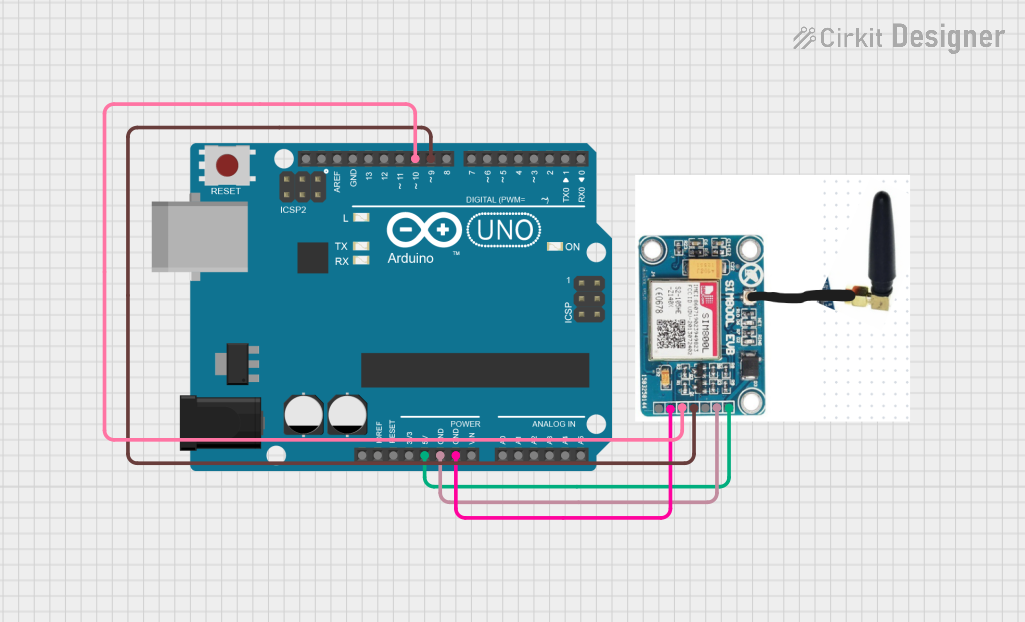
This circuit integrates an Arduino UNO with a SIM 800L module to enable SMS communication. The Arduino controls the SIM 800L module via software serial communication, allowing it to send and receive SMS messages based on commands received from the serial monitor.
Open Project in Cirkit DesignerArduino UNO and SIM800L SMS Communication System
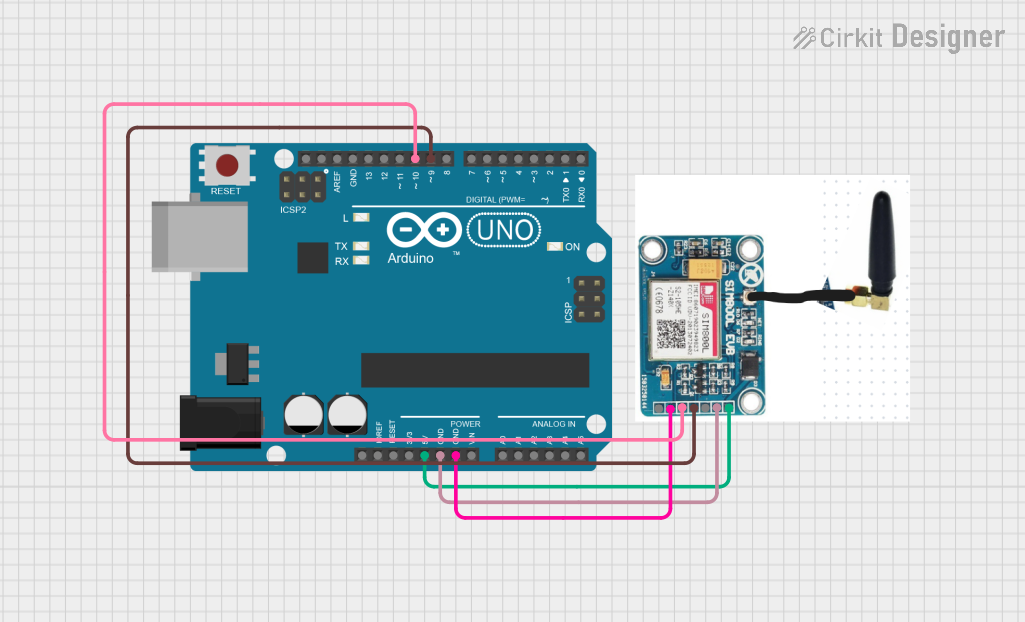
This circuit consists of an Arduino UNO connected to a SIM 800L GSM module. The Arduino UNO communicates with the SIM 800L module via software serial to send and receive SMS messages, with the Arduino providing power and ground connections to the GSM module.
Open Project in Cirkit DesignerArduino UNO and Sim800L GSM Module-Based Battery-Powered Smart Light Control System
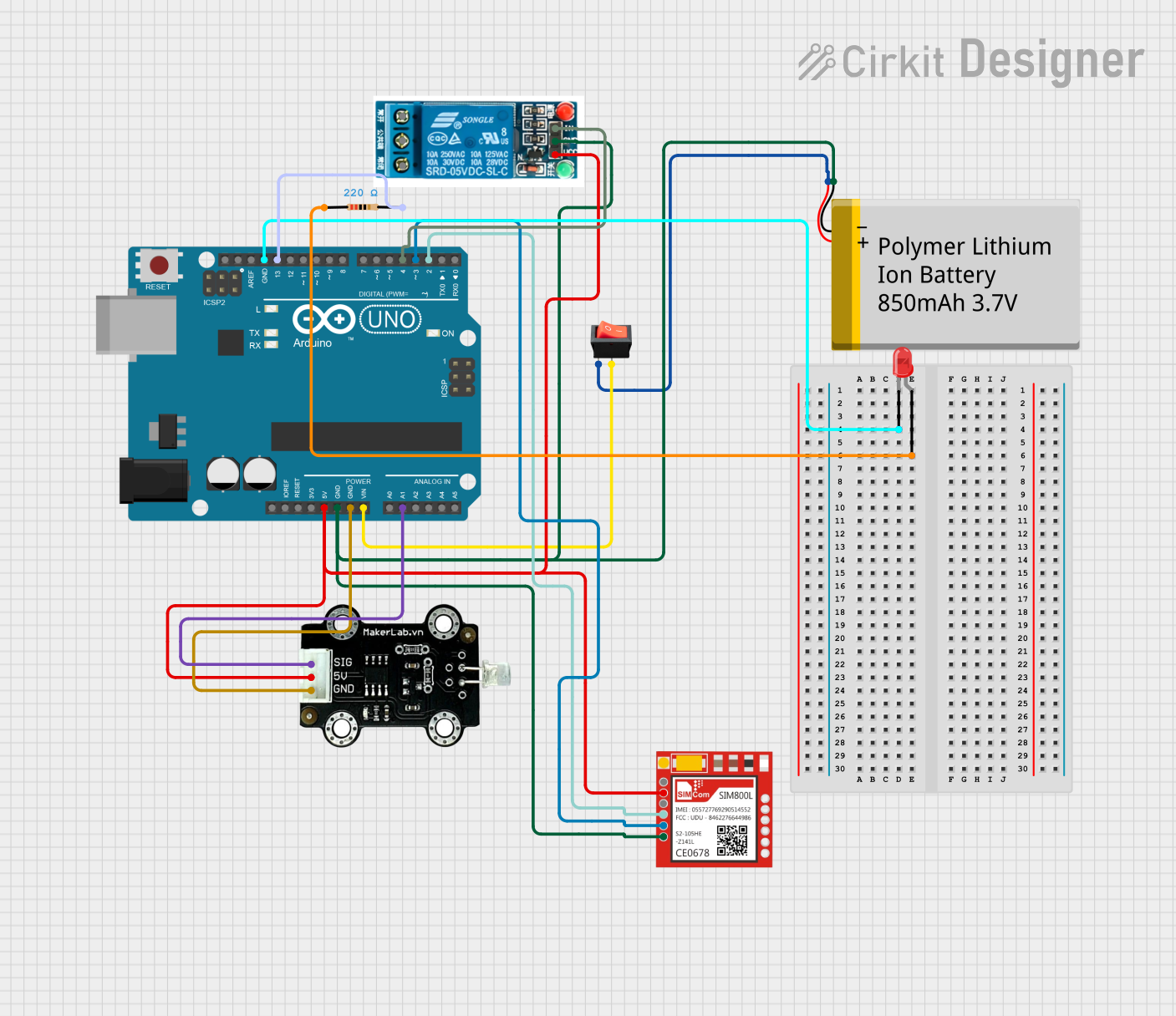
This circuit integrates an Arduino UNO with a SIM800L GSM module, a photo diode light sensor, a relay, and an LED. The Arduino controls the relay and LED based on input from the light sensor and communicates with the SIM800L for GSM functionalities. Power is supplied by a lithium-ion battery, with a rocker switch for power control.
Open Project in Cirkit DesignerArduino UNO and SIM800L GSM Module for Wireless Communication with LM2596 Power Regulation
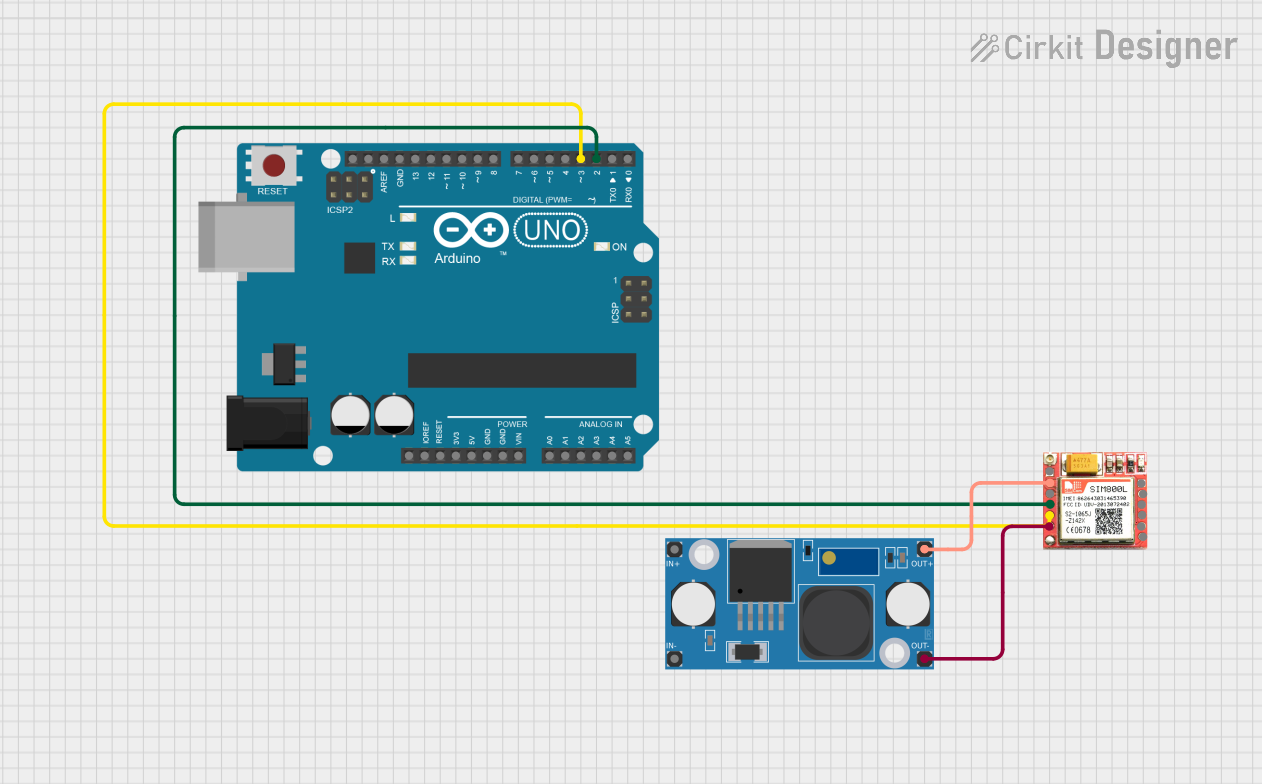
This circuit features an Arduino UNO microcontroller interfaced with a SIM 800L GSM module for communication purposes. The SIM 800L is powered by an LM2596 step-down module, which provides the necessary voltage regulation. The Arduino communicates with the SIM 800L via digital pins D2 and D3 for RX and TX respectively.
Open Project in Cirkit DesignerExplore Projects Built with Sim800l
Arduino UNO and SIM800L SMS Communication System
This circuit integrates an Arduino UNO with a SIM 800L module to enable SMS communication. The Arduino controls the SIM 800L module via software serial communication, allowing it to send and receive SMS messages based on commands received from the serial monitor.
Open Project in Cirkit DesignerArduino UNO and SIM800L SMS Communication System
This circuit consists of an Arduino UNO connected to a SIM 800L GSM module. The Arduino UNO communicates with the SIM 800L module via software serial to send and receive SMS messages, with the Arduino providing power and ground connections to the GSM module.
Open Project in Cirkit DesignerArduino UNO and Sim800L GSM Module-Based Battery-Powered Smart Light Control System
This circuit integrates an Arduino UNO with a SIM800L GSM module, a photo diode light sensor, a relay, and an LED. The Arduino controls the relay and LED based on input from the light sensor and communicates with the SIM800L for GSM functionalities. Power is supplied by a lithium-ion battery, with a rocker switch for power control.
Open Project in Cirkit DesignerArduino UNO and SIM800L GSM Module for Wireless Communication with LM2596 Power Regulation
This circuit features an Arduino UNO microcontroller interfaced with a SIM 800L GSM module for communication purposes. The SIM 800L is powered by an LM2596 step-down module, which provides the necessary voltage regulation. The Arduino communicates with the SIM 800L via digital pins D2 and D3 for RX and TX respectively.
Open Project in Cirkit DesignerCommon Applications
- Internet of Things (IoT) devices
- Remote monitoring and control systems
- Home automation
- GPS tracking systems
- SMS-based alert systems
- Voice communication in embedded systems
Technical Specifications
Key Technical Details
| Parameter | Value |
|---|---|
| Operating Voltage | 3.4V to 4.4V |
| Recommended Voltage | 4.0V |
| Power Consumption | Idle: ~1mA, Active: ~250mA, Peak: ~2A |
| Frequency Bands | Quad-band: 850/900/1800/1900 MHz |
| Communication Protocols | GSM, GPRS (Class 12) |
| Data Rate | GPRS: Up to 85.6 kbps |
| SIM Card Support | Micro SIM |
| Operating Temperature | -40°C to +85°C |
| Dimensions | 25mm x 23mm x 3mm |
Pin Configuration and Descriptions
| Pin Name | Pin Number | Description |
|---|---|---|
| VCC | 1 | Power supply input (3.4V to 4.4V) |
| GND | 2 | Ground |
| RXD | 3 | UART Receive pin (connect to TX of MCU) |
| TXD | 4 | UART Transmit pin (connect to RX of MCU) |
| RST | 5 | Reset pin (active low) |
| NET | 6 | Network status LED output |
| ANT | 7 | Antenna connection |
Usage Instructions
How to Use the SIM800L in a Circuit
- Power Supply: Ensure the module is powered with a stable voltage between 3.4V and 4.4V. A 4.0V power source is recommended. Use a capacitor (e.g., 1000µF) near the module to handle peak current demands.
- Antenna: Connect an external antenna to the ANT pin for reliable network connectivity.
- Microcontroller Interface: Connect the RXD and TXD pins to the TX and RX pins of your microcontroller, respectively. Use a logic level converter if your microcontroller operates at 5V logic.
- SIM Card: Insert a micro SIM card into the SIM card slot.
- Reset: Use the RST pin to reset the module if needed. Pull the pin low for at least 100ms to reset.
Important Considerations
- Power Supply: The module can draw up to 2A during transmission. Ensure your power supply can handle this peak current.
- Logic Levels: The SIM800L operates at 3.3V logic. Use a level shifter if interfacing with a 5V microcontroller.
- Antenna Placement: Place the antenna away from other components to avoid interference.
- Network Compatibility: Verify that your SIM card supports 2G networks, as the SIM800L does not support 3G or 4G.
Example: Connecting SIM800L to Arduino UNO
Below is an example of how to send an SMS using the SIM800L and Arduino UNO.
Circuit Connections
| SIM800L Pin | Arduino UNO Pin |
|---|---|
| VCC | External 4.0V |
| GND | GND |
| RXD | Pin 10 (via level shifter) |
| TXD | Pin 11 |
| RST | Pin 9 |
Arduino Code
#include <SoftwareSerial.h>

// Define RX and TX pins for SoftwareSerial
SoftwareSerial sim800l(10, 11); // RX = Pin 10, TX = Pin 11

void setup() {
  // Initialize serial communication
  Serial.begin(9600); // For debugging
  sim800l.begin(9600); // For SIM800L communication

  // Wait for the module to initialize
  delay(1000);
  Serial.println("Initializing SIM800L...");

  // Send AT command to check communication
  sim800l.println("AT");
  delay(1000);
  if (sim800l.available()) {
    Serial.println("SIM800L is ready.");
  } else {
    Serial.println("No response from SIM800L.");
  }

  // Send SMS
  sendSMS("+1234567890", "Hello from SIM800L!");
}

void loop() {
  // Nothing to do here
}

void sendSMS(const char* phoneNumber, const char* message) {
  sim800l.println("AT+CMGF=1"); // Set SMS mode to text
  delay(1000);

  sim800l.print("AT+CMGS=\"");
  sim800l.print(phoneNumber); // Set recipient phone number
  sim800l.println("\"");
  delay(1000);

  sim800l.print(message); // Write the SMS content
  delay(1000);

  sim800l.write(26); // Send Ctrl+Z to send the SMS
  delay(5000);

  Serial.println("SMS sent!");
}
Troubleshooting and FAQs
Common Issues
No Network Connection:
- Ensure the antenna is properly connected.
- Verify that the SIM card is active and supports 2G networks.
- Check the power supply for stability.
Module Not Responding:
- Confirm the RXD and TXD connections are correct.
- Ensure the module is powered with the correct voltage.
- Reset the module using the RST pin.
SMS Not Sending:
- Verify the phone number format (e.g., include the country code).
- Check the SIM card balance and SMS service availability.
Tips for Troubleshooting
- Use a multimeter to check the voltage at the VCC pin.
- Test the module with basic AT commands (e.g., "AT" and "AT+CSQ") to verify communication.
- Place decoupling capacitors near the module to reduce noise and voltage drops.
By following this documentation, you can effectively integrate the SIM800L module into your projects and troubleshoot common issues.