
How to Use DC 5V: Examples, Pinouts, and Specs
 Design with DC 5V in Cirkit Designer
Introduction
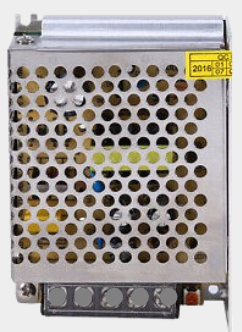
The DC 5V power supply is a direct current power source that provides a constant output voltage of 5 volts. It is widely used in powering electronic devices, microcontrollers, sensors, and other low-power circuits. This component is essential in applications where stable and reliable power is required, such as in embedded systems, prototyping, and consumer electronics.
Explore Projects Built with DC 5V
 Open Project in Cirkit Designer
 Open Project in Cirkit Designer
 Open Project in Cirkit Designer
 Open Project in Cirkit Designer
Explore Projects Built with DC 5V
Open Project in Cirkit DesignerOpen Project in Cirkit DesignerOpen Project in Cirkit DesignerOpen Project in Cirkit DesignerCommon Applications and Use Cases
- Powering microcontrollers like Arduino, Raspberry Pi, and ESP32
- Supplying power to sensors, modules, and small motors
- Charging USB-powered devices
- Providing a stable voltage source for breadboard prototyping
- Used in IoT devices and wearable electronics
Technical Specifications
Below are the key technical details of the DC 5V power supply:
| Parameter | Value |
|---|---|
| Manufacturer | DC |
| Manufacturer Part ID | DC |
| Output Voltage | 5V DC |
| Input Voltage Range | Typically 100-240V AC (for adapters) |
| Output Current | Varies (commonly 500mA to 2A) |
| Power Rating | Depends on the model (e.g., 10W) |
| Efficiency | Typically 80-90% |
| Connector Type | USB, barrel jack, or terminal block |
| Operating Temperature | 0°C to 50°C |
| Storage Temperature | -20°C to 85°C |
Pin Configuration and Descriptions
The DC 5V power supply typically has two output terminals or pins:
| Pin | Name | Description |
|---|---|---|
| 1 | VCC (+) | Positive terminal providing +5V DC output |
| 2 | GND (-) | Ground terminal for completing the circuit |
For USB-based DC 5V supplies, the pinout follows the USB standard:
| Pin | Name | Description |
|---|---|---|
| 1 | VBUS (+5V) | Positive terminal providing +5V DC output |
| 2 | D- | Data line (not used for power supply purposes) |
| 3 | D+ | Data line (not used for power supply purposes) |
| 4 | GND (-) | Ground terminal for completing the circuit |
Usage Instructions
How to Use the DC 5V Power Supply in a Circuit
- Connect the Output Terminals:
- Connect the VCC (+) terminal of the power supply to the positive rail of your circuit.
- Connect the GND (-) terminal to the ground rail of your circuit.
- Verify Voltage Requirements: Ensure that the components in your circuit are rated for 5V operation to avoid damage.
- Use Proper Connectors: If using a USB-based power supply, ensure the USB cable and connector are compatible and in good condition.
- Power On the Supply: Plug in the power supply to an AC outlet (if applicable) and switch it on.
Important Considerations and Best Practices
- Avoid Overloading: Ensure the total current draw of your circuit does not exceed the maximum current rating of the power supply.
- Use Decoupling Capacitors: Place capacitors (e.g., 0.1µF and 10µF) near the power pins of sensitive components to reduce noise.
- Check Polarity: Always double-check the polarity of connections to prevent damage to components.
- Heat Dissipation: If the power supply gets warm during operation, ensure proper ventilation to avoid overheating.
- Use Fuses or Protection Circuits: Add a fuse or overcurrent protection circuit to safeguard your components.
Example: Connecting to an Arduino UNO
The DC 5V power supply can be used to power an Arduino UNO via its 5V pin or USB port. Below is an example of powering an Arduino UNO and blinking an LED:
Circuit Connections
- Connect the VCC (+) terminal of the DC 5V power supply to the 5V pin of the Arduino UNO.
- Connect the GND (-) terminal to the GND pin of the Arduino UNO.
- Connect an LED to pin 13 of the Arduino UNO with a 220-ohm resistor in series.
Arduino Code
// This code blinks an LED connected to pin 13 of the Arduino UNO.
// Ensure the DC 5V power supply is properly connected to the Arduino.

void setup() {
  pinMode(13, OUTPUT); // Set pin 13 as an output pin
}

void loop() {
  digitalWrite(13, HIGH); // Turn the LED on
  delay(1000);            // Wait for 1 second
  digitalWrite(13, LOW);  // Turn the LED off
  delay(1000);            // Wait for 1 second
}
Troubleshooting and FAQs
Common Issues and Solutions
No Output Voltage:
- Check if the power supply is properly connected to the AC source.
- Verify that the power switch (if present) is turned on.
- Inspect the output terminals for loose connections.
Overheating:
- Ensure the power supply is not overloaded. Reduce the current draw if necessary.
- Provide adequate ventilation to dissipate heat.
Voltage Drop:
- Check for long or thin wires causing resistance in the circuit.
- Use thicker wires or shorter connections to minimize voltage drop.
Interference or Noise:
- Add decoupling capacitors near sensitive components.
- Use a regulated DC 5V power supply to ensure stable output.
FAQs
Q1: Can I use the DC 5V power supply to charge my smartphone?
A1: Yes, if the power supply has a USB output and meets the current requirements of your smartphone.
Q2: What happens if I connect a 3.3V device to the DC 5V supply?
A2: Connecting a 3.3V device to a 5V supply may damage the device. Use a voltage regulator or level shifter to step down the voltage.
Q3: Can I use this power supply with an Arduino Nano?
A3: Yes, the DC 5V power supply can be connected to the 5V pin or USB port of the Arduino Nano.
Q4: How do I know if my power supply is regulated?
A4: Check the product specifications or measure the output voltage under varying loads. A regulated power supply maintains a constant voltage.
By following this documentation, you can effectively use the DC 5V power supply in your projects while ensuring safety and reliability.