
How to Use 3 way switch: Examples, Pinouts, and Specs
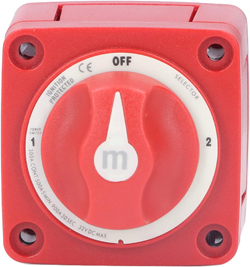
 Design with 3 way switch in Cirkit Designer
Introduction
A 3-way switch is a type of electrical switch that allows control of a single light or electrical device from two different locations. This functionality is commonly used in hallways, staircases, or large rooms where controlling a light from multiple points is convenient. The 3-way switch is a fundamental component in residential and commercial electrical systems, offering both functionality and flexibility.
Explore Projects Built with 3 way switch
 Open Project in Cirkit Designer
 Open Project in Cirkit Designer
 Open Project in Cirkit Designer
 Open Project in Cirkit Designer
Explore Projects Built with 3 way switch
Open Project in Cirkit DesignerOpen Project in Cirkit DesignerOpen Project in Cirkit DesignerOpen Project in Cirkit DesignerCommon Applications and Use Cases
- Controlling hallway or staircase lighting from both ends.
- Managing lighting in large rooms with multiple entry points.
- Enhancing convenience and energy efficiency in residential and commercial spaces.
Technical Specifications
The 3-way switch has three terminals and operates by redirecting the electrical current between two traveler wires. Below are the key technical details:
Key Technical Details
- Voltage Rating: Typically 120V or 240V AC (depending on the region and application).
- Current Rating: Commonly 15A or 20A.
- Number of Terminals: 3 (Common, Traveler 1, Traveler 2).
- Switch Type: SPDT (Single Pole Double Throw).
- Material: Plastic or metal housing with copper or brass terminals.
Pin Configuration and Descriptions
The 3-way switch has three terminals, as described in the table below:
| Terminal Name | Description |
|---|---|
| Common | Connects to the power source or the load (light or device). |
| Traveler 1 | Connects to one of the traveler wires, which links to the second 3-way switch. |
| Traveler 2 | Connects to the other traveler wire, which links to the second 3-way switch. |
Usage Instructions
How to Use the 3-Way Switch in a Circuit
To use a 3-way switch, you will need two 3-way switches and a light or electrical device. The switches are connected via two traveler wires, and the circuit is completed with a common wire. Below is a step-by-step guide:
- Turn Off Power: Before starting, turn off the power at the circuit breaker to ensure safety.
- Connect the Common Terminal:
- On the first switch, connect the common terminal to the power source.
- On the second switch, connect the common terminal to the load (light or device).
- Connect the Traveler Wires:
- Use two traveler wires to connect the traveler terminals of the first switch to the corresponding traveler terminals of the second switch.
- Ground the Switches:
- Connect the ground wire to the ground terminal on both switches.
- Test the Circuit:
- Restore power and test the switches to ensure the light or device can be controlled from both locations.
Important Considerations and Best Practices
- Always follow local electrical codes and regulations when installing a 3-way switch.
- Use a voltage tester to confirm that the power is off before working on the circuit.
- Label the traveler wires to avoid confusion during installation.
- Ensure all connections are secure to prevent loose wires or short circuits.
Arduino Integration
While a 3-way switch is typically used in AC circuits, it can be simulated in low-voltage DC circuits for educational purposes. Below is an example of how to simulate a 3-way switch using an Arduino UNO and two push buttons:
// Simulating a 3-way switch with Arduino
// Two push buttons control an LED, mimicking a 3-way switch setup.

const int button1 = 2; // Pin for first button
const int button2 = 3; // Pin for second button
const int led = 13;    // Pin for LED

bool ledState = false; // Tracks the LED state

void setup() {
  pinMode(button1, INPUT_PULLUP); // Set button1 as input with pull-up resistor
  pinMode(button2, INPUT_PULLUP); // Set button2 as input with pull-up resistor
  pinMode(led, OUTPUT);           // Set LED pin as output
}

void loop() {
  // Check if button1 is pressed
  if (digitalRead(button1) == LOW) {
    delay(200); // Debounce delay
    ledState = !ledState; // Toggle LED state
    digitalWrite(led, ledState);
  }

  // Check if button2 is pressed
  if (digitalRead(button2) == LOW) {
    delay(200); // Debounce delay
    ledState = !ledState; // Toggle LED state
    digitalWrite(led, ledState);
  }
}
Troubleshooting and FAQs
Common Issues and Solutions
Light Does Not Turn On:
- Ensure the power is turned on at the circuit breaker.
- Check all wire connections for loose or incorrect wiring.
- Verify that the light bulb is functional.
Switches Do Not Work as Expected:
- Confirm that the traveler wires are correctly connected between the two switches.
- Ensure the common terminal is connected to the correct wire (power source or load).
Flickering Light:
- Check for loose connections or damaged wires.
- Ensure the switches are rated for the voltage and current of the circuit.
FAQs
Q: Can I use a 3-way switch to control multiple lights?
A: Yes, you can connect multiple lights in parallel to the load terminal of the second 3-way switch.
Q: What is the difference between a 3-way switch and a regular switch?
A: A regular switch (single-pole) controls a light from one location, while a 3-way switch allows control from two locations.
Q: Do I need special wiring for a 3-way switch?
A: Yes, a 3-way switch requires two traveler wires in addition to the common and ground wires.
By following this documentation, you can successfully install and troubleshoot a 3-way switch in your electrical system.