
How to Use stm32 bluepill: Examples, Pinouts, and Specs
 Design with stm32 bluepill in Cirkit Designer
Introduction
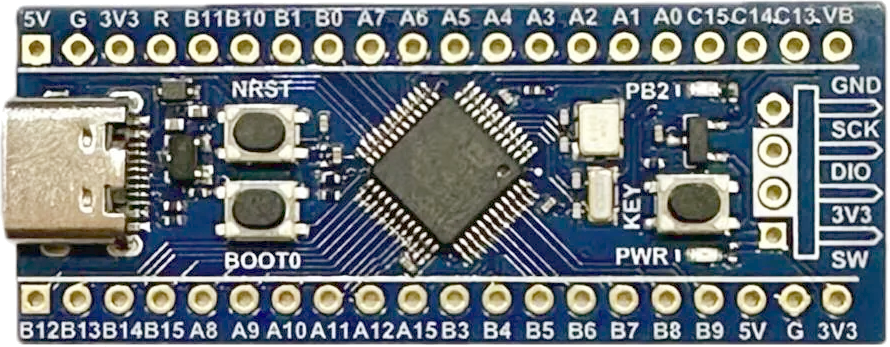
The STM32 Blue Pill is a low-cost development board manufactured by Bluepill, featuring the STM32F103C8T6 microcontroller. It is based on the ARM Cortex-M3 architecture and is widely used for prototyping and embedded systems projects. Its compact size, affordability, and versatility make it a popular choice among hobbyists and professionals alike.
Explore Projects Built with stm32 bluepill
 Open Project in Cirkit Designer
 Open Project in Cirkit Designer
 Open Project in Cirkit Designer
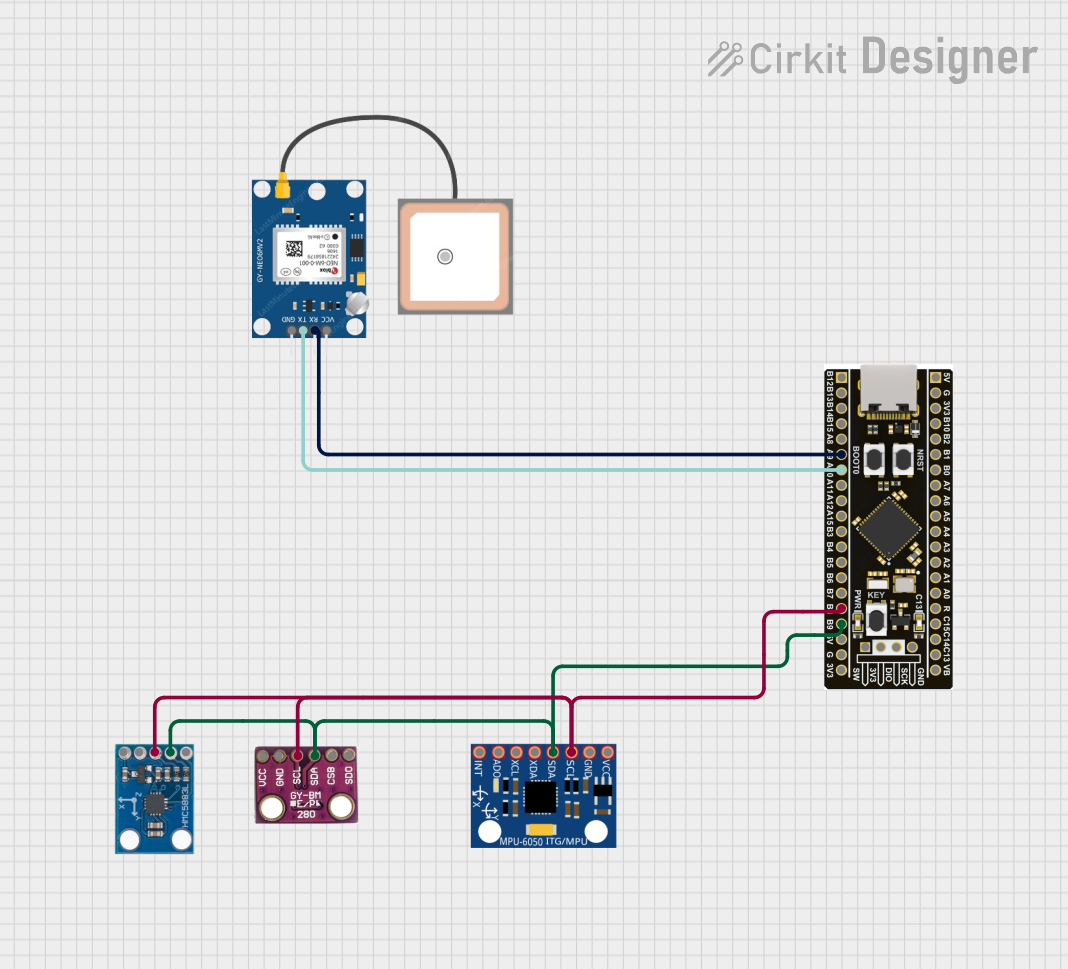 Open Project in Cirkit Designer
Explore Projects Built with stm32 bluepill
Open Project in Cirkit DesignerOpen Project in Cirkit DesignerOpen Project in Cirkit DesignerOpen Project in Cirkit DesignerCommon Applications and Use Cases
- Embedded systems and IoT projects
- Robotics and automation
- Sensor interfacing and data acquisition
- Prototyping for ARM-based applications
- Educational purposes for learning ARM microcontrollers
Technical Specifications
The STM32 Blue Pill is equipped with the STM32F103C8T6 microcontroller, offering the following key specifications:
| Parameter | Value |
|---|---|
| Microcontroller | STM32F103C8T6 |
| Core | ARM Cortex-M3 |
| Operating Frequency | 72 MHz |
| Flash Memory | 64 KB |
| SRAM | 20 KB |
| GPIO Pins | 37 |
| Communication Interfaces | USART, SPI, I2C, CAN, USB |
| ADC Channels | 10 (12-bit resolution) |
| PWM Channels | 15 |
| Operating Voltage | 3.3V |
| Input Voltage Range | 5V (via USB) or 7-12V (via VIN) |
| Dimensions | 53 mm x 22 mm |
Pin Configuration and Descriptions
The STM32 Blue Pill has a total of 32 GPIO pins, which can be configured for various functions. Below is the pinout description:
| Pin | Function | Description |
|---|---|---|
| PA0-PA15 | GPIO, ADC, PWM, USART, SPI | General-purpose I/O pins with alternate functions |
| PB0-PB15 | GPIO, ADC, PWM, USART, SPI | General-purpose I/O pins with alternate functions |
| PC13-PC15 | GPIO | General-purpose I/O pins |
| 3.3V | Power | 3.3V output for powering external components |
| 5V | Power | 5V input/output |
| GND | Ground | Ground connection |
| NRST | Reset | Reset pin for the microcontroller |
| BOOT0 | Boot Mode Selection | Used to select boot mode (Flash, RAM, or System Memory) |
| USB D+ | USB Data+ | USB communication |
| USB D- | USB Data- | USB communication |
Usage Instructions
How to Use the STM32 Blue Pill in a Circuit
Powering the Board:
- Use the micro-USB port to power the board with 5V.
- Alternatively, supply 7-12V to the VIN pin or 3.3V directly to the 3.3V pin.
Programming the Board:
- The STM32 Blue Pill can be programmed using various tools, such as:
- ST-Link: A hardware debugger/programmer.
- USB-to-Serial Adapter: Connect to the USART1 pins (PA9 for TX, PA10 for RX).
- Arduino IDE: Install the STM32duino core to program the board using Arduino syntax.
- PlatformIO: A professional development environment supporting STM32.
- The STM32 Blue Pill can be programmed using various tools, such as:
Boot Mode Selection:
- Set the BOOT0 pin to
0(GND) for normal operation (boot from Flash memory). - Set the BOOT0 pin to
1(VCC) to boot into the system memory for programming.
- Set the BOOT0 pin to
Connecting Peripherals:
- Use the GPIO pins for interfacing with sensors, actuators, and other devices.
- Configure the pins in software for the desired function (e.g., input, output, alternate function).
Important Considerations and Best Practices
- Voltage Levels: The STM32 Blue Pill operates at 3.3V logic levels. Ensure that external components are compatible or use level shifters.
- USB Connectivity: Install the appropriate USB drivers for your operating system to enable USB communication.
- Clock Configuration: The default clock speed is 72 MHz. Ensure proper clock initialization in your code.
- Bootloader: Some boards may not come with a pre-installed bootloader. Use an ST-Link or USB-to-Serial adapter to flash the bootloader if needed.
Example Code for Arduino IDE
Below is an example of blinking an LED connected to pin PC13 using the Arduino IDE:
// Define the LED pin
#define LED_PIN PC13

void setup() {
  pinMode(LED_PIN, OUTPUT); // Set PC13 as an output pin
}

void loop() {
  digitalWrite(LED_PIN, HIGH); // Turn the LED on
  delay(500);                 // Wait for 500 milliseconds
  digitalWrite(LED_PIN, LOW);  // Turn the LED off
  delay(500);                 // Wait for 500 milliseconds
}
Troubleshooting and FAQs
Common Issues and Solutions
The board is not detected via USB:
- Ensure the correct USB drivers are installed.
- Check the USB cable for data transfer capability (some cables are power-only).
- Verify that the BOOT0 pin is set to
0for normal operation.
Unable to upload code:
- Confirm that the correct COM port is selected in your programming environment.
- If using a USB-to-Serial adapter, ensure proper connections to PA9 (TX) and PA10 (RX).
- Check if the board requires a bootloader to be flashed.
The board is overheating:
- Verify that the input voltage does not exceed the recommended range.
- Check for short circuits in your circuit connections.
GPIO pins are not functioning as expected:
- Ensure the pins are properly configured in your code (e.g., input, output, alternate function).
- Check for conflicting pin assignments in your project.
FAQs
Q: Can I use the STM32 Blue Pill with the Arduino IDE?
A: Yes, you can use the Arduino IDE by installing the STM32duino core. This allows you to program the board using Arduino syntax.
Q: What is the maximum current output of the GPIO pins?
A: Each GPIO pin can source or sink up to 20 mA. However, it is recommended to limit the current to 8 mA for long-term reliability.
Q: How do I reset the board?
A: Press the onboard reset button or pull the NRST pin low to reset the microcontroller.
Q: Can I use the STM32 Blue Pill for USB communication?
A: Yes, the board supports USB communication. You may need to configure the USB peripheral in your code.
Q: What is the purpose of the BOOT0 pin?
A: The BOOT0 pin is used to select the boot mode (Flash memory, RAM, or System Memory). It is typically set to 0 for normal operation.