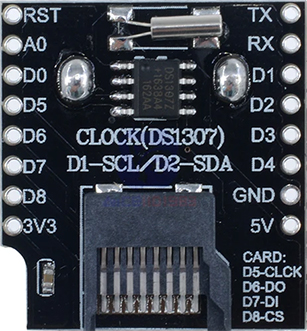
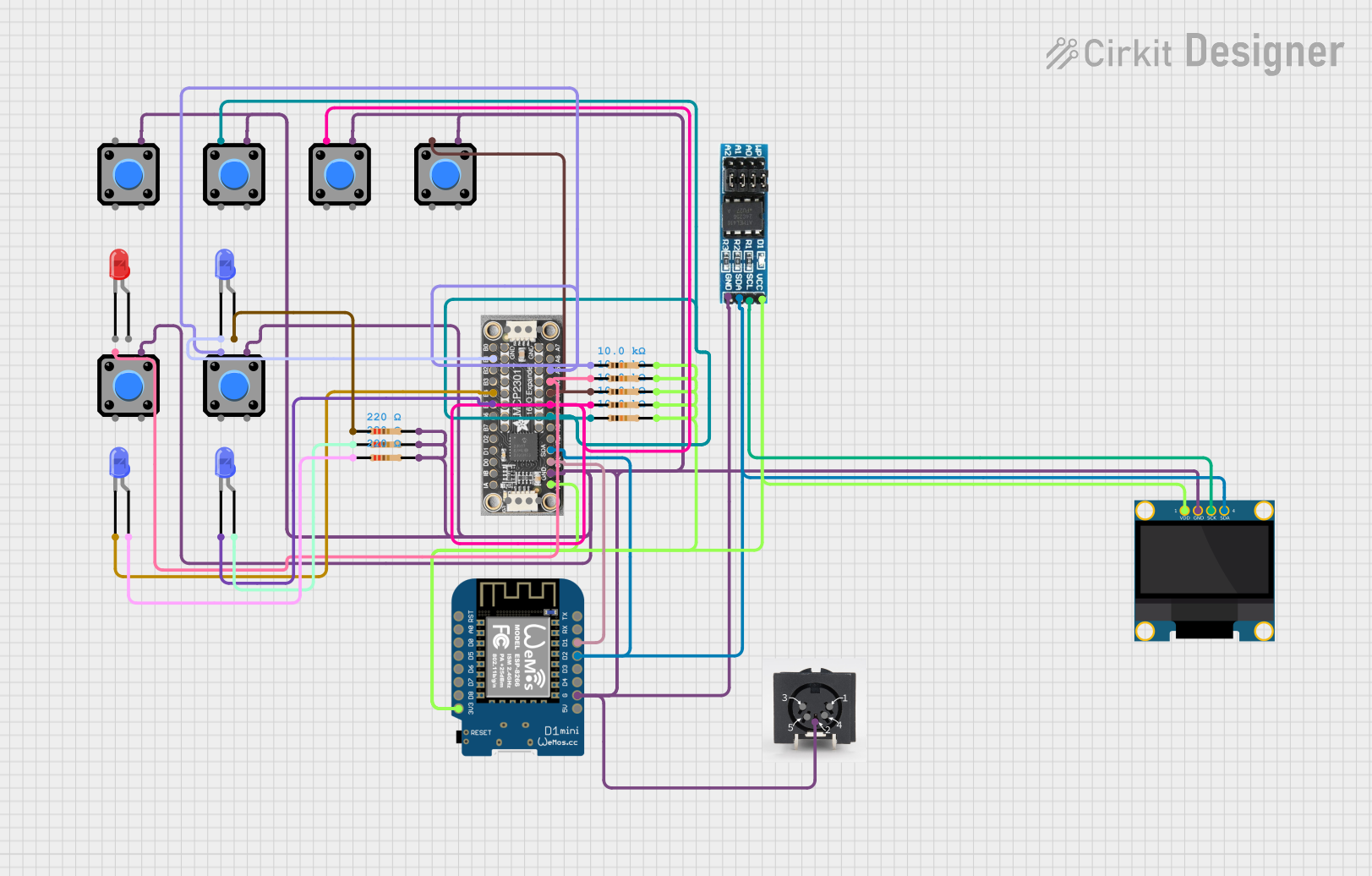
This is a microcontroller-based interactive device featuring a Wemos D1 Mini, an OLED display, external EEPROM, and an I/O expander. It includes user input buttons and status LEDs, with potential MIDI interface capabilities.
The WiFi D1 Mini is a compact microcontroller board based on the ESP8266 chip, designed for projects requiring built-in WiFi capabilities. Its small form factor, low power consumption, and ease of use make it an excellent choice for Internet of Things (IoT) applications, home automation, and rapid prototyping. The board is compatible with the Arduino IDE, making it accessible to both beginners and experienced developers.

This is a microcontroller-based interactive device featuring a Wemos D1 Mini, an OLED display, external EEPROM, and an I/O expander. It includes user input buttons and status LEDs, with potential MIDI interface capabilities.

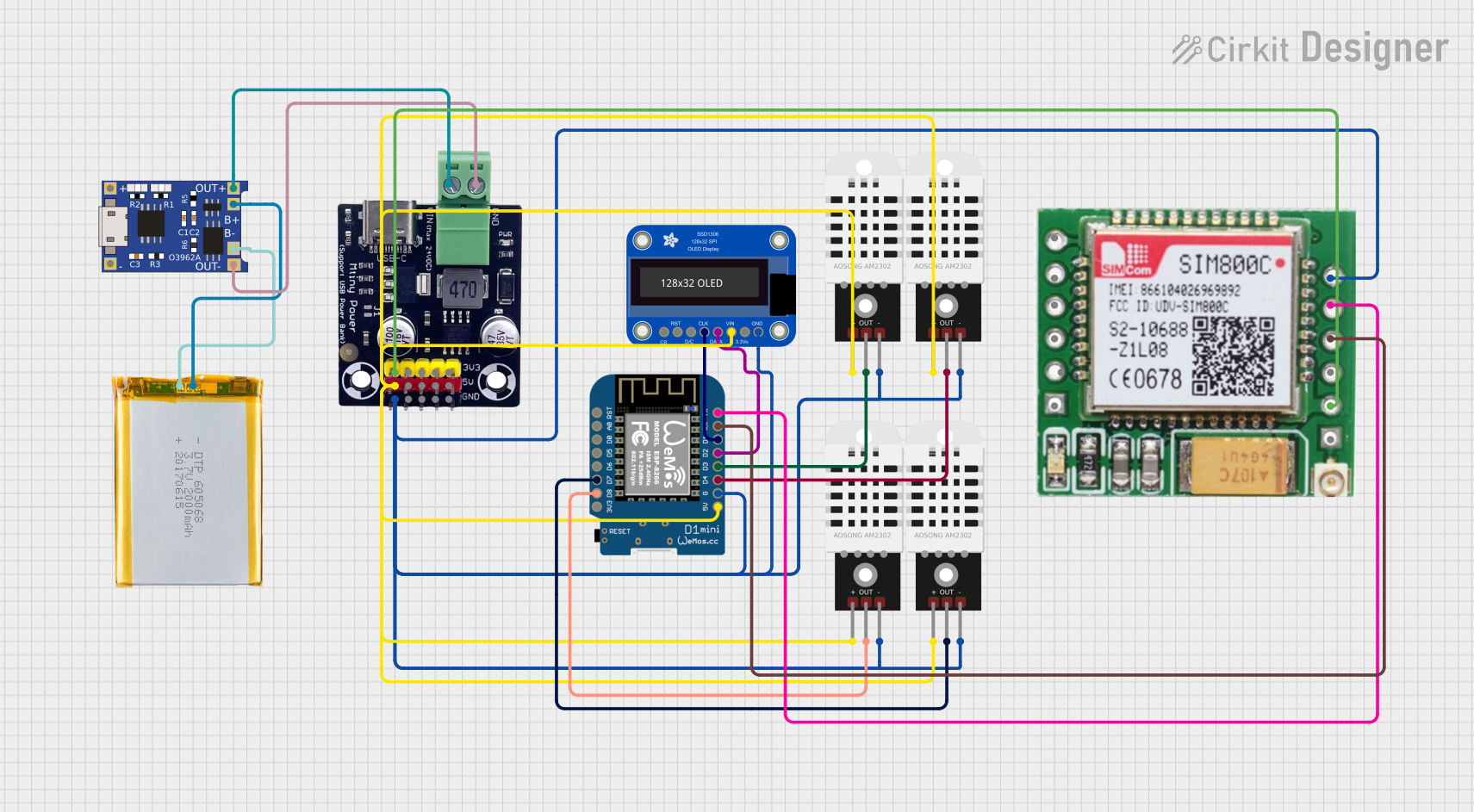
This circuit is a weather monitoring system that uses a Wemos D1 Mini microcontroller to read temperature and humidity data from four DHT22 sensors and display the information on an Adafruit OLED screen. The data is also transmitted via WiFi to an MQTT server for remote monitoring. The system is powered by a 2000mAh battery, which is managed by a TP4056 charging module and a Mtiny Power module.

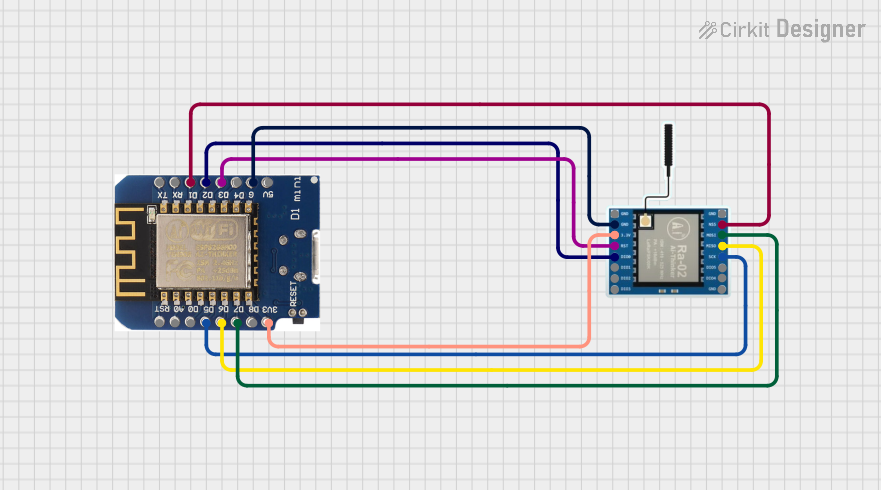
This circuit connects a Wemos D1 mini microcontroller to a LoRa Ra-02 SX1278 module for long-range wireless communication. The Wemos D1 mini's digital pins (D1, D2, D3, D5, D6, D7) are interfaced with the LoRa module's control pins (NSS, DI00, RST, SCK, MISO, MOSI) to enable SPI communication and control signals. The common ground and 3.3V power supply ensure that both components operate at the same voltage level, facilitating proper communication between them.

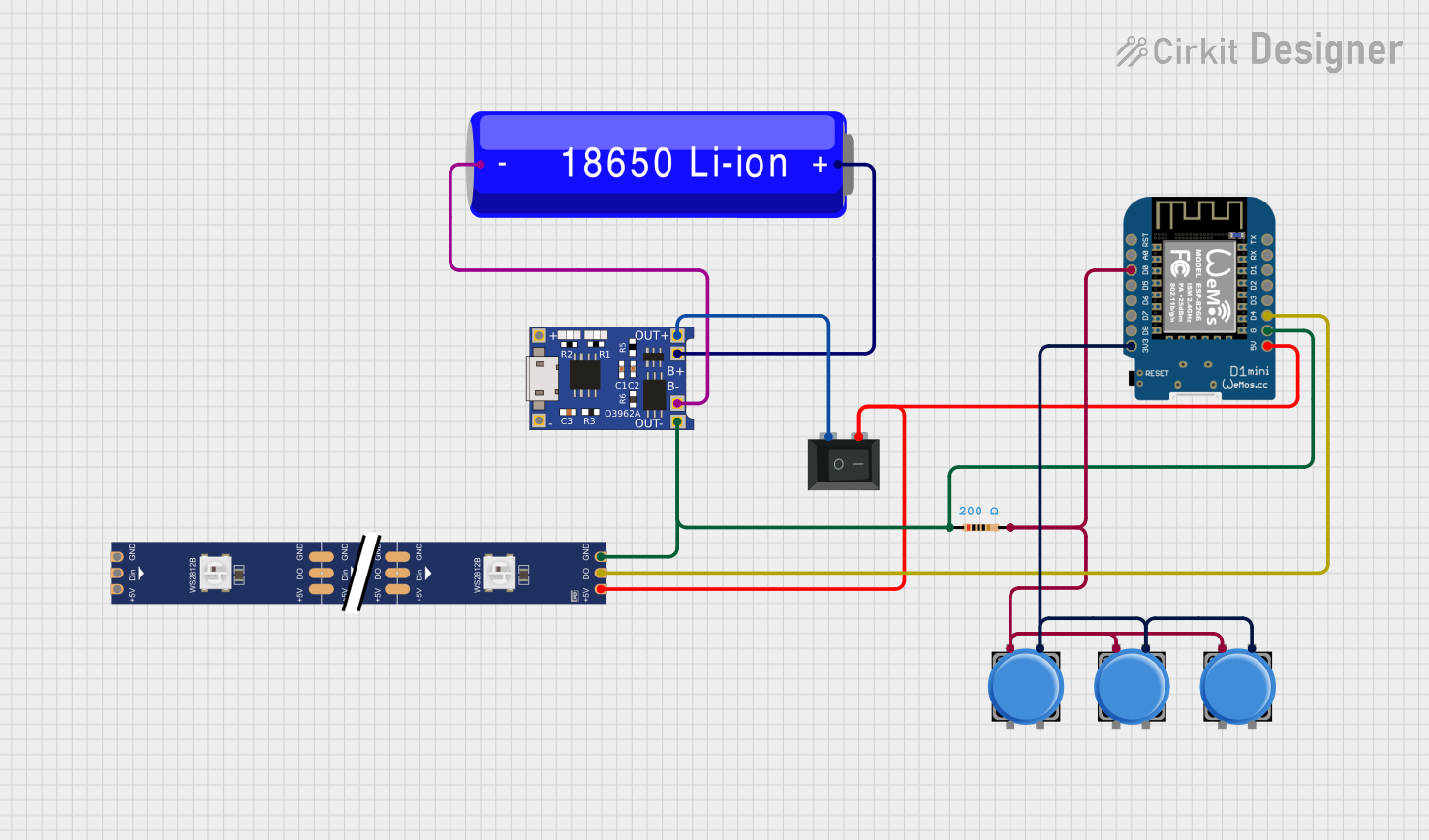
This circuit features a Wemos D1 Mini microcontroller powered by a 18650 Li-ion battery through a TP4056 charging module, with power control managed by a rocker switch. The Wemos D1 Mini controls a WS2812 RGB LED strip, with the data line connected to the D4 pin and power lines controlled by the switch. Multiple pushbuttons are connected to the D0 pin through a resistor, likely for user input to control the LED strip or other functions in the microcontroller's code.
The WiFi D1 Mini is equipped with the ESP8266 microcontroller, which integrates a full TCP/IP stack and microcontroller functionality. Below are the key technical details:
| Specification | Details |
|---|---|
| Microcontroller | ESP8266 |
| Operating Voltage | 3.3V |
| Input Voltage (VIN) | 5V (via USB or VIN pin) |
| Digital I/O Pins | 11 |
| Analog Input Pins | 1 (10-bit ADC, 0-3.3V range) |
| Flash Memory | 4MB |
| Clock Speed | 80 MHz (up to 160 MHz) |
| WiFi Standard | 802.11 b/g/n |
| Dimensions | 34.2mm x 25.6mm |
The WiFi D1 Mini features a total of 16 pins, including power, ground, and GPIO pins. Below is the pinout description:
| Pin | Name | Description |
|---|---|---|
| 1 | 3V3 | 3.3V output from the onboard voltage regulator |
| 2 | GND | Ground |
| 3 | D0 | GPIO16, can be used as a digital I/O pin |
| 4 | D1 | GPIO5, supports I2C (SCL) |
| 5 | D2 | GPIO4, supports I2C (SDA) |
| 6 | D3 | GPIO0, can be used as a digital I/O pin |
| 7 | D4 | GPIO2, can be used as a digital I/O pin |
| 8 | D5 | GPIO14, supports SPI (SCK) |
| 9 | D6 | GPIO12, supports SPI (MISO) |
| 10 | D7 | GPIO13, supports SPI (MOSI) |
| 11 | D8 | GPIO15, supports SPI (CS) |
| 12 | RX | UART RX (for serial communication) |
| 13 | TX | UART TX (for serial communication) |
| 14 | A0 | Analog input (0-3.3V) |
| 15 | VIN | Input voltage (5V) |
| 16 | RST | Reset pin, used to restart the microcontroller |
Powering the Board:
Programming the Board:
Connecting Peripherals:
WiFi Configuration:
#include <ESP8266WiFi.h>
// Replace with your network credentials
const char* ssid = "Your_SSID"; // Your WiFi network name
const char* password = "Your_PASSWORD"; // Your WiFi password
void setup() {
Serial.begin(115200); // Initialize serial communication
pinMode(D4, OUTPUT); // Set GPIO2 (D4) as an output pin
// Connect to WiFi
Serial.print("Connecting to WiFi");
WiFi.begin(ssid, password);
while (WiFi.status() != WL_CONNECTED) {
delay(500);
Serial.print(".");
}
Serial.println("\nWiFi connected!");
}
void loop() {
digitalWrite(D4, HIGH); // Turn the LED on
delay(1000); // Wait for 1 second
digitalWrite(D4, LOW); // Turn the LED off
delay(1000); // Wait for 1 second
}
The board is not detected by the Arduino IDE:
WiFi connection fails:
The board overheats:
Analog readings are incorrect:
Can I use 5V sensors with the D1 Mini?
Yes, but you will need a level shifter to convert the 5V logic to 3.3V.
What is the maximum current output of the GPIO pins?
Each GPIO pin can source or sink up to 12mA. Avoid exceeding this limit to prevent damage.
Can the D1 Mini act as a WiFi access point?
Yes, the ESP8266 supports both station and access point modes.
How do I update the firmware?
Use the ESP8266Flasher tool or the Arduino IDE to upload new firmware.
This concludes the documentation for the WiFi D1 Mini.