
How to Use Módulo 03962A Cargador de batería: Examples, Pinouts, and Specs
 Design with Módulo 03962A Cargador de batería in Cirkit Designer
Introduction
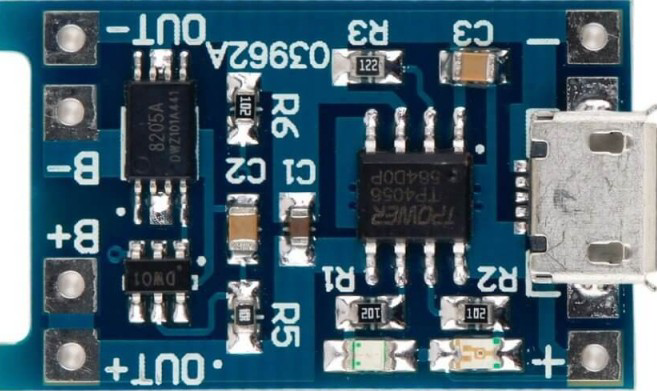
The Módulo 03962A Cargador de batería is a versatile and efficient battery charger module designed to support a wide range of battery types, including lithium-ion, lead-acid, and other rechargeable batteries. It features built-in overcharge protection, adjustable charging parameters, and a compact design, making it ideal for DIY electronics projects, battery-powered devices, and energy storage systems.
Explore Projects Built with Módulo 03962A Cargador de batería
 Open Project in Cirkit Designer
 Open Project in Cirkit Designer
 Open Project in Cirkit Designer
 Open Project in Cirkit Designer
Explore Projects Built with Módulo 03962A Cargador de batería
Open Project in Cirkit DesignerOpen Project in Cirkit DesignerOpen Project in Cirkit DesignerOpen Project in Cirkit DesignerCommon Applications and Use Cases
- Charging lithium-ion or lead-acid batteries in DIY projects
- Powering portable electronics and battery-operated devices
- Energy storage systems for solar panels or renewable energy setups
- Battery maintenance and testing in laboratories or workshops
Technical Specifications
The following table outlines the key technical details of the Módulo 03962A Cargador de batería:
| Parameter | Value |
|---|---|
| Input Voltage Range | 5V to 20V DC |
| Output Voltage Range | Adjustable (4.2V, 8.4V, 12.6V, etc.) |
| Maximum Charging Current | 2A |
| Efficiency | Up to 92% |
| Protection Features | Overcharge, short-circuit, and reverse polarity |
| Dimensions | 25mm x 20mm x 10mm |
| Operating Temperature | -20°C to 60°C |
Pin Configuration and Descriptions
The Módulo 03962A has the following pinout:
| Pin Name | Description |
|---|---|
| VIN+ | Positive input voltage terminal (5V to 20V DC) |
| VIN- | Negative input voltage terminal (ground) |
| BAT+ | Positive terminal for connecting the battery |
| BAT- | Negative terminal for connecting the battery |
| ADJ | Adjustment pin for setting the output voltage |
| LED1 | Charging status indicator (e.g., red for charging) |
| LED2 | Fully charged indicator (e.g., green for fully charged) |
Usage Instructions
How to Use the Component in a Circuit
Connect the Input Voltage:
- Connect a DC power source (5V to 20V) to the
VIN+andVIN-pins. - Ensure the input voltage matches the requirements of the battery being charged.
- Connect a DC power source (5V to 20V) to the
Connect the Battery:
- Attach the battery's positive terminal to the
BAT+pin and the negative terminal to theBAT-pin. - Double-check the polarity to avoid damage to the module or battery.
- Attach the battery's positive terminal to the
Adjust the Output Voltage:
- Use the
ADJpin or onboard potentiometer (if available) to set the desired charging voltage. - Refer to the battery's datasheet for the correct charging voltage.
- Use the
Monitor Charging Status:
- Observe the
LED1andLED2indicators for charging progress:LED1(red): Charging in progress.LED2(green): Charging complete.
- Observe the
Important Considerations and Best Practices
- Verify Battery Specifications: Ensure the battery's voltage and current ratings are compatible with the module.
- Heat Dissipation: If charging at high currents, ensure proper ventilation or add a heatsink to prevent overheating.
- Avoid Overdischarge: Do not connect deeply discharged batteries, as this may damage the module or the battery.
- Safety First: Always handle batteries with care to avoid short circuits, overheating, or fire hazards.
Example: Using with an Arduino UNO
The Módulo 03962A can be used in conjunction with an Arduino UNO to monitor the charging process. Below is an example code snippet to read the charging status using the Arduino's digital pins:
// Define pins for the charging status LEDs
const int chargingPin = 2;  // Connect LED1 (charging indicator) to pin 2
const int chargedPin = 3;   // Connect LED2 (charged indicator) to pin 3

void setup() {
  // Initialize serial communication for debugging
  Serial.begin(9600);

  // Set the LED pins as input
  pinMode(chargingPin, INPUT);
  pinMode(chargedPin, INPUT);
}

void loop() {
  // Read the status of the charging and charged LEDs
  int chargingStatus = digitalRead(chargingPin);
  int chargedStatus = digitalRead(chargedPin);

  // Print the charging status to the Serial Monitor
  if (chargingStatus == HIGH) {
    Serial.println("Battery is charging...");
  } else if (chargedStatus == HIGH) {
    Serial.println("Battery is fully charged!");
  } else {
    Serial.println("No battery detected or idle state.");
  }

  // Add a small delay to avoid flooding the Serial Monitor
  delay(1000);
}
Troubleshooting and FAQs
Common Issues and Solutions
Module Not Powering On:
- Cause: Incorrect input voltage or loose connections.
- Solution: Verify the input voltage is within the 5V to 20V range and check all connections.
Battery Not Charging:
- Cause: Incorrect polarity or incompatible battery type.
- Solution: Double-check the battery's polarity and ensure it matches the module's specifications.
Overheating During Operation:
- Cause: High charging current or poor ventilation.
- Solution: Reduce the charging current or improve heat dissipation with a heatsink or fan.
LED Indicators Not Working:
- Cause: Faulty LEDs or incorrect wiring.
- Solution: Test the LEDs with a multimeter and verify the connections.
FAQs
Q1: Can this module charge multiple batteries in series?
A1: Yes, but ensure the total voltage of the series-connected batteries matches the module's output voltage.
Q2: Is it safe to leave the battery connected after it is fully charged?
A2: Yes, the module includes overcharge protection to prevent damage to the battery.
Q3: Can I use this module with a solar panel?
A3: Yes, as long as the solar panel's output voltage and current are within the module's input range.
Q4: How do I adjust the charging current?
A4: The charging current is typically fixed, but some versions of the module may allow adjustment via a resistor or potentiometer. Check the module's datasheet for details.