
How to Use Tobsun 60W 24v-12v Stepdown converter: Examples, Pinouts, and Specs
 Design with Tobsun 60W 24v-12v Stepdown converter in Cirkit Designer
Introduction
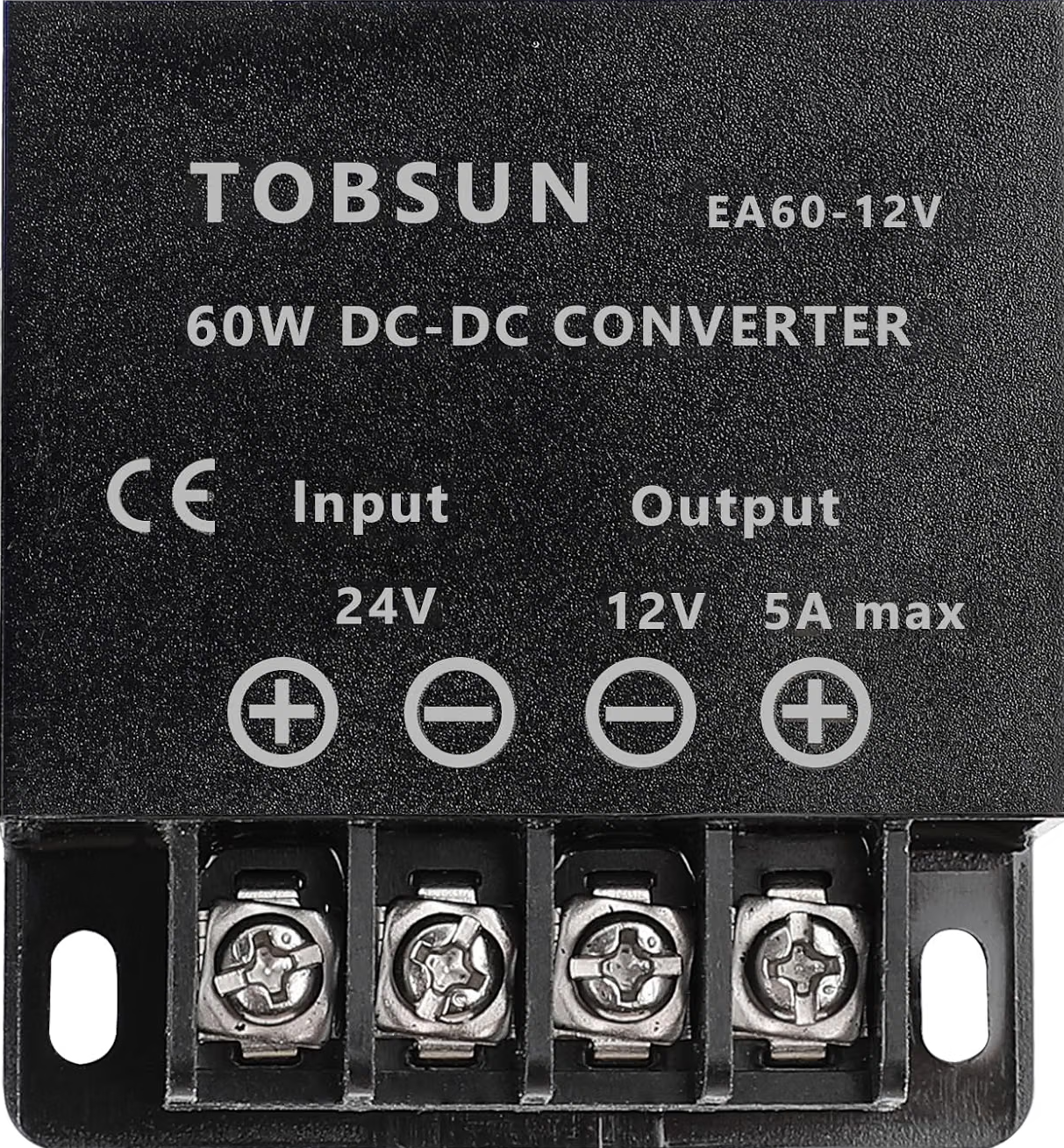
The Tobsun 60W 24V-12V Stepdown Converter (Part ID: EA60-12V) is a high-efficiency DC-DC converter designed to step down a 24V DC input to a stable 12V DC output. With a maximum power output of 60 watts, this converter is ideal for powering a wide range of electronic devices, including automotive accessories, LED lighting, communication equipment, and industrial control systems. Its compact design and robust construction make it suitable for both indoor and outdoor applications.
Explore Projects Built with Tobsun 60W 24v-12v Stepdown converter
 Open Project in Cirkit Designer
 Open Project in Cirkit Designer
 Open Project in Cirkit Designer
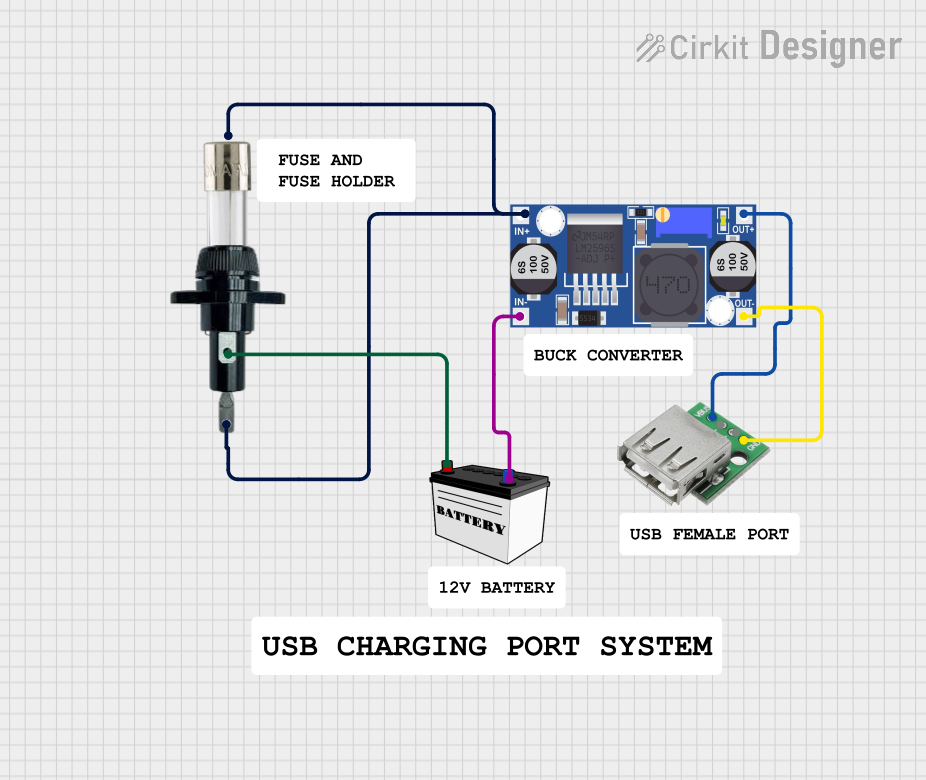 Open Project in Cirkit Designer
Explore Projects Built with Tobsun 60W 24v-12v Stepdown converter
Open Project in Cirkit DesignerOpen Project in Cirkit DesignerOpen Project in Cirkit DesignerOpen Project in Cirkit DesignerCommon Applications
- Powering 12V devices in vehicles with 24V electrical systems (e.g., trucks, buses).
- Supplying power to 12V LED strips or lighting systems.
- Operating communication devices such as radios and modems.
- Industrial automation and control systems requiring 12V power.
Technical Specifications
Key Specifications
| Parameter | Value |
|---|---|
| Input Voltage Range | 18V - 32V DC |
| Output Voltage | 12V DC |
| Maximum Output Current | 5A |
| Maximum Output Power | 60W |
| Efficiency | ≥ 95% |
| Operating Temperature | -40°C to +80°C |
| Protection Features | Overload, Overvoltage, |
| Overtemperature, Short Circuit | |
| Dimensions | 74mm x 74mm x 32mm |
| Weight | 150g |
Pin Configuration and Descriptions
The Tobsun EA60-12V converter has four connection terminals for input and output. The table below describes each terminal:
| Terminal Label | Description |
|---|---|
VIN+ |
Positive input terminal (24V DC) |
VIN- |
Negative input terminal (Ground) |
VOUT+ |
Positive output terminal (12V DC) |
VOUT- |
Negative output terminal (Ground) |
Usage Instructions
How to Use the Converter in a Circuit
- Connect the Input Terminals:
- Connect the
VIN+terminal to the positive terminal of the 24V DC power source. - Connect the
VIN-terminal to the negative terminal (ground) of the power source.
- Connect the
- Connect the Output Terminals:
- Connect the
VOUT+terminal to the positive terminal of the 12V load. - Connect the
VOUT-terminal to the negative terminal (ground) of the load.
- Connect the
- Verify Connections:
- Double-check all connections to ensure proper polarity and secure wiring.
- Power On:
- Turn on the 24V DC power source. The converter will automatically step down the voltage to 12V DC.
Important Considerations
- Input Voltage Range: Ensure the input voltage remains within the specified range (18V - 32V DC). Exceeding this range may damage the converter.
- Load Capacity: Do not exceed the maximum output power of 60W or the maximum output current of 5A.
- Heat Dissipation: Install the converter in a well-ventilated area to prevent overheating. If used in high-temperature environments, consider adding a heat sink or fan for additional cooling.
- Polarity: Always observe correct polarity when connecting the input and output terminals. Reversed polarity can damage the converter.
Example: Using the Converter with an Arduino UNO
The Tobsun EA60-12V converter can be used to power an Arduino UNO from a 24V power source. Below is an example wiring diagram and Arduino code to blink an LED:
Wiring Diagram
- Connect the
VIN+andVIN-terminals of the converter to the 24V power source. - Connect the
VOUT+andVOUT-terminals to the Arduino UNO'sVINandGNDpins, respectively. - Connect an LED to pin 13 of the Arduino UNO with a 220-ohm resistor in series.
Arduino Code
// Simple LED Blink Example
// This code blinks an LED connected to pin 13 of the Arduino UNO.

void setup() {
  pinMode(13, OUTPUT); // Set pin 13 as an output pin
}

void loop() {
  digitalWrite(13, HIGH); // Turn the LED on
  delay(1000);            // Wait for 1 second
  digitalWrite(13, LOW);  // Turn the LED off
  delay(1000);            // Wait for 1 second
}
Troubleshooting and FAQs
Common Issues and Solutions
| Issue | Possible Cause | Solution |
|---|---|---|
| No output voltage | Incorrect wiring or loose connections | Verify all connections and polarity. |
| Output voltage fluctuates | Input voltage is unstable | Use a regulated 24V DC power source. |
| Converter overheats | Overload or poor ventilation | Reduce load or improve ventilation. |
| Device does not power on | Input voltage out of range | Ensure input voltage is 18V - 32V DC. |
FAQs
Can I use this converter with a 12V battery as the input?
- No, the input voltage must be between 18V and 32V DC. A 12V battery is not suitable.
What happens if I exceed the maximum output power?
- The converter is equipped with overload protection and will shut down to prevent damage. Reduce the load and restart the converter.
Is the converter waterproof?
- The Tobsun EA60-12V is not waterproof. If used outdoors, ensure it is installed in a weatherproof enclosure.
Can I use this converter to charge a 12V battery?
- No, this converter is not designed for battery charging. Use a dedicated battery charger for this purpose.
This concludes the documentation for the Tobsun 60W 24V-12V Stepdown Converter (EA60-12V). For further assistance, refer to the manufacturer's datasheet or contact Tobsun support.