
How to Use RJ45 Macho: Examples, Pinouts, and Specs
 Design with RJ45 Macho in Cirkit Designer
Introduction
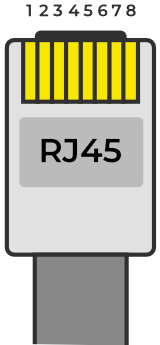
The RJ45 Macho is a male connector widely used in Ethernet networking applications. It features eight pins that connect to twisted pair cables, enabling reliable data transmission in local area networks (LANs). This connector is a critical component in wired networking setups, ensuring high-speed communication between devices such as computers, routers, switches, and modems.
Explore Projects Built with RJ45 Macho
 Open Project in Cirkit Designer
 Open Project in Cirkit Designer
 Open Project in Cirkit Designer
 Open Project in Cirkit Designer
Explore Projects Built with RJ45 Macho
Open Project in Cirkit DesignerOpen Project in Cirkit DesignerOpen Project in Cirkit DesignerOpen Project in Cirkit DesignerCommon Applications and Use Cases
- Ethernet networking for home and office LANs
- Connecting computers to routers, switches, or modems
- Industrial networking and automation systems
- Power over Ethernet (PoE) applications
- Telecommunications and structured cabling systems
Technical Specifications
Key Technical Details
- Connector Type: RJ45 Male (8P8C)
- Number of Pins: 8
- Supported Cable Types: Cat5, Cat5e, Cat6, Cat6a, Cat7
- Maximum Data Rate: Up to 10 Gbps (depending on cable type)
- Voltage Rating: 150V (maximum)
- Current Rating: 1.5A (maximum)
- Operating Temperature: -40°C to 85°C
- Durability: 750+ mating cycles
Pin Configuration and Descriptions
The RJ45 Macho connector uses an 8P8C (8 positions, 8 contacts) configuration. Below is the pinout for the T568B wiring standard, which is commonly used in Ethernet networking:
| Pin Number | Wire Color (T568B) | Signal |
|---|---|---|
| 1 | Orange/White | Transmit Data + (TX+) |
| 2 | Orange | Transmit Data - (TX-) |
| 3 | Green/White | Receive Data + (RX+) |
| 4 | Blue | Unused (or PoE) |
| 5 | Blue/White | Unused (or PoE) |
| 6 | Green | Receive Data - (RX-) |
| 7 | Brown/White | Unused (or PoE) |
| 8 | Brown | Unused (or PoE) |
Note: The T568A wiring standard is also used in some cases, but T568B is more common in modern Ethernet installations.
Usage Instructions
How to Use the RJ45 Macho in a Circuit
Prepare the Cable:
- Use a twisted pair Ethernet cable (e.g., Cat5e or Cat6).
- Strip approximately 1 inch of the outer insulation to expose the inner wires.
- Untwist the wire pairs and arrange them according to the T568B wiring standard.
Insert the Wires:
- Trim the wires to ensure they are of equal length.
- Insert the wires into the RJ45 Macho connector, ensuring each wire aligns with the correct pin.
Crimp the Connector:
- Use an RJ45 crimping tool to secure the wires in place.
- Verify that the wires are fully inserted and the connector is properly crimped.
Test the Connection:
- Use a cable tester to ensure proper continuity and pinout configuration.
- Connect the RJ45 Macho to the desired Ethernet port and verify network functionality.
Important Considerations and Best Practices
- Always use high-quality Ethernet cables and connectors to ensure reliable performance.
- Avoid excessive bending or twisting of the cable, as this can degrade signal quality.
- For Power over Ethernet (PoE) applications, ensure the connector and cable meet the required power and current ratings.
- Use a cable tester to verify the integrity of the connection before deployment.
Example: Connecting to an Arduino UNO
The RJ45 Macho can be used with an Ethernet shield to connect an Arduino UNO to a network. Below is an example code snippet for setting up a basic web server using the Ethernet library:
#include <SPI.h>
#include <Ethernet.h>

// MAC address and IP address for the Ethernet shield
byte mac[] = { 0xDE, 0xAD, 0xBE, 0xEF, 0xFE, 0xED };
IPAddress ip(192, 168, 1, 177);

// Initialize the Ethernet server on port 80
EthernetServer server(80);

void setup() {
  // Start the Ethernet connection
  Ethernet.begin(mac, ip);

  // Start the server
  server.begin();
  Serial.begin(9600);
  Serial.println("Server is ready at 192.168.1.177");
}

void loop() {
  // Listen for incoming clients
  EthernetClient client = server.available();
  if (client) {
    Serial.println("New client connected");
    while (client.connected()) {
      if (client.available()) {
        char c = client.read();
        Serial.write(c); // Echo data to the Serial Monitor

        // Respond to the client
        client.println("HTTP/1.1 200 OK");
        client.println("Content-Type: text/html");
        client.println();
        client.println("<h1>Hello, World!</h1>");
        break;
      }
    }
    client.stop();
    Serial.println("Client disconnected");
  }
}
Note: Ensure the Ethernet shield is properly connected to the Arduino UNO and the RJ45 Macho is securely plugged into the shield.
Troubleshooting and FAQs
Common Issues and Solutions
Issue: No network connectivity after crimping the RJ45 Macho.
- Solution: Verify the wiring order matches the T568B standard. Use a cable tester to check for continuity and correct pinout.
Issue: Intermittent or slow network performance.
- Solution: Check for loose connections or damaged cables. Ensure the cable length does not exceed 100 meters for Ethernet.
Issue: Ethernet shield not working with Arduino UNO.
- Solution: Confirm the MAC and IP addresses are correctly configured in the code. Ensure the Ethernet library is installed and up to date.
FAQs
Q: Can I use the RJ45 Macho for PoE applications?
A: Yes, the RJ45 Macho supports PoE, but ensure the cable and connector meet the required power and current ratings.Q: What is the difference between T568A and T568B wiring standards?
A: The difference lies in the arrangement of wire pairs. T568B is more commonly used in modern Ethernet installations.Q: How many times can I reuse an RJ45 Macho connector?
A: RJ45 Macho connectors are typically designed for one-time use. Reusing them may result in unreliable connections.
By following this documentation, you can effectively use the RJ45 Macho connector in your networking projects.