
How to Use SENSOR DO: Examples, Pinouts, and Specs
 Design with SENSOR DO in Cirkit Designer
Introduction
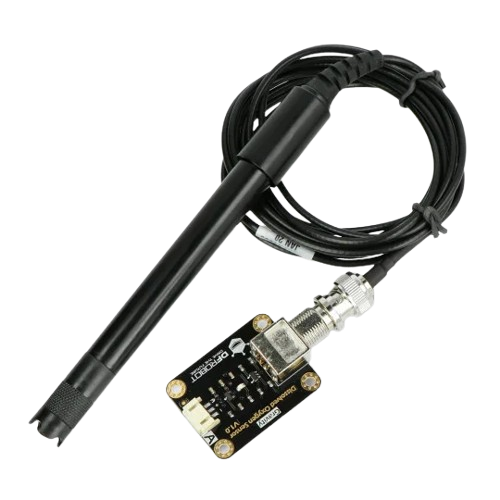
The SENSOR DO is a digital output sensor designed to detect specific environmental conditions and transmit a digital signal to a microcontroller or other devices. This sensor is widely used in applications requiring real-time monitoring and decision-making based on environmental changes. Its digital output simplifies integration with microcontrollers, making it ideal for both hobbyist and professional projects.
Explore Projects Built with SENSOR DO
 Open Project in Cirkit Designer
 Open Project in Cirkit Designer
 Open Project in Cirkit Designer
 Open Project in Cirkit Designer
Explore Projects Built with SENSOR DO
Open Project in Cirkit DesignerOpen Project in Cirkit DesignerOpen Project in Cirkit DesignerOpen Project in Cirkit DesignerCommon Applications and Use Cases
- Environmental monitoring systems
- Home automation projects
- Industrial control systems
- Robotics and IoT applications
- Alarm and notification systems
Technical Specifications
The SENSOR DO is designed for ease of use and compatibility with a wide range of microcontrollers. Below are its key technical specifications:
| Parameter | Value |
|---|---|
| Operating Voltage | 3.3V to 5V |
| Output Type | Digital (High/Low) |
| Output Voltage (High) | ~Vcc (3.3V or 5V, depending on input) |
| Output Voltage (Low) | ~0V |
| Current Consumption | < 20mA |
| Response Time | < 10ms |
| Operating Temperature | -20°C to 85°C |
| Dimensions | 30mm x 15mm x 10mm |
Pin Configuration and Descriptions
The SENSOR DO typically has three pins, as described in the table below:
| Pin | Name | Description |
|---|---|---|
| 1 | VCC | Power supply pin. Connect to 3.3V or 5V. |
| 2 | GND | Ground pin. Connect to the ground of the circuit. |
| 3 | DO | Digital output pin. Outputs HIGH or LOW based on the detected condition. |
Usage Instructions
How to Use the SENSOR DO in a Circuit
- Power the Sensor: Connect the VCC pin to a 3.3V or 5V power source, depending on your microcontroller's operating voltage. Connect the GND pin to the ground of the circuit.
- Connect the Output: Connect the DO pin to a digital input pin on your microcontroller.
- Read the Output: The DO pin will output a HIGH signal when the sensor detects the specified environmental condition and a LOW signal otherwise.
Important Considerations and Best Practices
- Ensure the operating voltage matches the sensor's specifications to avoid damage.
- Use pull-up or pull-down resistors if required by your microcontroller to stabilize the digital signal.
- Place the sensor in an appropriate location to ensure accurate detection of environmental conditions.
- Avoid exposing the sensor to conditions outside its operating temperature range (-20°C to 85°C).
Example: Connecting SENSOR DO to an Arduino UNO
Below is an example of how to connect and use the SENSOR DO with an Arduino UNO:
Circuit Connections
- Connect the SENSOR DO's VCC pin to the Arduino's 5V pin.
- Connect the SENSOR DO's GND pin to the Arduino's GND pin.
- Connect the SENSOR DO's DO pin to the Arduino's digital pin 2.
Arduino Code
// Define the pin connected to the SENSOR DO's digital output
const int sensorPin = 2;

// Define an LED pin for visual feedback
const int ledPin = 13;

void setup() {
  // Initialize the sensor pin as an input
  pinMode(sensorPin, INPUT);

  // Initialize the LED pin as an output
  pinMode(ledPin, OUTPUT);

  // Start the serial communication for debugging
  Serial.begin(9600);
}

void loop() {
  // Read the digital signal from the sensor
  int sensorValue = digitalRead(sensorPin);

  // Print the sensor value to the Serial Monitor
  Serial.print("Sensor Value: ");
  Serial.println(sensorValue);

  // Turn the LED on if the sensor detects the condition
  if (sensorValue == HIGH) {
    digitalWrite(ledPin, HIGH); // Turn LED on
  } else {
    digitalWrite(ledPin, LOW);  // Turn LED off
  }

  // Add a small delay for stability
  delay(100);
}
Troubleshooting and FAQs
Common Issues and Solutions
The sensor is not providing any output.
- Ensure the VCC and GND pins are properly connected to the power supply.
- Verify that the operating voltage matches the sensor's specifications.
- Check for loose or faulty connections in the circuit.
The sensor output is unstable or fluctuating.
- Use pull-up or pull-down resistors to stabilize the digital signal.
- Ensure the sensor is not exposed to electrical noise or interference.
The sensor does not detect the environmental condition.
- Verify that the sensor is placed in an appropriate location for detection.
- Ensure the environmental condition is within the sensor's detection range.
FAQs
Q: Can the SENSOR DO be used with a 3.3V microcontroller?
A: Yes, the SENSOR DO is compatible with both 3.3V and 5V systems. Ensure the VCC pin is connected to the appropriate voltage.
Q: How can I extend the sensor's detection range?
A: The detection range is determined by the sensor's design and cannot be extended. Consider using a different sensor if a longer range is required.
Q: Is the SENSOR DO waterproof?
A: No, the SENSOR DO is not waterproof. Avoid exposing it to water or high humidity environments unless it is enclosed in a protective casing.