
How to Use Molex Picoblade Series Header: Examples, Pinouts, and Specs
 Design with Molex Picoblade Series Header in Cirkit Designer
Introduction
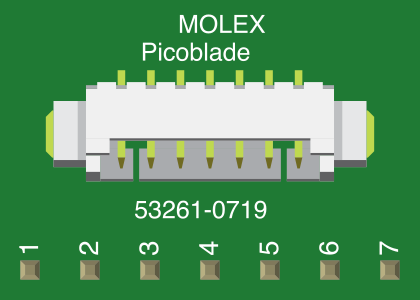
The Molex Picoblade Series Header (Part ID: 0532610719) is a compact and reliable connector designed for high-density applications. With its low-profile design and versatile pin count options, it is ideal for use in electronic devices where space is limited. This header is widely used in consumer electronics, industrial equipment, and automotive systems due to its robust construction and dependable performance.
Explore Projects Built with Molex Picoblade Series Header
 Open Project in Cirkit Designer
 Open Project in Cirkit Designer
 Open Project in Cirkit Designer
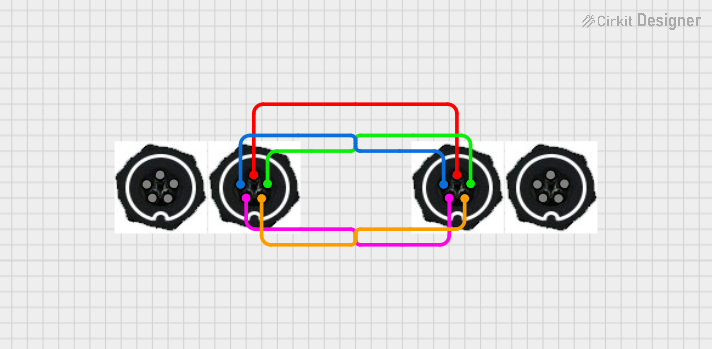 Open Project in Cirkit Designer
Explore Projects Built with Molex Picoblade Series Header
Open Project in Cirkit DesignerOpen Project in Cirkit DesignerOpen Project in Cirkit DesignerOpen Project in Cirkit DesignerCommon Applications
- Consumer electronics (e.g., wearables, handheld devices)
- Industrial control systems
- Automotive electronics
- Medical devices
- Robotics and IoT applications
Technical Specifications
Key Technical Details
| Parameter | Specification |
|---|---|
| Manufacturer | Molex |
| Part Number | 0532610719 |
| Connector Type | Header |
| Number of Positions | 7 |
| Pitch | 1.25 mm |
| Mounting Type | Surface Mount (SMT) |
| Current Rating | 1.0 A per contact |
| Voltage Rating | 50 V AC/DC |
| Operating Temperature | -25°C to +85°C |
| Contact Material | Phosphor Bronze |
| Contact Plating | Tin |
| Housing Material | Nylon |
| Flammability Rating | UL94V-0 |
Pin Configuration and Descriptions
The Molex Picoblade Series Header (7-pin version) has the following pin configuration:
| Pin Number | Description | Notes |
|---|---|---|
| 1 | Signal/Power Line 1 | Can be used for data or power |
| 2 | Signal/Power Line 2 | |
| 3 | Signal/Power Line 3 | |
| 4 | Signal/Power Line 4 | |
| 5 | Signal/Power Line 5 | |
| 6 | Signal/Power Line 6 | |
| 7 | Ground | Common ground connection |
Usage Instructions
How to Use the Component in a Circuit
- PCB Design: Ensure your PCB layout includes a footprint compatible with the Molex Picoblade Series Header. The 1.25 mm pitch requires precise alignment for proper soldering.
- Soldering: Use surface-mount soldering techniques to attach the header to the PCB. A reflow soldering process is recommended for optimal results.
- Mating Connector: Pair the header with a compatible Molex Picoblade receptacle or cable assembly for secure connectivity.
- Wiring: Connect the corresponding wires or traces to the appropriate pins based on your circuit design. Ensure proper polarity and signal routing.
Important Considerations and Best Practices
- Current and Voltage Limits: Do not exceed the rated current (1.0 A per contact) or voltage (50 V AC/DC) to avoid damage or failure.
- Temperature Range: Operate the component within the specified temperature range (-25°C to +85°C) to ensure reliability.
- Connector Mating: Use only compatible Molex Picoblade connectors to ensure a secure and reliable connection.
- Soldering Precautions: Avoid excessive heat during soldering to prevent damage to the housing or contacts.
Example: Connecting to an Arduino UNO
The Molex Picoblade Series Header can be used to connect sensors or other peripherals to an Arduino UNO. Below is an example of how to interface a sensor using the header:
Circuit Diagram
- Pin 1: Connect to Arduino 5V
- Pin 2: Connect to Sensor Data Out
- Pin 7: Connect to Arduino GND
Arduino Code Example
// Example code to read data from a sensor connected via the Molex Picoblade Header
// Pin 2 of the header is connected to Arduino pin A0 for analog input

const int sensorPin = A0; // Define the analog pin connected to the sensor
int sensorValue = 0;      // Variable to store the sensor reading

void setup() {
  Serial.begin(9600); // Initialize serial communication at 9600 baud
}

void loop() {
  sensorValue = analogRead(sensorPin); // Read the sensor value
  Serial.print("Sensor Value: ");      // Print the sensor value to the serial monitor
  Serial.println(sensorValue);
  delay(500); // Wait for 500 milliseconds before the next reading
}
Troubleshooting and FAQs
Common Issues and Solutions
Issue: Poor connection between the header and the mating connector.
- Solution: Ensure the mating connector is fully seated and compatible with the Molex Picoblade Series Header.
Issue: Overheating during soldering damages the header.
- Solution: Use a temperature-controlled soldering iron or reflow soldering process. Avoid prolonged exposure to high temperatures.
Issue: Signal interference or noise in the circuit.
- Solution: Use proper grounding (Pin 7) and shielded cables if necessary. Ensure traces are routed to minimize crosstalk.
Issue: Header pins are not aligned with the PCB footprint.
- Solution: Double-check the PCB design to ensure the footprint matches the header's dimensions.
FAQs
Q1: Can the Molex Picoblade Series Header handle high-frequency signals?
A1: Yes, the header can handle high-frequency signals, but proper PCB design and signal integrity practices should be followed to minimize interference.
Q2: Is the header available in different pin counts?
A2: Yes, the Molex Picoblade Series Header is available in various pin counts ranging from 2 to 15 positions.
Q3: Can this header be used in outdoor applications?
A3: While the header is robust, it is not specifically designed for outdoor use. Additional environmental protection (e.g., conformal coating or enclosures) may be required.
Q4: What tools are recommended for crimping wires to the mating connector?
A4: Molex offers specialized crimping tools for use with Picoblade connectors to ensure secure and reliable wire terminations.