
How to Use GY-33 Color Sensing Detection Sensor TCS34725 : Examples, Pinouts, and Specs
 Design with GY-33 Color Sensing Detection Sensor TCS34725 in Cirkit Designer
Introduction
The GY-33 Color Sensing Detection Sensor is a highly accurate color detection module based on the TCS34725 chip. Manufactured by Arduino with the part ID Mega, this sensor is capable of detecting and measuring the RGB (Red, Green, Blue) values of light. It features an integrated IR filter and a high-sensitivity photodiode, ensuring precise color measurements even in varying lighting conditions.
This sensor is widely used in applications such as:
- Robotics: For line-following robots or object recognition based on color.
- Automation: In industrial systems for color sorting or quality control.
- Consumer Electronics: For color calibration in displays or lighting systems.
- DIY Projects: Ideal for hobbyists working on creative projects involving color detection.
Explore Projects Built with GY-33 Color Sensing Detection Sensor TCS34725
 Open Project in Cirkit Designer
 Open Project in Cirkit Designer
 Open Project in Cirkit Designer
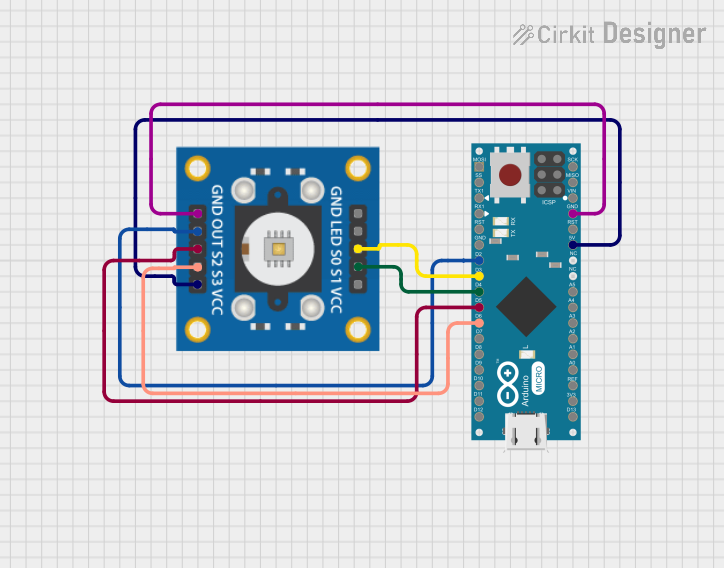 Open Project in Cirkit Designer
Explore Projects Built with GY-33 Color Sensing Detection Sensor TCS34725
Open Project in Cirkit DesignerOpen Project in Cirkit DesignerOpen Project in Cirkit DesignerOpen Project in Cirkit DesignerTechnical Specifications
The GY-33 sensor module is built around the TCS34725 chip and offers the following key specifications:
| Parameter | Value |
|---|---|
| Operating Voltage | 3.3V to 5V |
| Communication Interface | I2C |
| I2C Address | 0x29 |
| Spectral Range | 400 nm to 700 nm (visible light) |
| IR Filter | Integrated |
| Output Data | 16-bit RGB and Clear Light values |
| Operating Temperature | -40°C to 85°C |
| Dimensions | 20mm x 20mm |
Pin Configuration
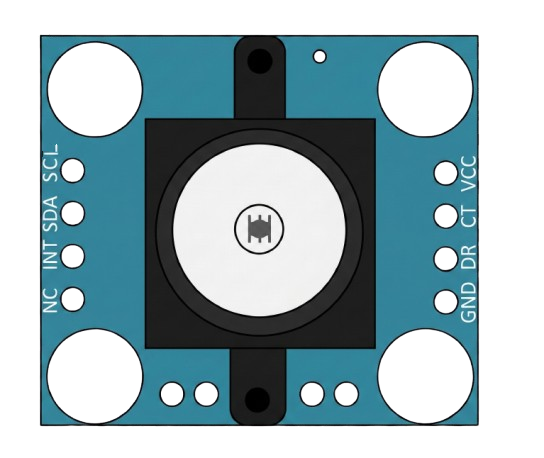
The GY-33 module has a simple pinout for easy integration into your projects. Below is the pin configuration:
| Pin Name | Description |
|---|---|
| VIN | Power input (3.3V to 5V) |
| GND | Ground |
| SDA | I2C Data Line |
| SCL | I2C Clock Line |
| INT | Interrupt pin (optional, for advanced use) |
Usage Instructions
Connecting the GY-33 to an Arduino UNO
To use the GY-33 sensor with an Arduino UNO, follow these steps:
- Wiring: Connect the sensor to the Arduino as follows:
- VIN → 5V on Arduino
- GND → GND on Arduino
- SDA → A4 (I2C Data Line)
- SCL → A5 (I2C Clock Line)
- Install Required Libraries: Download and install the
Adafruit_TCS34725library from the Arduino Library Manager. - Upload Code: Use the example code below to read RGB values from the sensor.
Example Code
#include <Wire.h>
#include "Adafruit_TCS34725.h"

// Create an instance of the TCS34725 sensor
Adafruit_TCS34725 tcs = Adafruit_TCS34725(TCS34725_INTEGRATIONTIME_700MS,
                                          TCS34725_GAIN_1X);

void setup() {
  Serial.begin(9600); // Initialize serial communication
  if (tcs.begin()) {
    Serial.println("TCS34725 found and initialized.");
  } else {
    Serial.println("No TCS34725 found. Check your connections.");
    while (1); // Halt execution if sensor is not found
  }
}

void loop() {
  uint16_t r, g, b, c;
  float red, green, blue;

  // Get raw data from the sensor
  tcs.getRawData(&r, &g, &b, &c);

  // Normalize RGB values
  red = (float)r / c * 255.0;
  green = (float)g / c * 255.0;
  blue = (float)b / c * 255.0;

  // Print RGB values to the Serial Monitor
  Serial.print("R: "); Serial.print((int)red);
  Serial.print(" G: "); Serial.print((int)green);
  Serial.print(" B: "); Serial.println((int)blue);

  delay(500); // Wait for 500ms before the next reading
}
Best Practices
- Ensure proper wiring to avoid damage to the sensor or Arduino.
- Use pull-up resistors on the I2C lines (SDA and SCL) if not already included on the module.
- Avoid exposing the sensor to direct sunlight or strong IR sources, as this may affect accuracy.
- Calibrate the sensor for your specific application to improve measurement precision.
Troubleshooting and FAQs
Common Issues
Sensor Not Detected:
- Cause: Incorrect wiring or I2C address mismatch.
- Solution: Double-check the connections and ensure the I2C address is set to
0x29.
Inaccurate Color Readings:
- Cause: Poor lighting conditions or incorrect calibration.
- Solution: Use consistent lighting and calibrate the sensor for your environment.
No Output on Serial Monitor:
- Cause: Serial communication not initialized or incorrect baud rate.
- Solution: Ensure
Serial.begin(9600)matches the Serial Monitor's baud rate.
FAQs
Q: Can the GY-33 detect colors in complete darkness?
A: No, the sensor requires some ambient light or an external light source to detect colors accurately.
Q: Can I use the GY-33 with a 3.3V microcontroller?
A: Yes, the sensor supports both 3.3V and 5V logic levels, making it compatible with a wide range of microcontrollers.
Q: How do I improve the accuracy of color detection?
A: Use a diffuser to evenly distribute light over the object being measured and avoid reflective surfaces.
By following this documentation, you can effectively integrate the GY-33 Color Sensing Detection Sensor into your projects and achieve precise color measurements.