
How to Use F405 V4 Flight Controller: Examples, Pinouts, and Specs
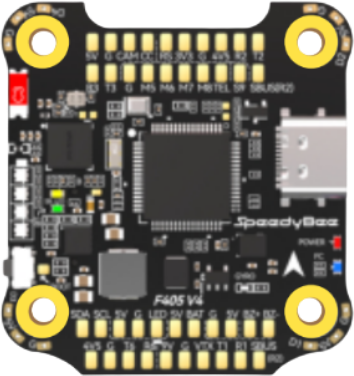
 Design with F405 V4 Flight Controller in Cirkit Designer
Introduction
The SpeedyBee F405 V4 Flight Controller is a compact and powerful flight controller designed specifically for multirotors and drones. It features an advanced F4 processor, a built-in On-Screen Display (OSD), and support for a wide range of flight modes and sensors. This flight controller is ideal for both hobbyists and professionals looking to build high-performance drones with precise control and reliable operation.
Explore Projects Built with F405 V4 Flight Controller
 Open Project in Cirkit Designer
 Open Project in Cirkit Designer
 Open Project in Cirkit Designer
 Open Project in Cirkit Designer
Explore Projects Built with F405 V4 Flight Controller
Open Project in Cirkit DesignerOpen Project in Cirkit DesignerOpen Project in Cirkit DesignerOpen Project in Cirkit DesignerCommon Applications and Use Cases
- Multirotor Drones: Suitable for quadcopters, hexacopters, and other multirotor configurations.
- FPV Racing: Optimized for fast response times and low latency, making it ideal for FPV (First-Person View) racing drones.
- Aerial Photography: Provides stable flight control for drones used in photography and videography.
- Autonomous Drones: Compatible with GPS modules and other sensors for autonomous flight capabilities.
Technical Specifications
Key Technical Details
- Processor: STM32F405 (F4 series) with 168 MHz clock speed.
- IMU (Inertial Measurement Unit): MPU6000 (6-axis gyro and accelerometer).
- OSD: Built-in Betaflight OSD for real-time telemetry display.
- Input Voltage: 3S–6S LiPo (9V–30V).
- BEC Output: 5V/2A and 9V/2A for powering peripherals.
- UART Ports: 5 UARTs for connecting peripherals like GPS, receivers, and telemetry modules.
- Flash Memory: 16 MB Blackbox for flight data logging.
- ESC Protocols: Supports DShot, ProShot, and PWM.
- Dimensions: 36 mm x 36 mm (30.5 mm x 30.5 mm mounting holes).
- Weight: 7.5 grams.
Pin Configuration and Descriptions
The F405 V4 Flight Controller features a variety of pins for connecting peripherals. Below is the pinout description:
| Pin Name | Description |
|---|---|
| GND | Ground connection for power and peripherals. |
| VBAT | Voltage input for the flight controller (connect to LiPo battery). |
| 5V | 5V output for powering peripherals (e.g., receiver, GPS). |
| 9V | 9V output for powering FPV cameras or VTX (Video Transmitter). |
| RX1/TX1 | UART1 for connecting receivers or telemetry modules. |
| RX2/TX2 | UART2 for GPS or other peripherals. |
| RX3/TX3 | UART3 for additional peripherals. |
| RX4/TX4 | UART4 for peripherals like smart audio or ESC telemetry. |
| RX5/TX5 | UART5 for additional devices. |
| M1–M4 | Motor outputs for ESCs (Electronic Speed Controllers). |
| LED | Addressable LED strip output (e.g., WS2812). |
| Buzzer | Buzzer output for audible alerts. |
| Boot | Bootloader pin for firmware flashing. |
| RSSI | Analog input for receiver signal strength indication. |
| Current | Current sensor input for monitoring power consumption. |
| SCL/SDA | I2C interface for external sensors (e.g., barometer, magnetometer). |
Usage Instructions
How to Use the F405 V4 Flight Controller in a Circuit
Powering the Flight Controller:
- Connect the VBAT pin to the positive terminal of a 3S–6S LiPo battery.
- Ensure the GND pin is connected to the battery's ground.
Connecting Motors and ESCs:
- Connect the signal wires of your ESCs to the M1–M4 motor output pins.
- Ensure the ESCs are powered separately or through the flight controller's power distribution board (if applicable).
Connecting Peripherals:
- Use the UART ports (RX/TX) to connect devices like GPS modules, telemetry radios, or smart audio.
- Connect your FPV camera and VTX to the 9V and GND pins for power, and route the video signal through the OSD.
Flashing Firmware:
- Use the Boot pin to enter bootloader mode for firmware updates.
- Flash the latest Betaflight firmware using the Betaflight Configurator software.
Configuring the Flight Controller:
- Connect the flight controller to your computer via USB.
- Open Betaflight Configurator and configure settings such as PID tuning, flight modes, and receiver mapping.
Important Considerations and Best Practices
- Voltage Compatibility: Ensure your LiPo battery voltage is within the supported range (3S–6S).
- Heat Management: Avoid overheating by ensuring proper airflow around the flight controller.
- Firmware Updates: Always use the latest firmware version for optimal performance and bug fixes.
- Wiring: Double-check all connections to avoid short circuits or incorrect wiring.
- Calibration: Calibrate the accelerometer and other sensors before the first flight.
Example: Connecting to an Arduino UNO
The F405 V4 can communicate with an Arduino UNO via UART for custom applications. Below is an example Arduino sketch to read telemetry data:
#include <SoftwareSerial.h>

// Define RX and TX pins for SoftwareSerial
#define RX_PIN 10  // Connect to TX pin of F405 V4
#define TX_PIN 11  // Connect to RX pin of F405 V4

SoftwareSerial flightControllerSerial(RX_PIN, TX_PIN);

void setup() {
  // Initialize serial communication
  Serial.begin(9600);  // For debugging via Serial Monitor
  flightControllerSerial.begin(115200);  // Match the baud rate of the F405 V4

  Serial.println("Arduino connected to F405 V4 Flight Controller");
}

void loop() {
  // Check if data is available from the flight controller
  if (flightControllerSerial.available()) {
    String telemetryData = flightControllerSerial.readString();
    Serial.println("Telemetry Data: " + telemetryData);
  }

  // Optional: Send commands to the flight controller
  // flightControllerSerial.println("Example Command");
}
Troubleshooting and FAQs
Common Issues and Solutions
Flight Controller Not Powering On:
- Solution: Check the VBAT and GND connections. Ensure the battery voltage is within the supported range (9V–30V).
No Communication with Betaflight Configurator:
- Solution: Ensure the correct USB drivers are installed. Use a data-capable USB cable and verify the COM port in Betaflight Configurator.
Motors Not Spinning:
- Solution: Verify motor connections to the M1–M4 pins. Check ESC calibration and ensure the correct motor protocol is selected in Betaflight.
OSD Not Displaying:
- Solution: Ensure the FPV camera and VTX are properly connected to the 9V and GND pins. Verify OSD settings in Betaflight Configurator.
Receiver Not Detected:
- Solution: Confirm the receiver is connected to the correct UART port (e.g., RX1/TX1). Check receiver protocol settings in Betaflight.
FAQs
Q: Can I use a 2S LiPo battery with the F405 V4?
A: No, the minimum supported voltage is 9V (3S LiPo).Q: Does the F405 V4 support GPS modules?
A: Yes, GPS modules can be connected via UART ports (e.g., RX2/TX2).Q: How do I reset the flight controller to factory settings?
A: Use the "Reset Settings" option in Betaflight Configurator or typedefaultsin the CLI.Q: Can I use this flight controller for fixed-wing aircraft?
A: Yes, the F405 V4 supports fixed-wing configurations in Betaflight.
This concludes the documentation for the SpeedyBee F405 V4 Flight Controller.